

Many companies want to use AI, but they do not know where to begin. The best AI automation agency projects usually start with a small, repeated task that wastes time every week. When that task is mapped, tested, and measured, AI can help the team move faster without taking away human control.
The goal is not to add a chatbot to every part of the business. The goal is to improve a real workflow. That could mean answering a new lead sooner, keeping a CRM clean, routing a support request, or preparing a weekly report.
This guide explains ten workflows worth reviewing first, how to choose between normal automation and AI, and what a safe rollout should include.
What Does an AI Automation Agency Do?
An AI automation agency studies how a business works, then connects software, data, rules, and AI to reduce repeated manual effort.
The work may include CRM automation, sales follow-up, marketing systems, support triage, reporting, document handling, internal task routing, and custom software. The agency should begin with the business problem and the desired result.
Some parts of a workflow need simple rules. For example, a new form submission can create a CRM record. Other parts may benefit from AI, such as reading a free-text enquiry and suggesting the right service category.
A good project also covers permissions, error handling, human review, testing, training, and support. A workflow that runs once in a demo but fails in daily work is not a useful business system.
Why the First Workflow Matters
Your first automation shapes how the team thinks about every later project. If it saves time and produces reliable results, people are more willing to try another workflow.
If it makes mistakes, sends the wrong message, or creates more checking work, trust falls quickly.
Choose a workflow that happens often, has a clear owner, and produces an output someone can review. Avoid starting with a high-risk action such as approving a payment, changing legal terms, or deleting records.
Measure the current process first. Record how long it takes, how often it happens, and where errors appear. You need this baseline to prove whether the new workflow helped.
What to Ask Deventity Before You Start
Before speaking with Deventity, write down the process you want to improve. Its AI automation services cover CRM, sales, marketing, support, reporting, and operations, so a clear example helps the discussion stay practical.
Explain the trigger, the systems involved, the people who approve work, and the exceptions that do not follow the normal path.
Ask what the first version will do, what it will leave for a person, and how results will be monitored after launch.
Also ask who owns the accounts, data, prompts, workflow logic, and documentation. You should be able to understand and maintain the system after the project is complete.
1. New Lead Capture and Qualification
New leads can arrive through forms, email, social media, phone calls, or chat. When each source is handled differently, some enquiries wait too long or never reach the right person.
An automation can collect the lead, check for duplicate records, create a CRM entry, and alert the correct owner.
AI can read the message and suggest a category, such as web development, mobile app work, or support. It can also prepare a short summary for the sales team.
Keep final qualification with a person during the first stage. The system can suggest a category or priority, but a team member should confirm important opportunities.
Measure response time, unassigned leads, duplicate records, and the number of enquiries that receive a clear next step.
2. Sales Follow-Up and Reminder Tasks
Sales teams often lose opportunities because follow-up depends on memory. A quote is sent, a call is completed, and then the next action disappears in a busy inbox.
A workflow can create a task when a quote is sent, remind the owner after an agreed period, and stop the reminders when the customer replies or the deal changes stage.
AI can summarize the latest conversation and suggest a helpful next message. A salesperson should approve the message before it goes out, especially when price, timing, or contract terms are involved.
Do not send a generic sequence to every customer. Use approved templates, clear timing rules, and a simple way for the customer to opt out of further messages.
3. CRM Data Updates and Cleanup
A CRM is only useful when its records are accurate. Yet staff may leave fields blank, create duplicate contacts, or store notes in different formats.
Automation can copy confirmed details from forms, emails, or meeting notes into the right fields. AI can turn a long call note into a short summary and suggest follow-up tasks.
Keep a source link for important information. If a note does not mention a budget or deadline, the system should leave the field empty instead of guessing.
Run duplicate checks before creating a new record. Give staff an approval screen for possible matches, since two people can share the same name.
Track missing fields, duplicate records, correction time, and the number of records updated without manual copying.
4. Customer Support Triage
Support teams often receive repeated questions about orders, access, billing, returns, or appointment changes. Sorting those requests can take almost as much time as answering them.
An AI workflow can read a new message, identify the likely topic, check basic information, and route the request to the right queue.
It can also draft an answer from approved help articles. The customer support agent reviews the draft before sending it while the workflow is being tested.
Set clear rules for sensitive requests. Complaints, payment disputes, account ownership questions, and safety issues should go directly to a trained person.
Measure routing accuracy, first response time, resolution time, and the number of messages that need to be corrected or reassigned.
5. Appointment Booking and Reminders
Booking workflows are often repetitive and easy to improve. A form can collect the customer’s details, show available times, create a calendar event, and send confirmation.
The system can send a reminder before the appointment and provide a link to reschedule. After the meeting, it can create a follow-up task or prepare a short summary for review.
Use normal rules for time zones, calendar availability, and reminder timing. Use AI only where it helps read an unusual request or summarize notes.
Test cancelled bookings, double submissions, time-zone changes, and failed calendar connections before a full launch.
Useful measures include booking admin time, missed appointments, rescheduling effort, and calendar errors.
6. Document Processing and First Drafts
Many teams receive documents that must be read, sorted, renamed, or summarized. Examples include supplier invoices, customer forms, project briefs, and support attachments.
An AI workflow can extract fields, classify the file, and prepare a first draft. It can then send the result to a person for approval.
Do not let the system make an important decision simply because it found a familiar phrase. Use confidence checks, required fields, and a manual review queue for unusual documents.
Keep the original file and the extracted data together. This makes it easier to find the source when someone questions a result.
Measure processing time, extraction accuracy, review time, and the number of files sent to the exception queue.
7. Weekly Reports and Business Summaries
Managers often spend too much time collecting numbers from different tools. Sales data sits in a CRM, support data sits in a help desk, and project updates arrive in chat.
Automation can collect approved figures and place them in a regular report. AI can explain changes in plain language and highlight questions for a manager to investigate.
Keep every important figure connected to its source and date range. A summary should not invent a reason for a change. If sales dropped, the report can flag the drop without claiming that a price change caused it.
Start with a small set of trusted measures. Add more only when the team understands how each number is calculated.
Measure report preparation time, data corrections, missing figures, and whether managers use the report in decisions.
8. Internal Task Routing
Small internal requests can become lost in email. A team member asks for access, a project review, a new purchase, or a website change, but no one knows who owns the next step.
A request form can collect the details, identify the correct department, and create a task with a due date.
AI can classify requests written in plain language. Fixed permission rules should control approvals. For example, a request for a new software account may need a manager and finance approval.
Give employees a status view so they can see whether a request is waiting, approved, or complete. This reduces repeated “any update?” messages.
Measure request completion time, unassigned tasks, approval delays, and repeated status questions.
9. Customer Onboarding and Handoffs
The period between a signed deal and the first delivery often includes many small handoffs. Sales needs to share scope, operations needs files, and the customer needs a clear welcome message.
An automation can create a project, assign an owner, prepare a checklist, and request missing information.
AI can summarize the approved sales notes and draft an internal handoff. A project lead should confirm that the summary matches the signed scope.
Do not ask the customer for information they already supplied. Connect the systems carefully and show staff where the source record lives.
Track time from sale to kickoff, missing files, repeated questions, and tasks completed before the first delivery milestone.
10. Knowledge Search and Internal Answers
Employees lose time searching for policies, product details, process notes, and old project decisions. An internal knowledge assistant can help them find information faster.
The assistant should search approved sources and show where an answer came from. It should say when it cannot find enough information rather than filling the gap with a guess.
Start with a small knowledge area. Clean outdated documents, agree on owners, and remove duplicate versions before adding an AI search tool.
Keep sensitive information behind access controls. A person who cannot open a document should not receive its private content through a chatbot.
Measure search time, unanswered questions, source accuracy, and the number of documents that need updating.
How to Choose the Right First Workflow
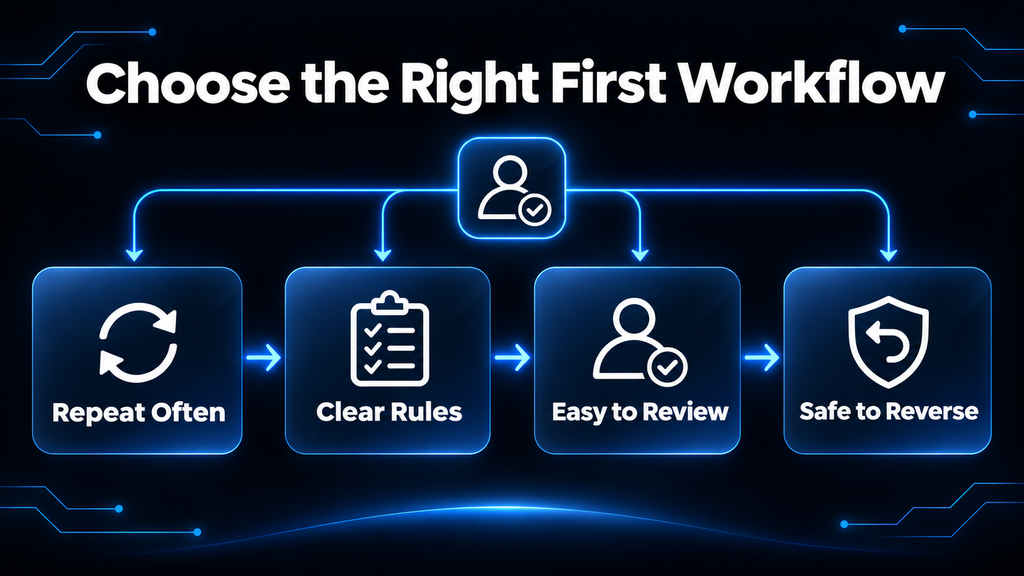
Score each workflow using four simple questions:
- Does it happen often enough to create visible value?
- Are the steps and expected outputs clear?
- Can a person review the result quickly?
- Is a mistake safe to detect and reverse?
A workflow that scores well on all four is a strong starting point.
Also check data readiness. AI cannot produce a reliable result from missing, conflicting, or outdated information. Sometimes data cleanup must come before automation.
Start with one owner and one team. A smaller pilot gives you better feedback than a large rollout where no one knows what caused a problem.
Normal Automation or AI?
Not every workflow needs AI. Use fixed automation when the rule is stable: if a form is submitted, create a record; if a payment is received, send a receipt.
Use AI when the system needs to interpret language, classify varied information, summarize content, or suggest an action.
Many useful workflows use both. Rules can control permissions and deadlines, while AI handles a message summary or category suggestion.
Choosing the simplest tool that solves the problem usually makes testing and support easier.
How to Launch Safely
Begin with a process map. Write down the trigger, inputs, decisions, actions, owner, and exception path.
Then build a supervised version. Let the system prepare a result while a person approves it. Record corrections and use them to improve the workflow.
Test normal and unusual cases. Include missing fields, duplicate submissions, failed integrations, unclear messages, and permission errors.
Define who receives alerts when the workflow cannot complete. A failed automation should create a visible task instead of disappearing silently.
Document the workflow in plain language. Staff should know what it does, what it does not do, and how to stop or correct it.
After launch, review cost, accuracy, usage, and business impact. A workflow needs maintenance as tools, prompts, policies, and customer behaviour change.
Mistakes to Avoid
Automating a broken process. Remove unnecessary steps and clarify ownership first.
Starting with a large autonomous agent. Prove a narrow workflow before expanding access.
Ignoring exceptions. The unusual cases often cause the greatest damage.
Using poor data. Clean records and define the trusted source.
Skipping staff review. The people doing the job should test the output.
Giving excessive permissions. Connect only the systems and actions the workflow needs.
Measuring only hours saved. Also track errors, customer experience, adoption, and ongoing cost.
Frequently Asked Questions
What is an AI automation agency?
It is a service partner that maps business processes and builds workflows using rules, software integrations, AI, approvals, and reporting.
Which workflow should a business automate first?
Choose a frequent, clear, measurable, low-risk process with an owner and reviewable output. Lead intake, CRM updates, support routing, and reporting are common starting points.
Does every workflow need an AI agent?
No. Standard rules are often better for fixed steps. AI helps when the process involves varied language, classification, summaries, or suggestions.
How long does an automation project take?
The timeline depends on workflow complexity, data quality, integrations, permissions, testing, and staff availability. A focused pilot is usually easier to plan than a broad transformation.
How do you measure AI automation ROI?
Compare the baseline with the new process. Track time, errors, response speed, capacity, customer results, software costs, and the effort needed to review outputs.
Start With One Workflow You Can Prove
The strongest automation roadmap does not begin with the biggest AI idea. It begins with a real task that people repeat, understand, and want to improve.
