

Close Menu
    What's Hot

    The Ultimate Guide to Choosing the Right Pail for Your Needs

    17 Dec 2025

    Which Brands Specialize in Custom Polos for Corporate Teams?

    17 Dec 2025

    Twitter Downloader: Save Videos from X Platform Without Limits

    17 Dec 2025

    Subscribe to Updates

    Get the latest creative news from FooBar about art, design and business.

    Facebook X (Twitter) Instagram
    Kongo Tech
    • Home
    • Social Media Tips
    • Organic Growth Tips
    • Technology
      • Phones & Tech
      • Business & Entrepreneurship
      • Banking & Finance
      • Education
        • Full Form
      • News, Media & Updates
      • Jobs & Career
      • Software & Tools
    • Blog
      • Arts & Entertainment
      • Beauty & Cosmetics
      • Games
      • Health & Fitness
      • Lifestyle & Fashion
      • Music & Movies
      • Net Worth
      • Quotes & Caption
      • Travel & Tourism
      • Food
      • Real Estate
      • Home Improvement
      • Packages
    • Write For Us – Kongo Tech
    Facebook X (Twitter) Instagram
    Kongo Tech
    Home»Organic Growth Tips»Step-by-Step Mac Trash Recovery: Recover Deleted Files Quickly
    Organic Growth Tips

    Step-by-Step Mac Trash Recovery: Recover Deleted Files Quickly

    adminBy admin16 Dec 2025Updated:17 Dec 2025No Comments6 Mins Read
    Facebook Twitter Pinterest LinkedIn Tumblr Email
    image 66
    Share
    Facebook Twitter LinkedIn Pinterest Email

    Table of Contents

    Toggle
    • Part 1. Inside Mac Trash: How Deleted Files Are Stored and Restored
      • How to Restore Files from Trash
    • Part 2. 5 Simple and Reliable Ways on How to Recover Empty Trash Mac
      • Method 1. Use Mac Data Recovery Software (Recoverit)
        • Key Features
        • Guide to Recover Deleted Video After Emptying Trash With Recoverit
          • Step 1. Select the File Location to Begin the Scanning Process
          • Step 2. Apply Search Filers While Scanning
          • Step 3. Preview The Scanned Files Before Exporting
      • Method 2. Recover Deleted Files from Time Machine Backup
      • Method 3. Recover Videos from iCloud Drive/Recently Deleted
      • Method 4. Recover from External Drives or SD Cards with Recovery Tools
      • Method 5. Recover from Third-Party Cloud Backups
    • Conclusion

    Important files disappearing on a Mac can instantly disrupt your workflow, break focus, and slow progress on critical tasks. A project can fall apart the moment important files vanish, leaving you frustrated and under pressure to fix the damage. This situation happens because of a simple mistake, such as deleting the wrong file or mishandling storage.

    The good news is that macOS manages file storage intelligently, which often leaves recoverable data behind temporarily. This guide explains how Mac’s file management system works and provides reliable methods to recover videos deleted from Trash.

    Part 1. Inside Mac Trash: How Deleted Files Are Stored and Restored

    Trash on Mac is a special folder that holds files you delete for a while. These deleted files are kept in the system for 30 days, after which they are deleted to release the free space. This setup allows a lot of time to locate and recover any valuable files you accidentally delete.

    image 67

    How to Restore Files from Trash

    Before learning how to recover empty Trash Mac, look at how you can retrieve the videos from Trash.

    ●        Open the Trash folder on your Mac by clicking the respective icon in the Dock.

    ●        Browse the Trash to locate the specific file or folder you want to restore.

    ●        Right-click the selected file and choose “Put Back” from the context menu to restore it.

    ●        The restored file is returned to its original folder, preserving its name, location, and metadata.
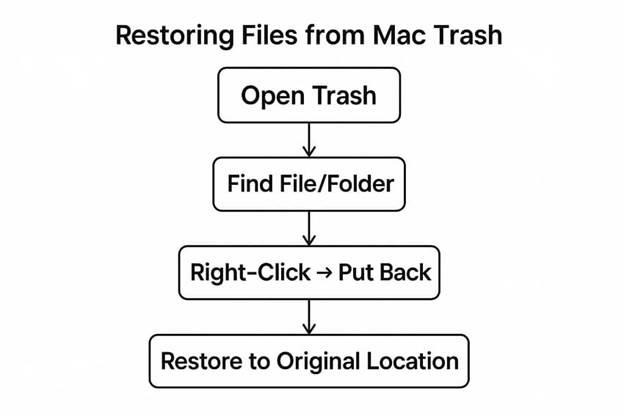
    image 68

    Part 2. 5 Simple and Reliable Ways on How to Recover Empty Trash Mac

    Once you know how Trash Mac recovery works, here are the top methods for how to recover deleted files Mac after empty Trash.

    Method 1. Use Mac Data Recovery Software (Recoverit)

    When videos are removed from the Trash, they disappear from Finder but remain on disk. In these cases, manual recovery methods fail, so specialized Mac recovery software becomes essential. This is where Wondershare Recoverit helps when videos are deleted from the Mac Trash. It provides a reliable way to restore lost video files without risking further data loss.

    Recoverit scans the Mac’s storage for traces of deleted video files instead of writing risky new data blocks. This careful approach helps reduce the chance of overwriting important footage during recovery. The tool supports over 1,000 file types across thousands of storage devices. You can work with Mac computers, external drives, and many other devices with Recoverit.

    Key Features

    1.       Advanced Search Filters: Users can apply filters like file type, size, and date to quickly locate specific files.

    2.       Preview Before Download: Before restoring, users can review scanned files in the Preview window to verify accuracy.

    3.       Cloud Recovery Support: Recoverit allows scanning iCloud and OneDrive storage to recover deleted files to a selected folder.

    Guide to Recover Deleted Video After Emptying Trash With Recoverit

    Having explored the key features, go through the steps below to learn how to how to recover empty Trash Mac:

    Step 1. Select the File Location to Begin the Scanning Process

    Once you access the main interface, click the “Hard Drives and Location” tab in the left side menu. Afterwards, select a drive to initiate the scanning process.
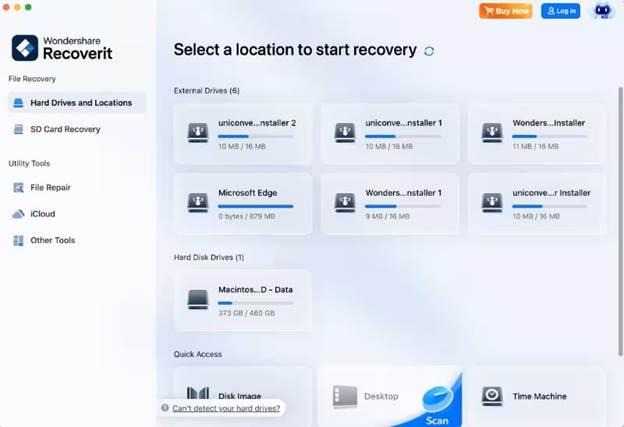
    image 69
    Step 2. Apply Search Filers While Scanning

    Next, move towards the top and click the “Filter” icon to access a drop-down menu. Now, select filter types, like “File Type” and “File Size,” to narrow down the process.
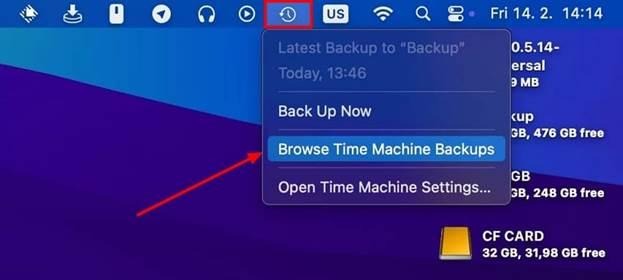
    image 70
    Step 3. Preview The Scanned Files Before Exporting

    Once the videos start appearing in the “File Path” panel, view them in the “Preview” screen. If the scanned videos are correct, hit the “Recover” button to save them to your Mac.
    image 77

    Method 2. Recover Deleted Files from Time Machine Backup

    Time Machine provides one of the safest ways to recover deleted files on a Mac after emptying the Trash. It creates incremental backups of your Mac to preserve previous versions of important files. When Trash has been emptied, these backups often become the most reliable recovery option. Now, follow the steps below to learn how to recover deleted files Mac after empty Trash with a Time Machine backup:

    Step 1. Open the location where the video was located before deleting and press the “Time Machine” icon at the top. Next, click the “Browse Time Machine Backups” option in the drop-down menu.

    image 70

    Step 2. Afterwards, use the timeline on the right side to locate the date when the video was available. Next, right-click the video and press the “Restore” option in the context menu to retrieve it.
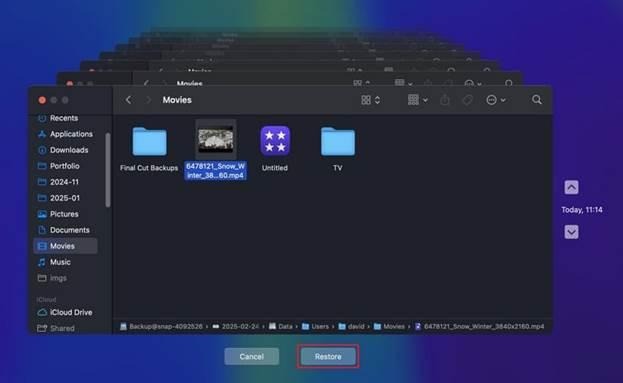
    image 73

    Method 3. Recover Videos from iCloud Drive/Recently Deleted

    Many users exploring how to recover empty Trash Mac overlook iCloud Drive and Recently Deleted. These built‑in Apple services often keep extra copies of videos beyond the local Trash. They provide a valuable safety net when files disappear from Finder but remain synced online. Adhere to the steps below to recover deleted videos from iCloud Drive:

    Step 1. Open “iCloud.com” and sign in to your Apple ID using your account details. Afterwards, click the “Drive” option on the main interface and find your video within the files.
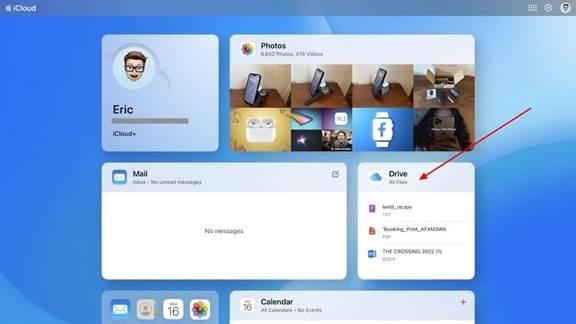
    image 72

    Step 2. Once you successfully find your video in the Drive, press the “Three Dots” icon on the right side to download the deleted video.
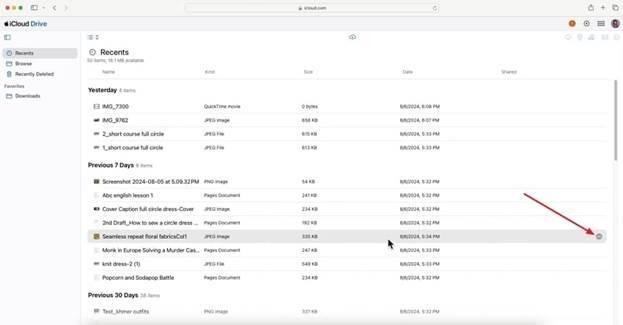
    image 71

    Method 4. Recover from External Drives or SD Cards with Recovery Tools

    External drives and SD cards often hold irreplaceable videos that disappear without any clear warning. When users try to recover videos deleted from Trash, these removable devices may still keep hidden fragments of the original files.

    Specialized recovery tools can scan external media sector by sector, revealing clips that are missing entirely of the standard methods. Recoverit can be used to recover videos from SD cards and external drives, among other storage media. This makes Recoverit a strong choice when removable storage seems to have lost everything.

    image 76

    Method 5. Recover from Third-Party Cloud Backups

    Many users search for how to recover empty Trash Mac and forget about cloud backups. Third‑party services like Dropbox and Google Drive often keep older file versions or hidden trash folders. These online backups can quietly preserve deleted Mac files, providing another chance to restore important data. Let’s learn how you can restore your deleted videos from Cloud backups with the following steps:

    Step 1. Start by opening Chrome and pressing the “Google Apps” icon to access your Google Drive.

    image 75

    Step 2. Afterwards, locate your file in the Drive storage and press the “Three Dots” icon on the right side to download it to your Mac.

    image 74

    Conclusion

    To conclude, this article covers the most effective methods on how to recover deleted files Mac after empty Trash. These approaches help restore lost footage safely, though manual methods like checking Trash, iCloud, or Time Machine may not always succeed. For a reliable solution, consider using Recoverit to recover videos while preserving their quality and file integrity.

    Share. Facebook Twitter Pinterest LinkedIn Tumblr Email
    admin
    • Website

    Related Posts

    Which Brands Specialize in Custom Polos for Corporate Teams?

    17 Dec 2025

    Twitter Downloader: Save Videos from X Platform Without Limits

    17 Dec 2025

    Why the Molicel INR-21700-M65A Is the New Standard for High EnergyDensity 21700 Cells

    16 Dec 2025
    Leave A Reply Cancel Reply

    Stay In Touch
    • Facebook
    • Twitter
    • Pinterest
    • Instagram
    • YouTube
    • Vimeo
    Top Posts

    How To Get More Views On Instagram Reels – Boost Visibility

    04 Apr 2024

    109+ Thoughtful Captions to Inspire and Motivate You

    25 Jan 2025

    How To Increase Organic Reach On Instagram – Boost Your Online Presence

    04 Apr 2024

    How To Promote Business On Instagram – Step By Step Guide 2025

    04 Jan 2025
    About Us

    Kongo Tech is a website where you will get tips and tricks to grow fast on social media and get information about technology, finance, gaming, entertainment, lifestyle, health, and fitness news. You should also write articles for Kongo Tech.

    We're accepting new partnerships right now.

    Email Us:
    blooginga@gmail.com |
    WhatsApp:
    +92 348 273 6504

  • สล็อต
  • สล็อต
  • https://cleelum50k.com/
  • แทงบอล
  • แทงบอล
  • sunwin
  • สล็อตเว็บตรง
  • สล็อต
  • เว็บสล็อตใหม่ล่าสุด
  • UFA888
  • คาสิโน
  • สล็อต
  • 789BET
  • สล็อตเว็บตรง
  • บาคาร่า
  • sunwin
  • สล็อตเว็บตรง
  • สล็อตเว็บตรง
  • UFABET
  • Link Bong88
  • https://du88.lol/
  • https://vb88.black/
  • เว็บหวยออนไลน์
  • UFABET888
  • ดูบอลสด
  • Royal Reels
  • 789p
  • s666
  • สล็อต
  • Facebook X (Twitter) Pinterest YouTube WhatsApp
    Usefull link
        • สล็อต
        • 9bet
        • บอลสด
        • แทงบอลออนไลน์
        • เล่นหวยออนไลน์
        • บาคาร่าออนไลน์
        • Nhà cái 789BET
        • sunwin
        • KJC
        • ivip9
        • new888
        • HB88
        • 78WIN
        • บาคาร่า
        • Nhà cái 789BET
        • สล็อตวอเลท
        • https://socolive.in/
        • บาคาร่า
        • Au88
        • mmoo
        • fc88
        • SHBET
        • new 88
        • NEW 88
        • บาคาร่า
        • บาคาร่า
        • 78WIN
        • https://f8betb1.com/
        • UFABET เข้าสู่ระบบ
        • VN88
        • XOCDIA88
        • LuongSonTV
        • https://biking79.com/
        • win55
        • 9bet
        • เว็บหวยลาว
    Contact Us

    Contact Us Section


    • Email Us:
      blooginga@gmail.com |
      WhatsApp:
      +92 348 273 6504
    • HelpFull Links
    • Here are some helpfull links for our user. hopefully you liked it.
    • Branded Poetry
    • สล็อต
    • เว็บตรง
    • สล็อตเว็บตรง
    • สล็อตเว็บตรง
    • สล็อตเว็บตรง
    • สล็อตเว็บตรง
    • สล็อตเว็บตรง
    • Scatter Hitam
    • สล็อตเว็บตรง
    • nha cai uy tin
    • แทงบอลออนไลน์
    • SHBET
    • SHBET
    • rajabandot
    • สล็อตเว็บตรง
    • สล็อตเว็บตรง
    • https://shbet.cruises/
    • ok vip
    • 789win
    • ซื้อหวยออนไลน์
    • แทงบอลออนไลน์
    • สล็อตเว็บตรง
    • bongdalu
    • hello88
    • mm99
    • ufabet
    • TK88
    • I9BET
    • F 168
    • ซื้อหวยออนไลน์
    • UFA339
    • UFABET
    • ufalao
    • เข้าสู่ระบบ
    • https://789bet7a.com/
    • fly88
    • okvip
    • KM88
    • TX88
    • ALO789
    Usefull links

    mb66 | GOJUDI | FUN88 | fly88 | แทงมวย | ufars | Okfun | 78win | 78win | F8BET | HIT CLUB | เว็บหวยออนไลน์ | new 88 | shbet | fly88 | แทงบอล   | https://socolive.in/ | https://new8838.net/ | HZ88 |
    บาคาร่า | fun88 | fly88 | สล็อต | SHBET | deneme bonusu veren siteler  |deneme bonusu veren siteler | deneme bonusu veren siteler | deneme bonusu | deneme bonusu | 789bet | บาคาร่า | Mb66 | JAYABAJI Online Casino


    Facebook X (Twitter) Instagram Pinterest
    • Home
    • Privacy Policy
    • About Us
    • Contact Us
    • Disclaimer
    • Terms and Conditions
    • Write For Us
    © 2025 ThemeSphere. Designed by kongotech.
    nanastoto nanastoto nanastoto depobos depobos hokijitu https://revistatransilvania.ro/about wdbos wdbos https://www.zobegaafd.nl/policy/ fatcai99 https://kwikcargo.bezaleelsolutions.com/ https://www.clubdefotografia.com/depobos/ wdbos nanastoto depobos depobos https://nanastotovictory.it.com https://lunatogelvictory.it.com https://togelonvictory.it.com https://situstotovictory.it.com https://protogelvictory.it.com https://tvtotovictory.it.com https://depobosvictory.it.com https://wdbosvictory.it.com https://latotovictory.it.com https://fatcai99victory.it.com https://jutawanbetvictory.it.com https://mancingduitvictory.it.com MANCINGDUIT JUTAWANBET PROTOGEL LUNATOGEL TOGELON SITUSTOTO TVTOTO WDBOS LATOTO FATCAI99 DEPOBOS MANCINGDUIT BANDAR80 HOKIJITU JUTAWANBET PROTOGEL LUNATOGEL NANASTOTO TOGELON SITUSTOTO TVTOTO WDBOS LATOTO FATCAI99 DEPOBOS MANCINGDUIT BANDAR80 HOKIJITU JUTAWANBET PROTOGEL LUNATOGEL TOGELON SITUSTOTO TVTOTO WDBOS LATOTO FATCAI99 DEPOBOS MANCINGDUIT BANDAR80 HOKIJITU JUTAWANBET PROTOGEL LUNATOGEL NANASTOTO TOGELON TVTOTO WDBOS LATOTO DEPOBOS MANCINGDUIT BANDAR80 HOKIJITU LAPAK99 LIGABANDOT JUTAWANBET PROTOGEL LUNATOGEL NANASTOTO TOGELON TVTOTO WDBOS LATOTO DEPOBOS MANCINGDUIT BANDAR80 HOKIJITU LAPAK99 LIGABANDOT JUTAWANBET PROTOGEL LUNATOGEL NANASTOTO TOGELON TVTOTO WDBOS LATOTO DEPOBOS MANCINGDUIT LIGABANDOT JUTAWANBET PROTOGEL LUNATOGEL NANASTOTO TOGELON TVTOTO WDBOS LATOTO DEPOBOS MANCINGDUIT BANDAR80 HOKIJITU LAPAK99 LIGABANDOT JUTAWANBET PROTOGEL TOGELON TVTOTO WDBOS LATOTO DEPOBOS MANCINGDUIT BANDAR80 JUTAWANBET PROTOGEL LUNATOGEL NANASTOTO TOGELON TVTOTO WDBOS LATOTO DEPOBOS MANCINGDUIT BANDAR80 HOKIJITU LAPAK99 LIGABANDOT JUTAWANBET PROTOGEL LUNATOGEL NANASTOTO TOGELON TVTOTO WDBOS LATOTO DEPOBOS MANCINGDUIT BANDAR80 HOKIJITU LAPAK99 LIGABANDOT JUTAWANBET PROTOGEL LUNATOGEL NANASTOTO TOGELON TVTOTO WDBOS LATOTO DEPOBOS MANCINGDUIT BANDAR80 HOKIJITU LAPAK99 LIGABANDOT JUTAWANBET PROTOGEL LUNATOGEL NANASTOTO TOGELON TVTOTO WDBOS LATOTO DEPOBOS MANCINGDUIT BANDAR80 HOKIJITU LAPAK99 LIGABANDOT LAPAK99 SLOT THAILAND LAPAK99 TOPANBOS88 TOPANBOS88 TOPANBOS88 BANDAR80 BANDAR80 BANDAR80 BANDAR80 BANDAR80 RUANGWD LIGABANDOT JEDERWD JEDERWD JEDERWD JEDERWD HOKIJITU HOKIJITU HOKIJITU HOKIJITU FATCAI99 FATCAI99 FATCAI99 FATCAI99 MONGGOWIN88 MONGGOWIN88 UDOY88 UDOY88 UDOY88 RUANGWD JUARA88 JUARA88 JUARA88 JUARA88 JUARA88 JUARA88 JUARA88 JUARA88 LIGABANDOT LIGABANDOT LIGABANDOT LIGABANDOT JUARA88 JUARA88 NAKBON99 DEPOBOS LIGABANDOT LIGABANDOT DEPOBOS DEPOBOS TOPANBOS88 TOPANBOS88 DEPOBOS WATITOTO DEPOBOS WDBOS LAPAK99 BANDAR80 LIGABANDOT HOKIJITU HOKIJITU LIGABANDOT NAKBON99 RUANGWD JUARA88 HOKIJITU WDBOS Depobos Depobos Depobos Depobos FATCAI99 HOKIJITU FATCAI99 LIGABANDOT JUARA88 LAPAK99 BANDAR80 MONGGOWIN88 UDOY88 TOPANBOS88 RUANGWD NAKBON99 JEDERWD WATITOTO HOKIJITU HOKIJITU BANDAR80 FATCAI99 BANDAR80 WDBOS WATITOTO LAPAK99 BANDAR80 JUARA88 TOPANBOS88 ziatogel dingdongtogel udintogel yoktogel yoktogel login yoktogel alternatif yoktogel hometogel lapak99 lapak99 login mancingduit mancingduit login FATCAI99 BANDAR80 https://www.oxford-modernworld.com/ ziatogel ziatogel login ziatogel link topanbos88 wdbos wdbos dingdongtogel DEPOBOS FATCAI99 HOMETOGEL LATOTO UDINTOGEL WDBOS YOKTOGEL ZIATOGEL DEPOBOS DINGDONGTOGEL FATCAI99 HOMETOGEL LATOTO UDINTOGEL WDBOS YOKTOGEL ZIATOGEL MANCINGDUIT MANCINGDUIT DEPOBOS DINGDONGTOGEL FATCAI99 HOMETOGEL LATOTO MANCINGDUIT UDINTOGEL WDBOS YOKTOGEL ZIATOGEL JUARA88 JUARA88 ZIATOGEL ZIATOGEL HOMETOGEL LATOTO WDBOS DINGDONGTOGEL YOKTOGEL DEPOBOS

    Type above and press Enter to search. Press Esc to cancel.

    https://edutek.ebyu.edu.tr/hakkimizda/ https://edutek.ebyu.edu.tr/contact/ https://edutek.ebyu.edu.tr/pandemi/ goltogel goltogel goltogel goltogel goltogel https://edutek.ebyu.edu.tr/contact/ gengtoto gengtoto gengtoto gengtoto gengtoto gengtoto togelon togelon togelon jonitogel jonitogel jonitogel jonitogel jonitogel jonitogel jonitogel dingdongtogel dingdongtogel wdbos wdbos wdbos wdbos wdbos hokijitu hokijitu bandar80 fatcai99 fatcai99 ligabandot ligabandot gengtoto goltogel dingdongtogel jonitogel hometogel togelon situstoto pwvip4d indrabet patihtoto fatcai99 bandar80 hokijitu ligabandot lapak99 jederwd jonitogel juara88 jederwd hokijitu goltogel wdbos gengtoto togelon wdbos jonitogel jonitogel wdbos gengtoto jonitogel goltogel gengtoto wdbos fatcai99 ligabandot bandar80 dingdongtogel jonitogel togelon hokijitu lapak99 jederwd juara88 ligabandot fatcai99 bandar80 hokijitu lapak99 pwvip4d patihtoto indrabet dingdongtogel goltogel