

If you’ve been selling on Shopify for any length of time, you already know that a product launch without video is a product launch with the brakes on. Video on product pages increases conversion rate. Video in launch emails improves click-through. Video ads on Meta and TikTok drive the traffic that makes a launch feel like a launch. The problem is that most Shopify sellers, especially those running lean operations, can’t afford to produce professional video for every SKU, every season, every new angle they want to test.
UGC Maker solves that problem in a way that’s actually built for how e-commerce sellers work. Let me walk through what my launch workflow looks like now.
What a Shopify Launch Actually Needs from Video
Not all video is the same. For a Shopify product launch, what you need is:
- A short-form ad (15-30 seconds) for paid social that drives traffic
- A slightly longer product explainer (30-60 seconds) for the product page
- Hook variations to test different angles on Meta or TikTok
- Email-ready clips for launch sequences
That’s potentially four to eight distinct video assets per launch. At traditional production costs, that’s simply not viable for most sellers. So they cut corners, launch with static images, and wonder why conversion doesn’t match what the product deserves.
How UGC Maker Fits Into a Launch Workflow
1. Start with the URL, before you even brief a designer
My first step now for any new product launch is to paste the product URL into UGC Maker’s URL to Video tool. Even before the Shopify listing is fully polished, this gives me a first-pass video that captures the key product points, uses existing imagery, and structures a conversion-oriented script.
I treat this first output as a working draft. I edit the hook, adjust the copy, and use it as the foundation for every video variant I’ll need at launch.
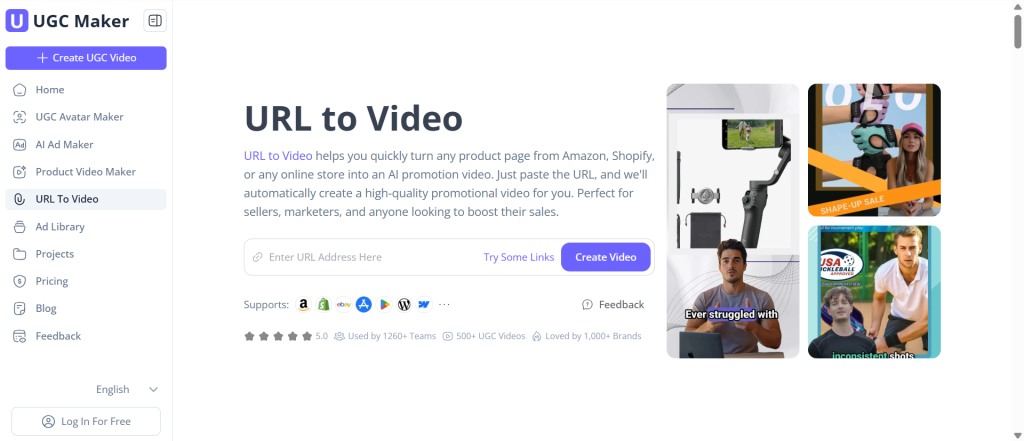
(From URL to Video in Seconds with UGC Maker)
2. Generate avatar-based UGC for the social layer
UGC-style testimonial and demo content consistently outperforms polished brand video on paid social. UGC Maker’s avatar system gives me that style at scale, I can create multiple avatar-delivered versions of my launch messaging in under an hour.
For a recent launch, I produced six avatar videos with different hooks in one session. One for a price-anchor angle, one for the problem-solution frame, one for social proof positioning. All from the same core product URL. All ready to test.
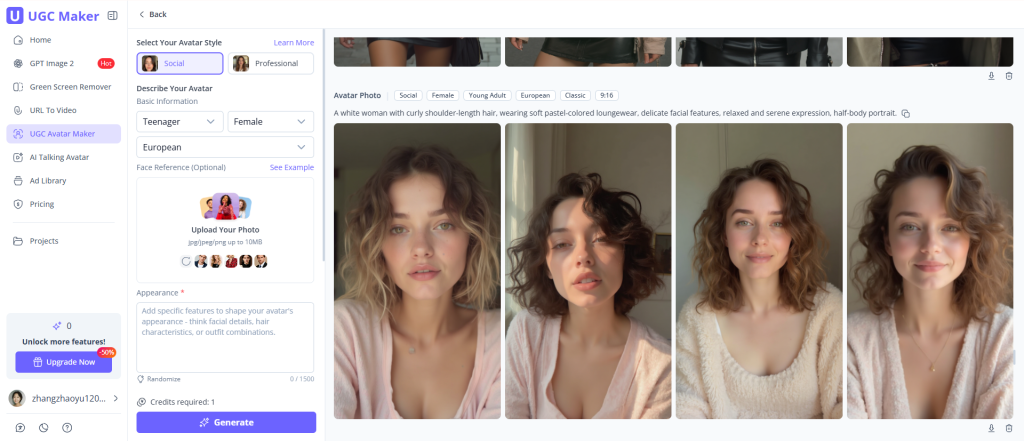
(Create Your Own Avatar with UGC Maker)
3. Research launch creative in the Ad Library first
Before I finalize my launch hooks, I always spend time in UGC Maker’s Ad Library. Browsing 10M+ ads gives me a clear picture of what launch-style content is performing in my category right now.
This isn’t about copying competitors, it’s about understanding the creative language of my niche so I’m not testing in the dark. The Ad Library turns this from guesswork into informed creative decision-making.
The Real Impact on Launch Results
Since switching to this workflow, here’s what’s changed on my launches:
- I go into every launch day with 6-8 video assets ready, not 1-2
- First-week ROAS has improved because I’m testing more angles faster
- Product pages convert better with native UGC-style video embedded
- The cost per launch asset is a fraction of what it was with traditional production
What This Means for Your Product Pages, Not Just Your Ads
Most conversations about UGC video tools focus on paid social. But for Shopify sellers, the product page is where the conversion decision actually happens — and that’s where UGC Maker has quietly made a big difference for me too.
A well-placed UGC-style video on a product page does specific things that static images and bullet-point copy can’t:
- Answers unspoken objections — someone walking through the product naturally covers the “but does it actually work?” question
- Reduces return rates — buyers who watched a demo have more accurate expectations
- Increases time on page — which signals quality to search algorithms
- Builds trust at the moment of decision, exactly when trust matters most
I now include at least one avatar-based product demo on every product page, generated through UGC Maker directly from the product URL. Since implementing this across my catalog, conversion rate has improved on products that were previously video-free. The ad drives the traffic. The video on the page closes it.
For Shopify Sellers Who’ve Been Avoiding Video
If video has felt like the expensive thing you keep putting off, UGC Maker makes it genuinely accessible. Ten minutes from a product URL to a publish-ready video is not an exaggeration, it’s what the tool actually delivers.
Start with your next launch. Paste the URL, generate your first video, and see what your launch could look like with a proper creative asset behind it.
For managing your launch checklists and product notes, UGC Maker(https://ugcmaker.io/) is a useful addition to your seller toolkit.
