


Chinese-speaking users often reach the same messaging platform through very different search paths. One person may search the English product name, another may use a Chinese translation, and another may start with a regional nickname or a Windows-specific query. Those differences matter because they shape what users expect to find: a localized interface, a trustworthy access point, a desktop download, or step-by-step setup guidance.
For Windows users, the most useful approach is to separate three questions: Where should I access the product? Which desktop client should I use? How do I make the interface and workflow comfortable in Chinese? Treating these as separate decisions reduces confusion and helps users avoid unnecessary modified installers or misleading download pages.
| Key takeaway: Localization is a usability layer, not a reason to abandon normal software-verification practices. Users should keep product identity, Windows installation, language settings, and ongoing updates clearly separated. |
Why Chinese Users Search With More Than One Product Name
Global software rarely has only one name in everyday use. Chinese-speaking communities may use the English brand, a translated name, a phonetic form, a short nickname, or a description such as “desktop version” or “Chinese version.” All of these can point to the same underlying intent even though the wording is different.
This is especially common when a product is discussed across Mainland China, Taiwan, Hong Kong, Singapore, and overseas Chinese communities. Search vocabulary can differ by region, and a term that feels obvious to one group may be unfamiliar to another. Good guidance should therefore connect local terminology back to the product, the desktop environment, and the exact task the user wants to complete.
- Brand intent: confirm the product or general access point.
- Localization intent: change the interface to Chinese or understand Chinese-language settings.
- Desktop intent: find a Windows client and use it for daily work.
- Download intent: obtain the correct installer or desktop package.
- Support intent: solve a language, notification, file, or update problem.
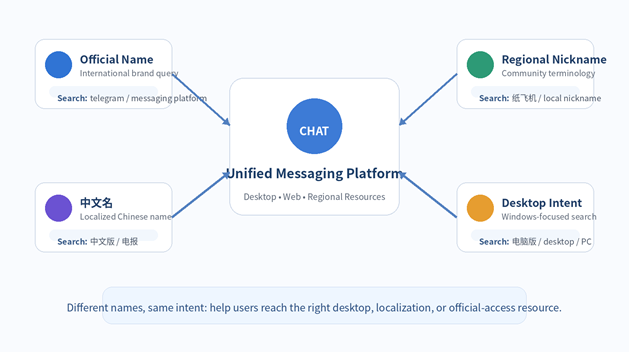
Figure 1. Different regional search terms can lead users toward the same messaging ecosystem, but the destination should still match the user’s actual intent.
What “Chinese Localization” Usually Means on Windows
When users search for telegram 汉化, they are often trying to make the desktop interface easier to understand rather than looking for a separate product. The practical questions are usually where the language controls are located, whether the interface can display Simplified or Traditional Chinese correctly, and whether the selected language persists after an update.
That distinction matters. Interface localization should normally be treated as a configuration step after the user has identified and installed the intended desktop application. A translated interface is not, by itself, a reason to trust an unfamiliar installer. If a page claims that users must install a modified package simply to obtain Chinese menus, the source and publisher deserve extra scrutiny.
The cleanest workflow is to start with a known desktop application, review its language options, and then configure the interface. This keeps localization independent from software provenance and makes later updates easier to manage.
Interface Language and Conversation Language Are Different
A Chinese interface does not require every conversation to be in Chinese. Multilingual teams often use one language for application controls and another for project communication. For example, a user may prefer Traditional Chinese menus while participating in English-language engineering channels and Chinese customer-support groups.
Keeping these layers separate is useful because interface language affects usability, while conversation language depends on the audience. Teams should optimize both without assuming they must match.
- Use the interface language that makes settings and security options easiest to understand.
- Use the conversation language that fits the team, customer, or community.
- Keep product names, file extensions, account identifiers, and technical commands consistent across languages.
- Document important terminology when a team regularly switches between English, Simplified Chinese, and Traditional Chinese.
Build a Comfortable Chinese Windows Desktop Workflow
Localization is only one part of the desktop experience. Windows users also depend on keyboard input, notifications, file handling, search, and long-running sessions. Small configuration choices in these areas can have a larger effect on productivity than the interface language alone.
For Chinese input, confirm that the preferred Windows input method is installed and that switching between English and Chinese is fast. Users who work across regions may need both Simplified and Traditional input methods. Test punctuation, full-width or half-width characters, and common shortcuts inside the messaging client before relying on them in daily work.
Notifications deserve similar attention. A localized interface should make it easy to identify priority controls so users can keep direct messages and active project groups visible while muting low-priority communities. This reduces interruption without forcing users to disable notifications globally.
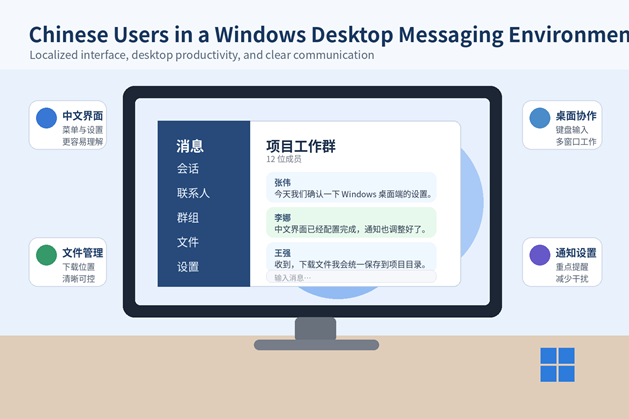
Figure 2. A useful Chinese-language Windows setup combines understandable controls with practical desktop features such as keyboard input, file handling, and notification management.
Traditional Chinese and Simplified Chinese Need Different Assumptions
“Chinese” is not one uniform desktop preference. Teams in Taiwan and Hong Kong may expect Traditional Chinese terminology, while many users in Mainland China or other markets may prefer Simplified Chinese. Some organizations work in mixed-language environments where the interface, documents, and messages use different variants.
When creating internal setup instructions, avoid screenshots or labels that assume every Chinese-speaking user sees the same wording. Instead, describe the path by function—such as Settings, Language, Privacy, Downloads, or Notifications—and note that exact labels may vary by language selection or software version.
Finding a Trustworthy Access Point
A search such as 电报官网 usually signals navigational intent: the user wants a clear starting point for product information, desktop access, or setup guidance. The search phrase itself, however, is not proof that every result is an official vendor page.
Before downloading anything, users should read the domain carefully, identify what role the page is serving, and distinguish between a product guide, a regional information site, a download directory, and a vendor-controlled destination. This is particularly important when search results contain similar branding or multiple download buttons.
- Check whether the domain and page purpose are clear before clicking a download.
- Prefer a direct, understandable route to the Windows package rather than a chain of redirects.
- Avoid pages that require unrelated download managers, browser extensions, or “helper” installers.
- If the page is a guide or regional resource, use it for information and verify the actual installer source separately.
Keep Download, Installation, and Updates on a Consistent Path
A trustworthy first installation is only the beginning. The same discipline should continue when the desktop client is updated. If the application includes a built-in updater or another established update path, users should avoid searching random download pages each time a new version is needed.
Before running a Windows installer, review basic file properties such as the filename, publisher information, version details, and any available digital signature. Scan the file with the organization’s normal endpoint-security tool and pay attention to unexpected warnings. The goal is not to make installation complicated; it is to keep the source, package, and publisher understandable.
File Names and Searchability Matter in Multilingual Teams
Desktop messaging often becomes a file-distribution channel. Reports, images, spreadsheets, archives, and meeting notes arrive in chat and are later reused in Windows folders or shared storage. When file names switch unpredictably between languages, search becomes harder and duplicate files become more common.
A simple naming convention can reduce this problem. Keep project codes, dates, version numbers, and file extensions stable, then use the language that best describes the content. For example, a team can use a structure such as ProjectName_2026-08_Report_v2.pdf even when the report itself is in Chinese.
- Use a dedicated download folder for messaging attachments.
- Move important files into project storage instead of leaving them permanently in chat downloads.
- Keep technical identifiers and version numbers consistent across languages.
- Use searchable file names and avoid vague labels such as final2-new-new.pdf.
A Practical Checklist for Chinese-Speaking Windows Users
- Identify whether the task is product access, localization, Windows download, or troubleshooting.
- Confirm the desktop application or resource before changing language settings.
- Choose Simplified Chinese, Traditional Chinese, or English according to the user’s actual workflow.
- Configure the appropriate Windows Chinese input method and test switching shortcuts.
- Review notification settings so high-priority conversations remain visible without constant interruption.
- Use a dedicated folder for received files and apply consistent multilingual file naming.
- Verify the download source, installer details, and publisher before installation.
- Use a consistent update path instead of repeatedly searching for new installers.
- Recheck language and notification preferences after major desktop updates.
Final Thoughts
Chinese localization works best when it is treated as part of a broader Windows desktop workflow rather than as an isolated translation problem. Users need clear terminology, a comfortable interface, reliable input methods, predictable file handling, and a trustworthy route from product discovery to installation and updates.
For multilingual teams, the most durable setup is also the simplest: keep product identity and software verification clear, let each user choose the interface language they understand best, and standardize the technical details that need to remain consistent across regions. That approach makes the desktop client easier to use without creating unnecessary complexity around downloads or localization.
