

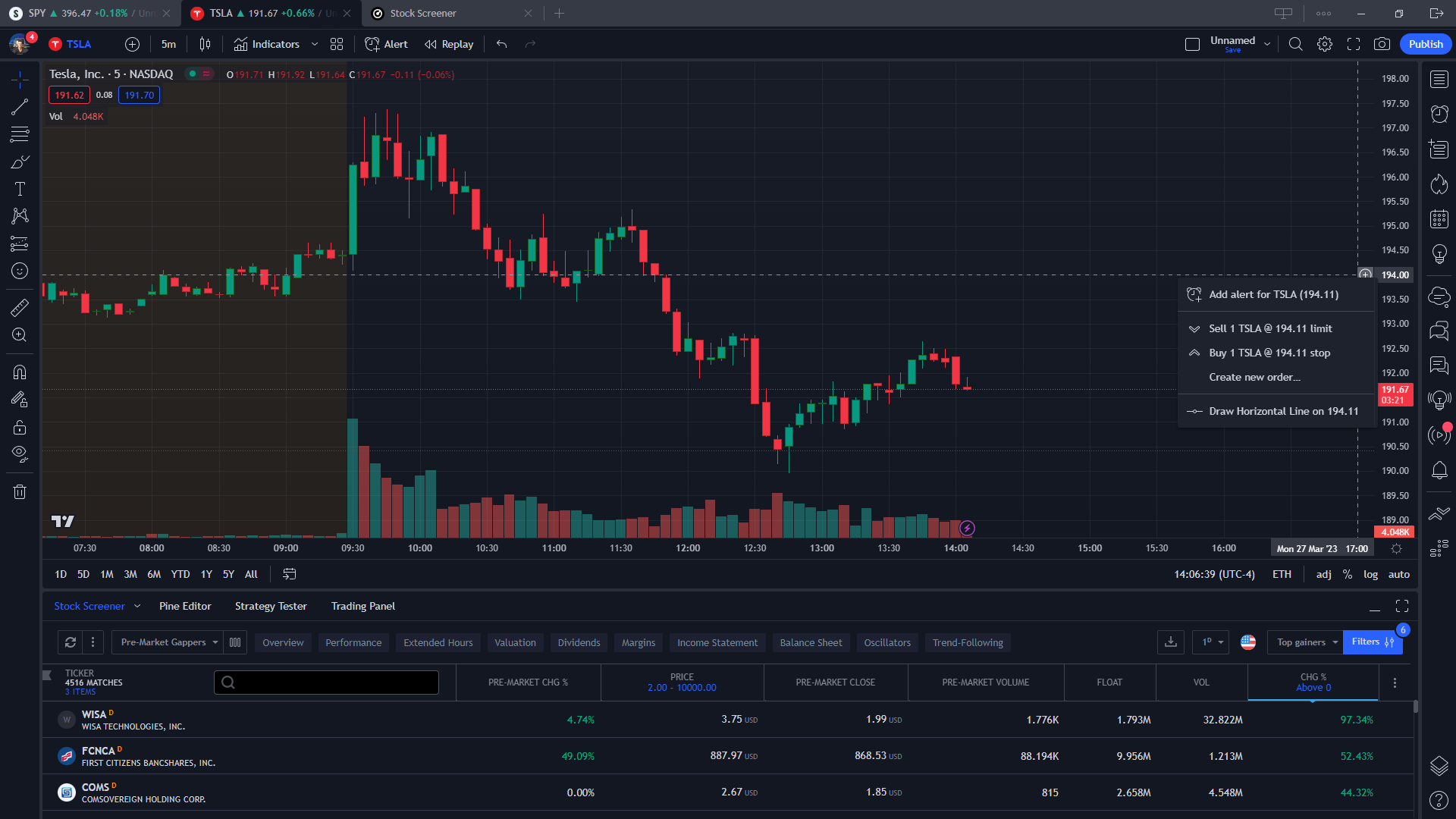
Few tools in retail trading have become as close to a default as TradingView. Whether you trade US equities, spot forex, or crypto perpetuals, there is a good chance the chart you saw in a Discord server, a YouTube breakdown, or a broker’s own web terminal was rendered by it. That ubiquity raises an obvious question for 2026: is the platform still worth your attention (and potentially your subscription money), or has it coasted on reputation while competitors caught up?
This review looks at the platform from the perspective of a working retail trader. We will walk through the charting engine, drawing tools, indicators, Pine Script, alerts, screeners, broker connectivity, the social side of the platform, the apps, and the pricing structure. We will finish with a comparison against MetaTrader- and thinkorswim-style platforms, a pros and cons summary, and a clear verdict on who should use it.
What TradingView Actually Is
At its core, TradingView is a browser-based charting and market analysis platform that aggregates price data from a large number of exchanges and data providers across stocks, indices, futures, forex, cryptocurrencies, bonds, and economic data. It is not a broker in itself. Instead, it sits between you and the market as an analysis layer: you study charts, build watchlists, run screeners, set alerts, and then execute either through an integrated broker or through your broker’s own platform.
Over the years it has grown from a lightweight web chart into something closer to a full trading workstation. The company reports tens of millions of users worldwide, and its free tier is a big reason for that reach. The important thing to understand is that the free version is a genuine product rather than a crippled demo, and the paid tiers mostly remove limits rather than unlock entirely different features.
Charting Tools and Drawing Tools
Charting is the reason most people arrive, and it remains the platform’s strongest area. Charts load quickly, scroll smoothly, and handle intraday timeframes down to seconds on higher tiers. You get the standard chart types (candlesticks, bars, line, area, Heikin Ashi) plus more specialised options such as Renko, Kagi, Point and Figure, Line Break, and range bars. Custom timeframes are supported, so a 4-hour or 45-minute chart is a few clicks away rather than a workaround.
The drawing toolbox is unusually deep for a mainstream product. Beyond trend lines and horizontal levels, you have Fibonacci retracements, extensions, fans, arcs and time zones, Gann tools, pitchforks, Elliott Wave labelling, harmonic pattern templates, position tools for long and short setups with visible risk-to-reward, measurement tools, and a full set of annotation shapes and text. Drawings sync across devices and can be locked, grouped, hidden by timeframe, or organised into named layouts.
Multi-chart layouts let you place several symbols or timeframes on one screen with synchronised crosshairs, symbols, and intervals. Higher tiers unlock more charts per layout, which matters for anyone who monitors correlated pairs or trades multiple crypto assets at once. Chart templates and saved layouts make it easy to jump between a scalping setup and a swing-trading setup without rebuilding everything.
Indicators: Built-In and Community
The platform ships with a comprehensive library of built-in indicators covering trend, momentum, volatility, and volume: moving averages of every flavour, RSI, MACD, Bollinger Bands, ATR, Ichimoku, VWAP, volume profile variants, and many more. Each can be customised in terms of inputs, colours, and visibility, and indicators can be stacked in separate panes or overlaid on price.
What really separates the platform is the community library. Because users can publish scripts, there are hundreds of thousands of open-source and invite-only indicators and strategies available. Some of them are genuinely excellent and would cost money on other platforms; many are noise. The rating system, comments, and author reputation help you filter, but you should still test anything you add to a chart. For crypto traders in particular, the community has produced tools for funding rates, open interest overlays, and exchange-specific quirks that built-in libraries rarely cover.
Pine Script: The Secret Weapon
Pine Script is the platform’s proprietary scripting language, and it is a major reason serious traders stay with TradingView rather than defecting. It is deliberately lightweight compared to MQL or Python, with a syntax that a non-programmer can pick up in a weekend. You can write custom indicators, alert conditions, and full backtestable strategies with entries, exits, position sizing, and commission modelling.
Recent versions of Pine have added better type handling, user-defined types, methods, libraries you can import from other scripts, and more flexible request functions for pulling data from other symbols and timeframes. The built-in editor now offers autocomplete, inline error hints, and a growing amount of AI-assisted help. Backtesting runs through the Strategy Tester, which reports net profit, drawdown, win rate, profit factor, and trade-by-trade detail, and deep backtesting on higher tiers extends the historical range.
Pine Script has limits. It is not a general-purpose language, execution is sandboxed inside the chart, and complex strategies can hit resource caps. But for the vast majority of retail use cases, it strikes a very good balance between power and accessibility.
Alerts
Alerts are another area where TradingView punches above its weight. You can set alerts on price crossings, drawing objects such as trend lines and channels, any indicator value, and any custom Pine Script condition. Delivery options include in-app notifications, push to mobile, email, sound, and webhooks. Webhook alerts are the bridge many traders use to connect TradingView signals to automated execution on exchanges or third-party bots, which effectively turns the platform into a lightweight algorithmic trading front end.
Alert limits scale with your plan. The free tier allows only a small number of active alerts, which is the single most common reason active traders upgrade. Premium plans raise the ceiling substantially and add features such as second-based intervals and alerts that never expire.
Screeners for Stocks, Crypto, and Forex
There are dedicated screeners for stocks, crypto, and forex, plus more recent additions for ETFs and bonds. The stock screener is the most mature, letting you filter on fundamentals (market cap, P/E, dividend yield, revenue growth), technicals (RSI, moving average relationships, volatility), and performance over multiple periods. The crypto screener covers a huge universe of coins and pairs across major exchanges, while the forex screener focuses on technical ratings and pair performance.
Screener results can be saved as watchlists, and the Pine Screener (available on paid tiers) lets you scan a watchlist using your own custom scripts. That last feature closes a long-standing gap: you no longer have to leave the platform to find symbols that meet a bespoke condition.
Broker Integration and Paper Trading
Because TradingView is not a broker, it relies on integrations. Dozens of brokers across stocks, futures, CFDs, forex, and crypto exchanges are connected directly, and if yours is on the list you can log in through the trading panel and place, modify, and manage orders straight from the chart. Order entry supports market, limit, stop, and bracket orders depending on what the broker permits, and open positions are drawn on the chart in real time.
If your broker is not integrated, the built-in Paper Trading account is still valuable. It simulates fills against real-time or delayed data, tracks P&L, and lets you rehearse a strategy without risking capital. Beginners will find it a low-pressure way to learn order types, and experienced traders can use it to forward-test Pine strategies before committing real money.
Social Community and Published Ideas
The social layer is one of the more polarising aspects of the platform. Users publish annotated chart ideas, and you can follow authors, comment, and browse trending analyses by asset. The best ideas are educational and show clear reasoning. The worst are cluttered, promotional, or simply wrong. Treat the feed the way you would treat any public trading forum: a source of perspectives and occasional insight, never a substitute for your own analysis.
The Minds feature, live streams, and public chat rooms extend this further. Their usefulness depends heavily on the asset you trade and on your willingness to filter aggressively. Many long-term users switch most of the social elements off and treat the platform purely as a charting tool, which is entirely possible.
Mobile and Desktop Apps
TradingView is available as a browser app, a native desktop app for Windows, macOS, and Linux, and mobile apps for iOS and Android. The desktop app is essentially the web version with better performance, multi-monitor support, and keyboard shortcuts, which makes it the preferred choice for anyone running several layouts at once.
The mobile apps are impressively complete. You can draw, apply indicators, manage alerts, browse ideas, and even trade through connected brokers from your phone. Layouts and drawings sync across all devices, so a level drawn on a desktop chart during the day is waiting on your phone in the evening. This cross-device consistency is something MetaTrader and most broker-native apps still struggle to match.
Pricing Tiers in 2026
The service uses a tiered subscription model. The company adjusts pricing and features periodically, so treat the following as a structural overview rather than a price list, and check the current plan page before subscribing.
- Basic (free): Full charting, one chart per layout, a limited number of indicators per chart, a handful of active alerts, and ads. Ideal for casual users and beginners.
- Essential: Removes ads, allows a couple of charts per layout, more indicators per chart, more alerts, and additional saved layouts and templates. The sensible entry point for a part-time trader.
- Plus: More charts per layout, more indicators and alerts, custom timeframes and range bars, deeper chart data, and access to intraday features that day traders rely on.
- Premium: The largest layouts, the highest indicator and alert limits, second-based intervals, longer historical data, priority support, and advanced features such as deep backtesting and non-expiring alerts.
Annual billing typically comes with a noticeable discount over monthly, and real-time data for certain exchanges (notably US stocks and futures) is sold as add-on packages regardless of tier. That add-on cost surprises some new users, so factor it in if you need live exchange data rather than delayed quotes.
TradingView vs. MetaTrader and thinkorswim-Style Platforms
FeatureTradingViewMetaTrader 4/5thinkorswim-style broker platforms Primary strengthCharting, multi-asset analysis, community scriptsForex and CFD execution, expert advisorsOptions analytics, integrated brokerage Asset coverageStocks, forex, crypto, futures, indices, bondsMostly forex, CFDs, some futuresBroker-dependent, usually stocks, options, futures ScriptingPine Script (easy to learn)MQL4/MQL5 (C-like, steeper curve)thinkScript or proprietary tools AutomationWebhooks and broker integrationsNative expert advisors run locally or on VPSLimited, often via broker API Cross-device syncExcellent (web, desktop, mobile)Weak, layouts tied to installationModerate CostFree tier plus subscriptionsFree through brokersFree with a funded brokerage account Best forAnalysis-first traders across marketsAutomated forex and CFD tradingOptions and active US equity traders The pattern is clear. MetaTrader wins if you run fully automated forex strategies through expert advisors on a VPS. Broker-native platforms win if you need deep options chains and want everything under one login. TradingView wins on chart quality, breadth of markets, ease of scripting, and the ability to use the same workspace no matter which broker you eventually execute with.
Pros and Cons
Pros
- Best-in-class charting with smooth performance in the browser and native apps
- Broad multi-asset coverage that spans stocks, forex, crypto, and futures in one place
- Pine Script is approachable and the community library is enormous
- Flexible alert system with webhooks for automation
- Useful free tier and cross-device sync of layouts and drawings
Cons
- Alert and indicator limits on lower tiers push active traders toward Premium
- Real-time exchange data costs extra on top of the subscription
- Community ideas are of very mixed quality
- Not a broker, so execution depends on third-party integrations
- Pine Script is not suited to heavy quantitative research compared to Python
Who TradingView Is Best For
Discretionary traders who lean on technical analysis will get the most value. Swing traders and position traders can often live comfortably on the Essential or Plus tier. Day traders and scalpers who run several layouts and dozens of alerts will want Premium. Crypto traders benefit from the exchange coverage and webhook alerts, and stock investors will appreciate the fundamentals-aware screener and the ability to overlay earnings, dividends, and splits on the chart.
It is a weaker fit for pure options traders, for fully automated forex traders already invested in MQL, and for quants who prefer to do research in Python or R and only need a chart occasionally.
Verdict
In 2026, TradingView is still the best general-purpose charting platform available to retail traders. Competitors have improved, and a few broker platforms now embed its charts directly, but nothing else combines the same chart quality, market breadth, scripting accessibility, and cross-device experience. Start on the free plan, learn the tools, and upgrade only when the alert or layout limits genuinely get in your way. Used that way, it is one of the few subscriptions in trading that consistently earns its cost.
Frequently Asked Questions
Is TradingView free to use?
Yes. The Basic plan is free and includes full charting, a limited number of indicators and alerts, and access to the community. Paid tiers remove ads and raise the limits.
Can I trade directly from the charts?
You can, provided your broker or exchange is one of the integrated partners. If it is not, you can still use the platform for analysis and the built-in Paper Trading account for practice.
Do I need to know how to code to use Pine Script?
No. Thousands of community indicators require no coding at all. If you do want to build your own tools, Pine Script is one of the easiest trading languages to learn, and the documentation and editor hints are beginner-friendly.
Is the platform good for crypto traders?
It is one of the strongest options. Coverage spans major centralised exchanges, the crypto screener is extensive, and webhook alerts make it straightforward to connect signals to trading bots.
