

The market for AI transcription tools has exploded in the last two years. A quick search reveals numerous plugins, websites, and apps promising to turn video into text. However, a closer look at the “under the hood” performance reveals a stark divide in quality and intended use case. Most tools currently on the market fall into two rigid categories: meeting recorders (like Tactiq, which excel at Zoom/Google Meet logs) or basic content summarizers (like NoteGPT). Lynote.ai has emerged as a distinct third category: a Deep Learning Assistant designed specifically for content consumption.
The “Flowing Account” Problem (S-Level Issues) If you have ever used a standard transcription plugin or a basic wrapper tool, you are likely familiar with the “S-level flowing account” issue. This technical term refers to the output generated when an AI simply transcribes word-for-word without understanding context, pacing, or topic shifts.
The result is a fragmented mess of text—often a solid block of thousands of words—that is mentally taxing to process. It forces the user to do the heavy lifting of figuring out where one idea ends and another begins. Competitors like Tactiq are excellent for capturing meeting minutes where every specific word counts for compliance, but for YouTube learning, their output often lacks the narrative flow required for study. It reads like a raw data dump, not a study guide.
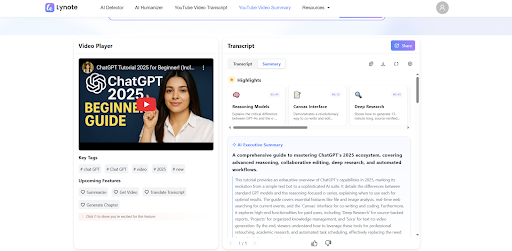
Visualized Smart Summary: A Structural Advantage Lynote.ai differentiates itself through its interface and processing logic. As seen in recent competitive analysis charts, Lynote prioritizes “Visualized Smart Summaries.” It doesn’t just listen to the audio; it analyzes the semantic meaning.
- Smart Chapters: The AI identifies topic shifts and creates clickable chapters automatically. This allows users to navigate a one-hour lecture by topic (e.g., “The History of Rome,” “The Fall of the Republic”) rather than by arbitrary timestamps.
- Video Keyword Analysis: It extracts the core terminology and concepts, presenting them upfront. This acts as an “executive summary,” letting you know exactly what the video covers before you commit to reading or watching it.
Accessibility and Cost-Effectiveness: A User-First Approach When comparing accessibility, Lynote offers a flexible “Dual-Ended” approach (Plugin + Web). This is a significant advantage over competitors like Tactiq, which often require a browser extension installation to function, or ScreenAPP, which is strictly a web dashboard. Lynote meets the user where they are, whether they prefer a sidebar assistant while browsing YouTube or a dedicated dashboard for managing library content.
Furthermore, the “barrier to entry” for premium features is significantly lower with Lynote. The economics of AI usage can be tough for students and freelancers. While many tools hide their best features (like GPT-4 level summaries) behind a paywall immediately, Lynote’s strategy is aggressively user-first, offering 50 free requests daily. This generous allowance covers the needs of almost any student or professional researcher. In comparison, the free versions of competitors often feel like limited demos that force an upgrade after just one or two videos.
The Verdict on “Deep Reading” For users who need a video to text AI solution that acts more like a smart editor than a robotic typist, the choice is clear. While others focus on just getting the words onto the screen, Lynote focuses on how those words are consumed and retained. The integration of precise timestamps, smart segmentation into readable paragraphs, and the ability to handle videos without subtitles positions it as the superior YouTube summary tool for anyone serious about content consumption. It shifts the paradigm from “capturing text” to “structuring knowledge.”
