

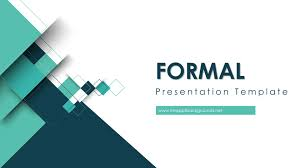
Ppt presentations are an essential tool for communication in various fields, from business and education to personal projects. Whether you’re presenting data, sharing insights, or telling a story, the visual impact of your presentation plays a crucial role in how your message is received. One of the easiest and most efficient ways to create professional and visually appealing presentations is by using PowerPoint templates.
In this article, we will explore what PowerPoint templates are, why they are important, the different types available, and how you can effectively use them to enhance your presentations.
What Are Ppt Templates?
Ppt templates are pre-designed slide layouts that provide structure and design for your presentations. These templates include a set of predefined layouts, color schemes, fonts, backgrounds, and other design elements that you can easily modify to fit your content. Instead of starting from scratch, templates offer a ready-made design that makes it easy to create cohesive and aesthetically pleasing presentations in a fraction of the time.
Templates typically consist of a title slide, content slides, and various placeholders for text, images, charts, and diagrams. These templates allow users to focus on adding valuable content while ensuring that the overall design remains consistent and polished.
Why Use PowerPoint Templates?
- Save Time and Effort:
Designing a presentation from scratch can be time-consuming and tedious. Templates eliminate the need to create a design from the ground up, helping you focus on crafting your message rather than worrying about formatting and design. - Consistency Across Slides:
One of the biggest challenges in creating a presentation is maintaining consistent design elements across all slides. PowerPoint templates help by automatically applying consistent fonts, colors, and layouts throughout the presentation, ensuring a professional and cohesive look. - Professional Look:
Templates are designed by professionals who are skilled in graphic design principles. Using these templates gives your presentation a polished, high-quality appearance that can leave a lasting impression on your audience. - Customizability:
While templates provide a structured design, they are also highly customizable. You can modify the colors, fonts, and images to match your brand, project, or personal style. This flexibility ensures that your presentation looks unique while still benefiting from the template’s foundational design. - Ease of Use:
Templates are user-friendly, even for beginners. Most templates are designed to be easy to navigate and modify, which means you don’t need advanced design skills to create an impactful presentation.
Types of PowerPoint Templates
PowerPoint templates come in a variety of styles and formats, catering to different types of presentations. Here are some common types of templates:
- Business Templates:
Business PowerPoint templates are perfect for corporate presentations, such as sales pitches, project proposals, financial reports, or annual meetings. These templates typically feature clean, professional designs with sections for graphs, charts, and key points. - Creative Templates:
Creative templates are ideal for artistic presentations or projects that require a more dynamic and imaginative design. These templates often feature bold colors, creative fonts, and unique layouts, making them great for marketing campaigns, product launches, or design portfolios. - Educational Templates:
Educational templates are designed for use in academic settings, whether in classrooms or webinars. These templates often include layouts that highlight lesson plans, discussion points, and educational content, making it easier for teachers and presenters to convey their message clearly. - Minimalist Templates:
Minimalist templates focus on simplicity and clarity. They are perfect for those who want to create a clean, uncluttered presentation. These templates use plenty of white space, minimalistic designs, and neutral colors to emphasize the content without distractions. - Infographic Templates:
Infographic templates help present complex data and statistics in a visually appealing and easy-to-understand format. These templates often include graphs, charts, timelines, and other visual elements that simplify information for the audience.
Where to Find PowerPoint Templates:
There are several sources where you can find Ppt templates, ranging from free to premium options. Here are some popular platforms to explore:
- Microsoft Office Templates:
PowerPoint itself provides a wide range of free templates. You can access them directly from the PowerPoint application by clicking on “New” and selecting a template from the available categories. This is a quick and easy way to find pre-designed templates within the software. - Online Template Marketplaces:
Several websites offer free and premium PowerPoint templates for download. Some popular options include:
- AiPPT: Explore a vast library of professionally designed templates. Find the perfect fit for any industry—from business and technology to education. Our collection features creative and animated styles, with ready-to-use layouts for timelines, roadmaps, and company profiles.
- Envato Elements: Offers a vast collection of premium templates, along with other digital assets like fonts and stock images.
- SlideModel: A website that provides high-quality PowerPoint templates for various business and creative presentations.
- SlidesCarnival: A free resource for professional and creative PowerPoint templates, with a wide range of categories.
- Canva: Known for its easy-to-use design tools, Canva offers customizable PowerPoint templates that can be edited online and then downloaded.
- Third-Party Software:
You can also use third-party software like Adobe Spark or Visme to create custom PowerPoint templates. These platforms allow you to design your own templates or choose from a selection of pre-made ones.
How to Use PowerPoint Templates Effectively:
Using a PowerPoint template is simple, but to make the most of it, keep these tips in mind:
- Choose the Right Template:
Select a template that suits your presentation’s tone and purpose. For example, a minimalist template might be best for a professional report, while a creative template could work well for a product launch or marketing presentation. - Customize the Template:
Customize the colors, fonts, and images to match your branding or personal style. But avoid over-customizing, as this can detract from the overall coherence and effectiveness of the template’s design. - Focus on Content:
While templates provide a great structure, the content is still the star of your presentation. Ensure your message is clear, concise, and aligned with your audience’s needs. Use bullet points, charts, and visuals to break up text and make your slides more engaging. - Use High-Quality Visuals:
Replace the placeholder images in the template with high-quality visuals that are relevant to your topic. Clear, professional images enhance the look of your presentation and help illustrate your message. - Maintain Consistency:
Ensure that the design remains consistent across all slides. Stick to the template’s layout, and avoid excessive use of different fonts, colors, or animations, which can make the presentation look cluttered. - Proofread and Review:
Before finalizing your presentation, proofread all your content for spelling and grammatical errors. Also, check the overall layout to ensure everything is properly aligned and looks balanced.
Conclusion:
PowerPoint templates are a fantastic tool for creating visually appealing, professional, and effective presentations with minimal effort. Whether you’re presenting for business, education, or creative purposes, templates can help you save time, maintain consistency, and deliver a polished final product. By selecting the right template, customizing it to fit your needs, and focusing on high-quality content, you can create presentations that captivate your audience and effectively communicate your message.
