

In the fast-paced world of social media, X—formerly known as Twitter—remains the global town square for breaking news, viral memes, and high-quality educational threads. Every day, millions of videos are uploaded, ranging from breathtaking drone footage and insightful tech tutorials to hilarious clips that define internet culture.
However, there is a persistent challenge for every user: the platform does not offer a native “Save Video” button. If you find a clip you want to keep for a long-term project, share with a friend who isn’t on the app, or watch during your morning commute without killing your data plan, you’re often out of luck.
This is where a dedicated twitter video downloader becomes an essential part of your digital toolkit. In this guide, we’ll explore the benefits of offline viewing, how to choose the right tool, and a step-by-step walkthrough for saving your favorite content across all your devices.
Why Users Need Offline Access to Twitter Videos
The transition from “scrolling” to “saving” isn’t just about digital hoarding; it’s about utility. There are several professional and personal reasons why having offline access to X content is a game-changer.
1. Reliable Content Creation and Research
For journalists, researchers, and content creators, social media is a primary source of information. Relying on a live link is risky; tweets can be deleted, accounts can be suspended, or the platform’s API might change, making a video inaccessible. By using a downloader, professionals can archive evidence or reference material safely on their local hard drives.
2. Data Conservation
Video streaming is one of the highest consumers of mobile data. If you have a favorite motivational speech or a “how-to” coding video that you watch repeatedly, streaming it every time is a waste of bandwidth. Downloading it once over Wi-Fi saves your data for more important tasks.
3. Seamless Sharing Outside the App
Not everyone is on X. When you want to send a video to a family group chat or embed a clip into a professional presentation, a direct MP4 file is far more versatile and professional than a link that forces the recipient to log in or navigate a cluttered interface.
The Benefits of Using a High-Quality Downloader
While there are many methods to “rip” video from the web, using a specialized tool like TwtVideoDownloader offers several distinct advantages over screen recording or using sketchy browser extensions.
High-Definition Resolution
Screen recording often results in a loss of quality, distorted aspect ratios, and the inclusion of UI elements (like the volume bar or notifications). A dedicated downloader fetches the original file directly from the server, allowing you to choose the highest resolution available, such as 720p or 1080p.
Speed and Efficiency
Manual methods are time-consuming. A web-based tool processes the URL in seconds, extracts the video and audio tracks, and provides a direct download link. It’s a “copy-paste-click” workflow that fits into a busy schedule.
No Software Installation
The best tools are “clientless,” meaning they run entirely in your web browser. This saves space on your device and prevents you from having to install potentially bloated software that slows down your operating system.
Security and Privacy: Staying Safe Online
In the era of cybersecurity threats, the way you download content matters. Many “free” downloaders are riddled with intrusive pop-up ads, tracking cookies, or even malware.
Choosing a reputable platform like TwtVideoDownloader ensures a layer of privacy. These tools typically:
- Do not require registration: You don’t need to provide an email address or create a password.
- No tracking of download history: Your choices remain private to your session.
- HTTPS Encryption: Ensures that the connection between your device and the tool is secure.
Always avoid tools that ask for your Twitter login credentials. A legitimate downloader only needs the public URL of the tweet to function.
How to Download Twitter Videos: A Step-by-Step Guide
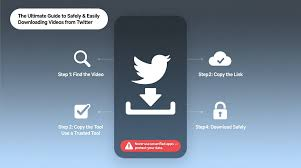
Whether you are tech-savvy or a complete beginner, the process of saving a video is remarkably simple. Here is how to do it using a reliable twitter video downloader.
Step 1: Copy the Tweet URL
Navigate to the tweet containing the video you want to save.
- On Desktop: Click the “Share” icon (the little arrow pointing up) and select “Copy link to Tweet.” Alternatively, copy the URL directly from your browser’s address bar.
- On Mobile: Tap the “Share” button under the video and select “Copy Link.”
Step 2: Visit TwtVideoDownloader
Open your preferred web browser and head to https://twtvideodownloader.com/. You will see a clean, prominent input box on the homepage.
Step 3: Paste and Analyze
Paste the link you copied into the input field and click the “Download” button. The tool will then communicate with X’s servers to find the video file associated with that link.
Step 4: Choose Quality and Save
Within seconds, you will see a preview of the video along with different quality options. Choose the resolution that fits your needs (e.g., 1080p for a TV screen or 360p to save space) and click the final download link to save the file to your device.
Device Compatibility: iPhone, Android, and PC
One of the best features of modern web-based downloaders is their “agnostic” nature—they work on virtually any device with an internet connection.
- For PC and Mac Users: This is the most straightforward experience. Use any browser (Chrome, Safari, Firefox, Edge) to save files directly to your “Downloads” folder.
- For Android Users: Most Android browsers allow for direct file downloads. Once the file is saved, it will appear instantly in your Gallery or Photos app under a “Downloads” album.
- For iPhone (iOS) Users: Since iOS 13, Safari has a built-in download manager. When you click the download link, tap the “down arrow” in the address bar to see your file. You can then save it to your “Files” app or move it to your “Camera Roll.”
Frequently Asked Questions (FAQ)
1. Is it legal to download videos from Twitter? Downloading videos for personal, offline use (like watching a tutorial later) is generally considered acceptable. However, you should never re-upload or distribute downloaded content as your own without permission from the original creator, as that would violate copyright laws.
2. Why can’t I download a video from a private account? Downloaders work by accessing the public URL of a tweet. If an account is set to “Private,” the tool cannot “see” the video because it is protected by X’s privacy settings. You can only download videos from public profiles.
3. Does TwtVideoDownloader work for GIFs? Yes! Twitter actually converts GIFs into a looped video format (MP4) to save space. When you use the downloader on a tweet containing a GIF, it will save it as a high-quality MP4 file.
4. Is there a limit to how many videos I can download? Most high-quality web tools, including TwtVideoDownloader, offer unlimited usage for free, making it easy to archive as much content as you need.
Conclusion
The ability to save and archive digital media gives you control over your online experience. Whether you’re building a library of inspiration, saving a critical news clip, or just wanting to enjoy a funny video without an internet connection, a reliable twitter video downloader is the perfect companion for your social media journey.
Ready to start your offline collection? Head over to TwtVideoDownloader and save your first video today. It’s fast, free, and designed to make your digital life just a little bit easier.
