

Planning Room Concepts with Greater Clarity
Starting with an Uploaded Space
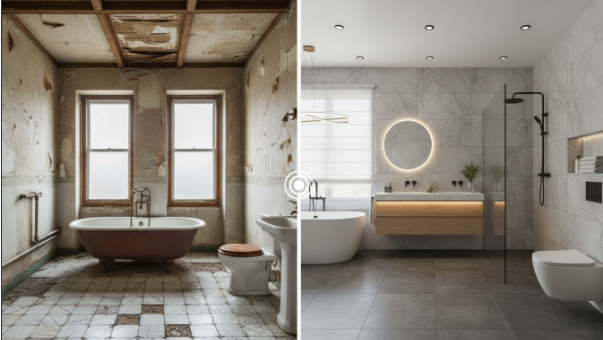
Most room-planning work begins with an existing environment, whether it is an unfinished apartment, a half-renovated corner, or a simple phone snapshot. The first time the workflow introduces AI, users interact with the tool through the linked AI Room Design feature. The system analyzes the image’s structure and orientation, then rebuilds the visual layout in a cleaner and more flexible form. This creates a stable base where ideas can be applied without losing the original room’s proportions or lighting. As a result, the early phase of planning—normally the hardest to articulate—becomes more concrete.
Moving from Style Selection to Visual Output
Once the room reference is uploaded, users can shift from ambiguity to a structured design choice by selecting a target interior style. Each style option acts as a controlled instruction set that guides the transformation. This stability reduces trial-and-error and shortens the time it takes to generate a first workable draft. The consistency of interpretation allows room ideas to evolve through deliberate iteration, giving users clearer checkpoints during their decision-making process.
Strengthening Creative Control in the Workflow
Using Text Prompts for Custom Variations
Not all projects follow fixed design rules. Some require flexibility, especially when users want to test ideas that fall between known styles. This is where text prompts come into play. By describing details such as mood, lighting, or functional purpose, users can guide the transformation toward a more customized direction. Each prompt functions like a micro-brief, letting the model generate variations without losing track of the room’s spatial constraints. The lightweight nature of this interaction keeps the design cycle quick while supporting diverse creative approaches.
Refining the Vision Through Repeated Iterations
Interior ideas rarely succeed on the first attempt. VDraw’s iterative speed allows users to refine specific elements—sofa layout, lighting balance, wall accents—without restarting from scratch. This fits the reality of design planning: improvements often emerge only after seeing visual options side by side. By lowering the cost of each iteration, the tool encourages more systematic exploration, creating room concepts that are both visually aligned and practically feasible.
Extending the Workflow Beyond Room Design
Applying AI Editing for Small but Critical Adjustments
Room visualization often requires operations that sit outside pure style generation, such as removing objects, repairing damaged areas, or adjusting color consistency. VDraw includes broader editing tools to support these adjustments without forcing users into additional software. These features make the workflow more self-contained, especially for users who want to finalize room mockups before presenting them to others.
Removing Unwanted Marks from Reference Images
In some projects, creators rely on clips or short walkthrough videos of a space as their starting reference. These files may carry platform stamps or branded overlays that distract from the design work. For those situations, VDraw offers a dedicated Video Watermark Remover tool that clears these marks before the content enters the planning stage. While it focuses on video files, the benefit is the same: cleaner source material leads to clearer design outputs and a smoother workflow from reference to final concept.
Creating a Reliable and Repeatable Design Process
Aligning Concepts with Real-World Constraints
A strong room concept must go beyond aesthetics. Lighting direction, spatial depth, and structural proportions all influence whether an idea can be executed realistically. VDraw’s AI engine interprets these factors from the uploaded image and integrates them into the generated output. This alignment ensures that the resulting visuals do not drift into abstract or impractical designs. For users planning renovations, furniture replacements, or small-scale improvements, this grounded approach provides a more dependable planning reference.
Supporting Fast Decision Cycles for Home Projects
Home improvement decisions increasingly happen under time pressure—tight schedules, limited budgets, or the need to quickly compare alternatives. VDraw’s AI Room Design helps shorten these decision cycles by producing clear visuals that users can evaluate immediately. Instead of relying on imagination or lengthy manual sketches, users get visual drafts that accelerate conversations with contractors, partners, or stakeholders. This practical advantage is one of the primary reasons the feature fits well into modern design workflows.
Looking Ahead: Why This Workflow Matters
Enhancing Creative Autonomy Without Increasing Complexity
The long-term value of VDraw’s design approach lies in how it balances autonomy and simplicity. Users maintain control over ideas while the tool handles technical translation. The workflow reduces friction without reducing choice, giving individuals and teams a clearer path from concept to visual clarity. As more design tasks shift toward AI-assisted execution, having a tool that preserves intent while accelerating output becomes increasingly important.
Building a Scalable Method for Everyday Room Planning
Whether used for a single room refresh or a sequence of home upgrades, VDraw offers a scalable method that adapts to varying levels of ambition. The combination of fast generation, controlled style options, and iterative refinement supports both beginners and experienced planners. For anyone looking to visualize room ideas quickly and accurately, VDraw’s AI Room Design represents a practical upgrade to the traditional design process.
