

What “free” actually has to mean
Almost every editor has a free tier. Very few let you finish a job on it. We ranked these six on four things that decide whether a free plan is usable: can you start without an account, does the export carry a watermark, is there a daily cap on how many images you can process, and does the tool hold up when the photo has text in it.
One disclosure before the list: the first tool is ours. It sits at number one because it is the one we test against the others every week, not because it wins every category — it is not the best choice for scanned family prints or for design work that needs layers. Where that matters, we say so.
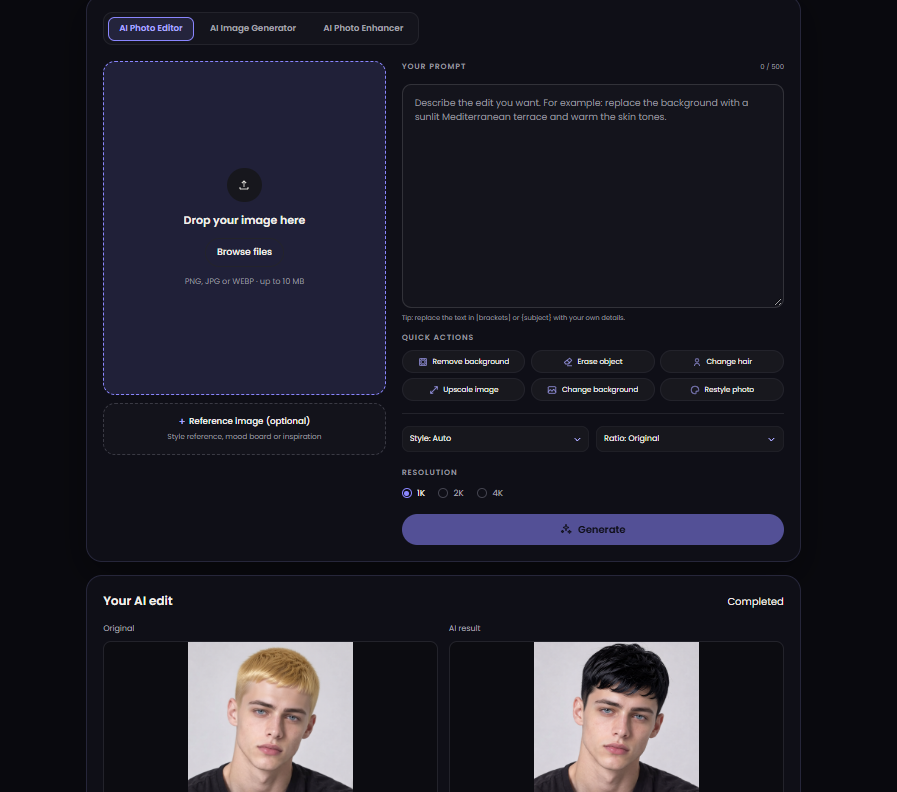
1. ai-photo-editor.app — the one that removes the friction
Open the page, drop a photo, type what you want, export. No account, no watermark on the file you download, and no per-image cap on AI edits. Everything happens in the browser, so it works the same on a laptop and on a phone in a stockroom.
- Good at: one-pass cleanup in a single window — remove background, erase an object, change the background, restyle, change hair, then upscale and export at 1K, 2K or 4K.
- Also inside: a generator tab for images you never shot, and an enhancer tab for the batch that only needs rescuing.
- Watch out: it is an editor, not a layered design tool. If you need masks, blend modes and typography, go to number 3.
2. Upscayl — free and offline, if you can install software
The only genuinely free-upscaling option on this list: open source, runs on your own machine, no account and no upload. For anyone who processes client photos and cannot send them to a server, that alone decides it.
- Good at: enlarging old or low-resolution images with several model presets, at 2x and 4x.
- Watch out: desktop install, wants a decent GPU, and there is no editing beyond upscaling. It also does not fix text — packaging copy still turns to mush.
3. Canva — the free plan that is really a layout tool
Canva’s free plan is generous for templates, text, and social sizing, and its AI editing features are the reason many creators never leave. The catch is that the interesting AI actions are metered, and the free export options are narrower than the paid ones.
- Good at: turning a fixed photo into a finished post or thumbnail with brand fonts and consistent sizing.
- Watch out: it is a design canvas first. If your job is “clean this photo up”, you will spend more clicks here than anywhere else on the list.
4. Pixlr — the browser editor closest to Photoshop habits
Familiar layers, brushes and selection tools in a tab, with AI cutout and generative fill bolted on. Free tier exists, ads and limits come with it.
- Good at: creators who already know their way around a layers panel and want it without installing anything.
- Watch out: the interface assumes experience, and the free tier interrupts.
5. remove.bg — one job, done better than most
Not a general editor, and it does not pretend to be. For cutouts on hair, fur and semi-transparent edges it is still the reference, and the free allowance covers occasional use.
- Good at: product cutouts for listings, profile pictures, thumbnails.
- Watch out: everything past the cutout needs another tool. Free downloads are resolution-limited.
6. Fotor — the all-in-one for people who do not want six tabs
Retouch, background change, upscaling, filters and templates under one login, with a free tier that is fine for experimentation and tight for production.
- Good at: beginners who want guided one-click fixes and a template library.
- Watch out: free exports are limited, and heavy processing is gated behind the subscription.
The short version
| Tool | How it is free | Best for | Watch out |
|---|---|---|---|
| ai-photo-editor.app | No account, no watermark | Product and social photos, fast batches | Not a layered design tool |
| Upscayl | Open source, offline | Private upscaling on your own machine | Install, GPU, no editing |
| Canva | Free plan | Finished posts and thumbnails | AI actions metered |
| Pixlr | Free tier | Layer-based edits in a browser | Learning curve, ads |
| remove.bg | Free allowance | Clean cutouts | Resolution limits |
| Fotor | Free tier | Guided one-click fixes | Exports gated |
Which one to pick
- You sell products and shoot on a phone: start with number one, keep remove.bg for the hard cutouts, and stop there.
- You handle client files you are not allowed to upload: Upscayl, no question.
- You publish to social and need it to look on-brand: Canva, with number one doing the cleanup first.
- You already think in layers: Pixlr, and expect the free tier to nudge you.
None of these are interchangeable, which is the useful part: the free combination that covers a full week of creator work is usually one editor for cleanup, one specialist for cutouts or upscaling, and one canvas for layout. Pick the editor first — that is the step everything else depends on.
If you only have two minutes, use them on one photo rather than six reviews: open a free AI Photo Editor Online, drop in an image with visible text, and export it. If the label survives, the tool is worth keeping.
