

Starting a live channel has never been cheaper, but the gap between a stream that looks improvised and one that feels professional is mostly a matter of tools and settings. This guide walks through the hardware, software and growth tools that new Twitch and Kick streamers actually use, and how to put them together without overspending.
Hardware: spend where viewers notice
Viewers forgive an average webcam far more easily than bad audio. If your budget is limited, the order of priorities is simple:
- Microphone first. A USB dynamic microphone removes most room noise and keyboard clatter, which matters more than a 4K camera.
- A stable connection. Use a wired Ethernet cable instead of Wi-Fi. Dropped frames are the fastest way to lose a new viewer.
- Enough CPU or GPU headroom. Modern graphics cards have dedicated encoders (NVENC, AMF, Quick Sync), so you can stream at 1080p without slowing your game down.
- Lighting before camera. A cheap LED panel makes an entry-level webcam look far better than an expensive camera in a dark room.
Software: OBS and a few smart settings
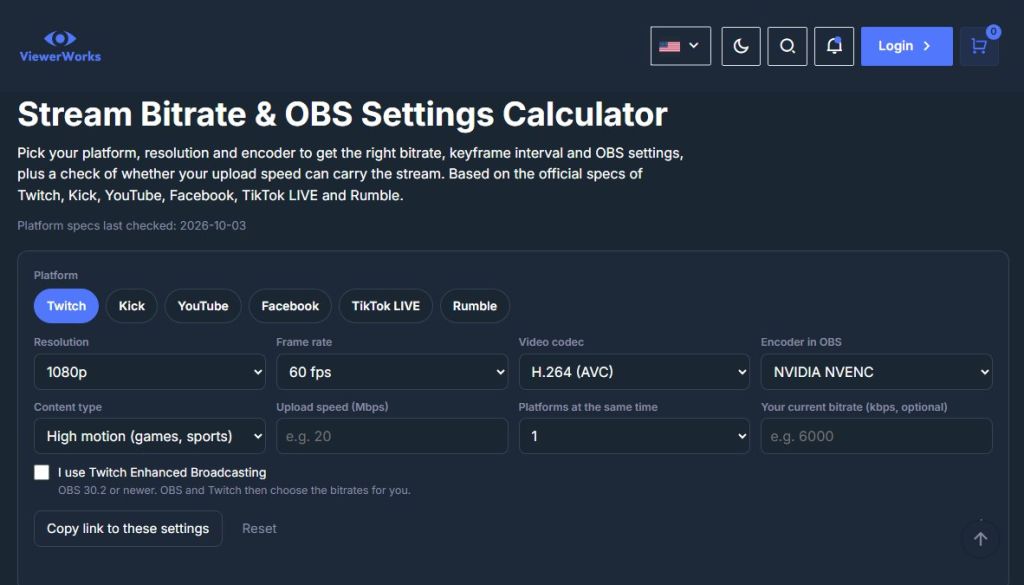
OBS Studio is free and works with both Twitch and Kick. For most channels, a bitrate between 4,500 and 6,000 kbps at 1080p and 60 fps is a safe starting point on Twitch, while Kick accepts higher bitrates if your upload speed allows it. Set the keyframe interval to 2 seconds, use the hardware encoder of your graphics card and run a short test stream before going public.
Scenes are worth the setup time. A “starting soon” screen, a main gameplay scene, a “just chatting” scene with a larger camera and a “be right back” screen give your stream structure and make it easier to switch topics without awkward pauses.
Overlays, alerts and chat tools
Alerts for new followers and subscribers turn small moments into interaction. Keep them short and quiet; an alert that covers half the screen for ten seconds annoys viewers more than it excites them. A chat overlay helps viewers who watch fullscreen, and a simple countdown or goal bar gives regulars a reason to come back for a milestone stream.
Moderation tools matter from day one. Even a small chat can attract spam links, so set up a bot with link filters and a list of blocked words before you need it.
Discovery: the hardest part of the stack
Good equipment does not solve the main problem of a new channel: nobody sees it. Both platforms sort category pages by current viewer count, so a stream with zero viewers sits at the bottom of a long list. Creators use several approaches to break this cycle:
- Smaller categories. A game with 40 live channels gives you a real chance to appear on the first screen; a game with 4,000 does not.
- Short clips. Cutting highlights for TikTok, YouTube Shorts and Instagram Reels brings viewers from outside the platform.
- Collaborations and raids. Streaming with creators of a similar size introduces you to audiences that already like your type of content.
- Paid visibility. Some streamers use a Twitch viewer bot or a Kick viewer bot to raise the viewer count for a limited time while they build a real community. Whether this fits your channel is a personal decision; check the platform rules first and treat it as a short boost, not a replacement for content.
Analytics: measure what matters
Both Twitch and Kick show average viewers, peak viewers, followers gained and chat activity per stream. Track these numbers weekly rather than daily. The most useful metric for a new channel is retention: how long people who join actually stay. If viewers leave within a minute, the problem is usually the first impression, such as a silent intro, a messy layout or an unclear stream title.
A simple starter checklist
- Microphone, wired internet and basic lighting in place
- OBS configured with hardware encoding and four core scenes
- Alerts, chat overlay and a moderation bot set up
- A fixed schedule shown on your profile
- Clips posted after every stream
- Weekly review of average viewers and retention
The right tech stack will not make a channel successful on its own, but it removes the technical friction that makes new viewers leave. Once the basics are solid, consistency and smart discovery decide how fast a Twitch or Kick channel grows.
