

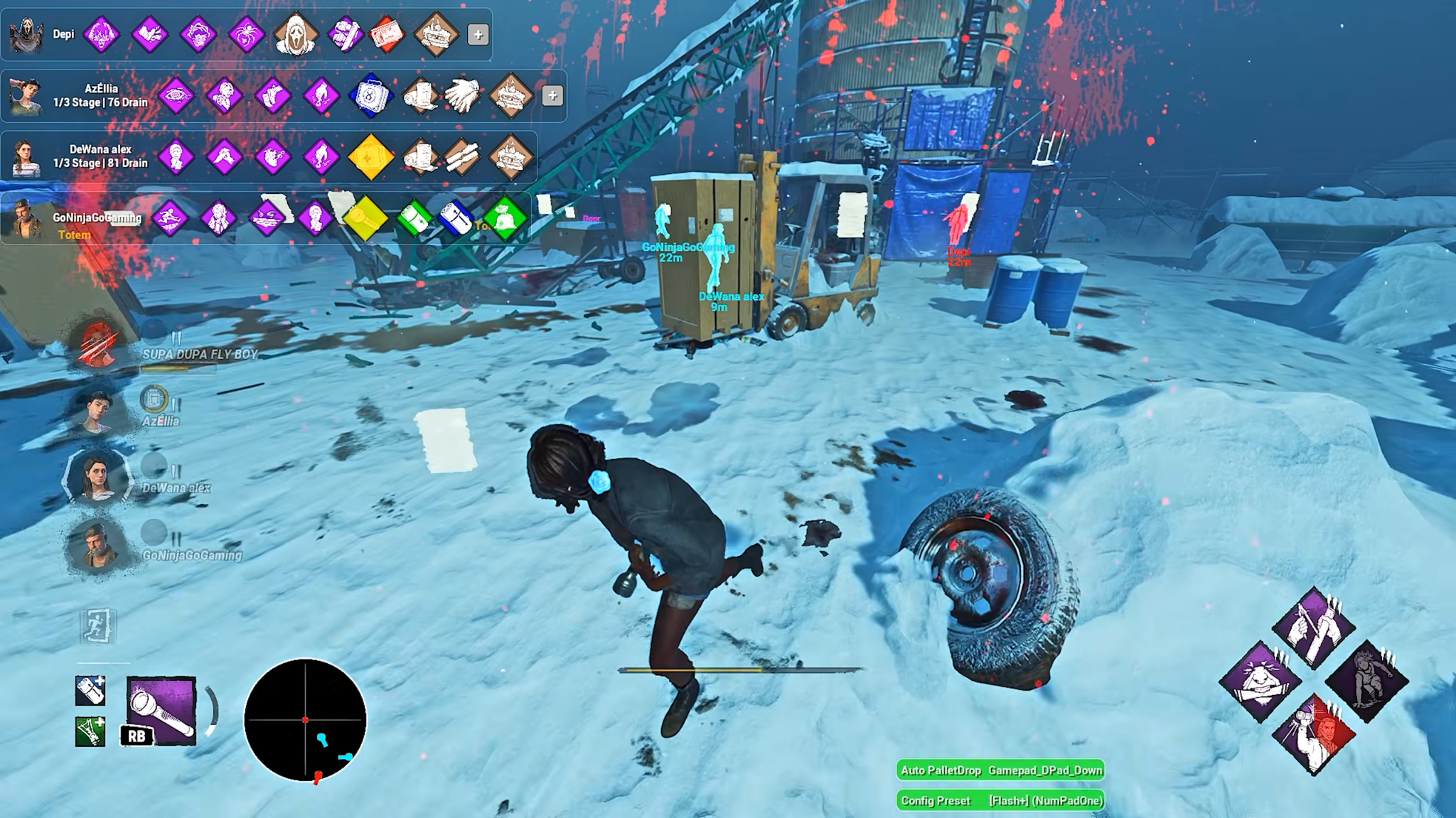
A Survivor rounds Killer Shack and loses sight of the Killer. They have a moment to choose between vaulting the window, running along the outside wall, and leaving the loop. Footsteps and a glimpse of the Red Stain can help them guess where the Killer is going. An ESP overlay can show the Killer’s position through the wall, giving the Survivor more information at exactly the point when they have to choose a route.
Dead by Daylight cheats can also affect a timed input or the equipment a player brings into a Trial. Automatic skill checks act during repairs and other interactions. Loadout unlockers affect the build selected before the match. Some PC cheat menus combine those features with ESP and aim assistance, as shown in this overview of Dead by Daylight cheats.
What ESP reveals during a Trial
In a standard match, four Survivors repair generators to power the exit gates while one Killer tries to stop them. Both sides make decisions with information that can change from one moment to the next. A Killer might follow the scratch marks a running Survivor leaves behind. Someone repairing a generator might hear the Terror Radius getting louder and decide to leave before the Killer reaches them.
In discussions of DBD cheats, ESP usually means an overlay that adds information to the screen. A box can mark a character’s position, a skeleton can show how they are moving, and a highlight can make their silhouette stand out through cover. Objective labels can mark generators or provide details such as repair progress. A built-in aura appears when the conditions of a perk, item, or ability are met. A third-party overlay can draw its own highlights independently of those triggers.
At a loop with two tall walls, the Killer might expect an injured Survivor to keep running toward the next window. A position marker can reveal that the Survivor stopped or turned toward another part of the map. The same extra information can help a Survivor pick a different route when the Killer doubles back. That change matters before anyone swings or vaults, because it affects where the next encounter will happen.
The overlay can also affect decisions away from a chase. A Killer with several generators left to patrol might head toward one that is nearly finished even if another is closer. A Survivor who notices progress on a nearby generator can choose a route that leads the Killer away from that repair. A label showing that a generator is blocked can affect whether a player crosses the map to work on it.
Aiming and automated chase actions
A DBD aimbot can adjust the player’s aim toward a target. A ranged Killer offers a clear example. The Deathslinger might spot a Survivor crossing a narrow gap and have a brief chance to fire his harpoon. Aim assistance can influence how the reticle follows that movement. The shot needs a clear path at the moment it is fired, and landing it starts the separate task of reeling the Survivor in.
Some features automate a single chase action. Auto Pallet Drop can attempt a drop in response to a nearby Killer. An automated Dead Hard input can affect the moment a Survivor uses that perk when it is available. These actions have consequences beyond the initial timing. Spending a pallet can create distance now and leave that lane without the pallet for the next player who gets chased there.
Head On has a different timing condition. A Survivor can stun the Killer by rushing out of a locker once the perk is ready and the Killer is in range. A timing tool can respond to that opening. When the Killer stays back or takes a different route, the Survivor has to decide how long to wait in the locker while the rest of the Trial continues.
What automatic skill checks do during repairs
A repair skill check starts with a warning sound, followed by a moving indicator and a marked target area. A Good result keeps the repair going. A Great result can add bonus progress. Missing the check can cost progress and create a noise notification, giving the Killer a reason to look at that generator.
An automatic skill check feature handles the timed input on supported prompts. A mode may produce a mix of Good and Great results or aim for Great checks wherever the prompt has a Great zone. Some menus also list result conversion, which changes the grade an eligible check records. Consistent Great results can affect repair progress, especially when a Survivor brings a perk that rewards those results.
Consider a Survivor repairing the last generator while a teammate is being chased nearby. An automatic check can handle the button press while the Survivor watches where that chase is heading. If the Killer turns toward the generator, they have to weigh the remaining repair progress against how much time they need to reach a window or pallet. The choice matters even after the check has passed.
A Great check can give information to the Killer, too. The Deathslinger’s Gearhead perk can reveal where a repair is happening when a Survivor lands a Great check while the perk is active. A Great result can advance the repair and give the Killer a reason to investigate that generator.
Skill checks can come up in other actions, including healing and wiggling while being carried. Those prompts have their own success conditions and effects, so the result depends on the interaction. Healing checks are part of recovering a health state, while wiggle checks are part of trying to escape the Killer’s grasp. The timing modes and the different types of prompts are covered in the guide to automatic skill checks in Dead by Daylight.
How loadout unlockers affect the build
A Survivor can enter a Trial with perks and an item such as a med-kit or toolbox, along with compatible add-ons. A Killer also chooses perks and can equip add-ons for their power. The options ordinarily available to a player depend on their progression, inventory, and the content they own. A loadout unlocker can temporarily expand the choices available for a session.
The change becomes visible when the build comes into play. A Survivor using a healing perk and a med-kit may be able to get a teammate back on their feet sooner after a chase. A Killer add-on can change how a power behaves, such as its reach or recovery time. Two players using the same loadout feature can bring very different builds because the effects come from the particular perks, items, and add-ons they equip.
A wider selection also affects how players specialize. A Survivor who expects to take chases might equip a perk that gives them a burst of speed after a vault. A teammate who plans to handle hook rescues might use that slot for a perk that helps them reach an injured ally or recover afterward. Each build has its own useful moments, depending on the situations that come up in the Trial.
How DLC and skin options differ on PC
DLC access concerns which characters a player can select. MilkyWay lists its loadout unlocker across the Steam, Epic Games Store, and Microsoft Store releases. It lists DLC character access for the Windows release distributed through the Microsoft Store and Xbox app. A Killer’s power comes with the character, so character access can change which power a player brings into a Trial. Temporary access applies to the session. The storefront records purchases separately.
Cosmetic features affect appearance. MilkyWay describes a client-side skin changer that changes what the player sees on their own screen during a match. It also describes a cosmetic unlocker for temporarily equipping supported skins in the lobby and Trial. The menu gives the ownership-based cosmetic and DLC options an explicit ban warning. For platform availability and what each option affects, see the guide to Dead by Daylight unlockers.
Fair play and account bans
An advantage can reach players who never saw the action. If a Killer lands a ranged shot earlier in a chase, one Survivor can end up on a hook while another leaves a generator to rescue them. When extra information helps a Survivor avoid a hit, their teammates may spend more time repairing. Each player has to respond to the outcome, even when the extra information or automated input was visible to just one person.
Behaviour Interactive lists third-party software used to gain an unfair advantage among the grounds for a permanent ban. Its published examples also cover cheated progress and obtaining in-game cosmetics through unauthorized channels. A tool can create an advantage through an overlay or a single automated action, even when most of the match still looks like ordinary play.
Behaviour says a permanent ban results in an in-game notification explaining the offense. It provides an appeal through Dead by Daylight Support for players who believe a ban was issued in error. A permanent ban has consequences beyond the Trial in which a cheat was used, because it can prevent the player from using that account in future online matches.
