

If you are an avid movie fan, you probably have a large collection of Blu-ray disks. But it’s a hassle to take out the Blu-ray drive and replace the disks every time you want to watch a movie, and the disks wear out in the long run.
So, using a Blu-ray ripper to copy your disks into digital files could be the best solution. Then, you can enjoy flexible Blu-ray playback on any device, anytime, anywhere. This post will bring you a review of VideoByte BD-DVD Ripper. It is one of the best Blu-ray rippers for Windows & Mac. It can help you convert Blu-ray to digital formats and save it to your computer with lossless quality.

Key Features of VideoByte BD-DVD Ripper for Blu-ray Conversion [Software]
- Comprehensive Format and Device Compatibility
- Supports DVD and BD-DVD Disks: Allows ripping of DVD/Blu-ray movies into digital video formats.
- Compatible with Win & Mac Systems: Works seamlessly on both Windows and Mac, including their latest versions.
- Advanced Decryption and Output Quality
- Decrypts DVD/Blu-ray Protections: Supports bypassing protections like APS, CSS, ARccOS, CPRM, AACS, BD+, and Cinavia.
- 4K High-Definition Output and Multiple Formats: Supports outputting videos in various formats, including up to 4K resolution, with lossless download options.
- User-Friendly Interface and Customization Options
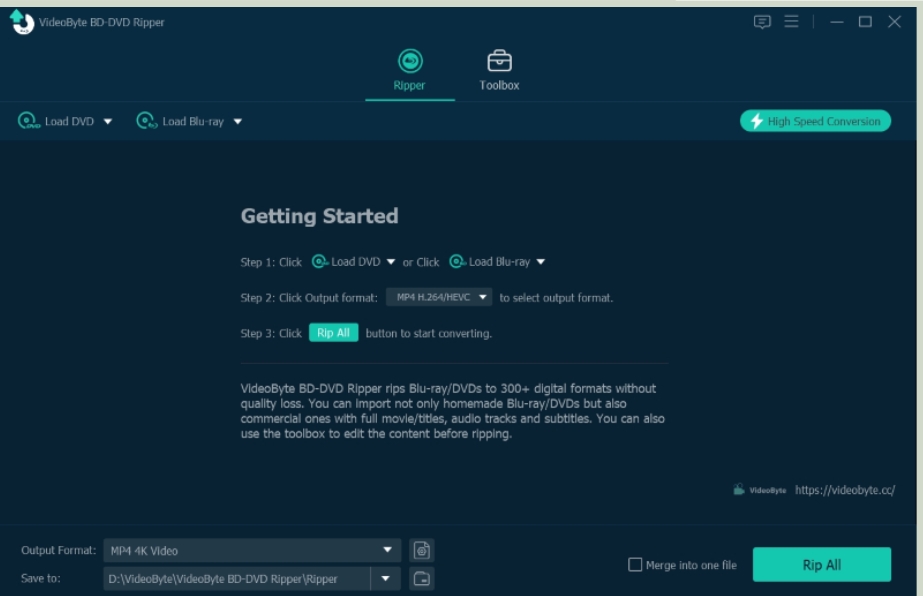
- Simple and Intuitive Interface: Unlike many professional software with complex operations, VideoByte has a clear interface and completes tasks in just three steps.
- Comprehensive Editing Capabilities: Allows users to personalize their ripped movies with features like cutting, cropping, rotating, merging, adjusting effects, adding filters, and watermarks. You can also set different video parameters.
- Retains All Subtitles and Audio Tracks: Keeps multiple language subtitles and audio tracks, allowing users to embed them in the downloaded videos.

Use Cases of VideoByte BD-DVD Ripper for Blu-ray Conversion [Software]
We can see many people use VideoByte BD-DVD Ripper mainly for three reasons below, and that’s where it helps.
1. Ripping and Saving Blu-ray Movies for Playback on Any Common Player
You may want to buy new Blu-ray movies and watch them on any common device without any limitations. However, Blu-rays come with advanced encryption technology. Apart from preventing copying, they also have restrictions like region codes. With VideoByte BD-DVD Ripper, you can bypass the Blu-ray protection, convert the film to digital format, and enjoy Blu-ray movies in any common player.
2. Backing Up DVDs to Prevent Damage or Loss
Everyone with a cherished DVD collection knows that DVDs can get scratched, damaged, or lost. To protect their collection, they use VideoByte BD-DVD Ripper to create backups. They insert the DVD into their computer, use the software to rip the movie into a digital format, and store these digital copies on an external hard drive. This protects the original DVDs and ensures the movies are safe and can be easily restored if the physical disks are damaged or lost.
3. Pre-edit Movie Clips for Creative Projects
You may want to use clips from a DVD/Blu-ray movie for video editing. Then you will need to use VideoByte BD-DVD Ripper to save the entire movie and pre-edit the video files like effect or filter. Once the movie is saved locally, you can open the video editing software, import the ripped movie, and easily clip the scenes you need. This feature allows you to use high-quality videos for your creative projects.

Objective Reviews from VideoByte BD-DVD Ripper Users for Blu-ray Conversion
By browsing Trustpilot, we have captured the following objective reviews of user experiences with VideoByte BD-DVD Ripper, including positive reviews and criticisms.
Positive Reviews
Based on the screenshots of reviews below, it’s clear that many users are praising the reliability and user-friendliness of VideoByte BD-DVD Ripper. They appreciate its intuitive interface, simple operation, and ability to rip Blu-ray disks without any loss in quality. This sentiment aligns with my own experience using the software as well. However, like any product, it also has its criticisms, which we’ll discuss next.

Criticisms and How VideoByte BD-DVD Ripper Addresses Them
Based on the screenshots of star 1 reviews below, it’s evident that some users have encountered issues with activation. Despite the inevitability of encountering some program errors, the proactive and responsive approach of VideoByte toward this feedback is reassuring. VideoByte has been actively addressing these concerns through diligent customer support and continuous program optimizations, which instill confidence in their commitment to quality and customer satisfaction.

The objective reviews on Trustpilot are an important reference for us to check is videobyte useful enough or not. They provide genuine user experiences and feedback on the performance of VideoByte BD-DVD Ripper, such as ease of operation and meeting the needs of Blu-ray conversion. These insights can help you make smarter purchasing decisions. For instance, if you encounter issues mentioned in negative reviews, like product activation or ineffective subscription purchases, you can refer to the solutions provided by VideoByte in the review section and contact them promptly to resolve the issues.
Conclusion
In conclusion, I believe you now have a good understanding of VideoByte BD-DVD Ripper. This software excels in both functionality and customer service. For users looking to burn Blu-ray disks, it is genuinely useful and not just a gimmick. With its user-friendly design, powerful features, and responsive support, it meets the growing demands of users and has earned a solid reputation in a competitive market. For users seeking efficient, convenient, and high-quality DVD or Blu-ray experiences on a common video player, VideoByte BD-DVD Ripper is undoubtedly a recommended choice.
