

TikTok has quickly become one of the most popular social media platforms, offering a never-ending stream of creative and entertaining content. With so many videos that make us laugh, inspire us, or leave us amazed, it’s natural to want to save some of these clips for later viewing or sharing. While TikTok itself allows you to save videos, there are many other ways to download and preserve your favorite content. In this article, we’ll explore the best tips and tricks to save TikTok clips, ensuring you never lose those moments that brighten your day.
1. Using TikTok’s Built-In Features
TikTok has made it easy to save videos directly within the app. Here’s how you can do it:
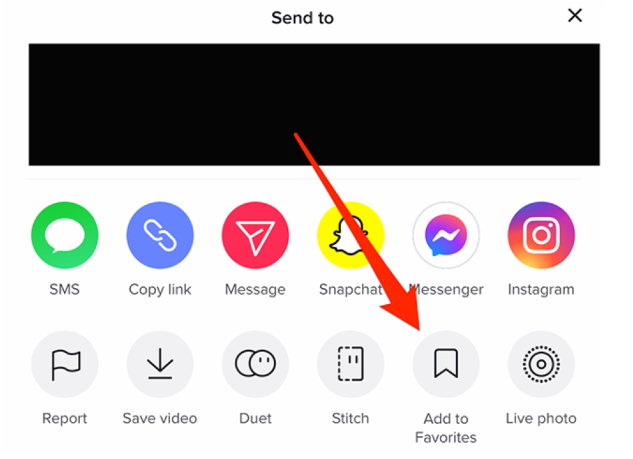
- Saving to Your Device: If the creator allows downloads, you can simply tap the “Share” icon on the right side of the screen and select “Save video.” The clip will be downloaded to your device’s gallery or camera roll.
- Adding to Favorites: If you’re short on storage or want to keep a video within TikTok for easy access, you can add it to your “Favorites.” Tap the bookmark icon on the right, and it will be saved to your profile under the “Favorites” section.
However, not all creators enable the download option. In such cases, you’ll need to explore alternative methods.
2. Third-Party Tools for Downloading TikTok Videos
When TikTok’s built-in features fall short, third-party tools come to the rescue. One of the most reliable options is SSSTik, a user-friendly website that allows you to download TikTok videos without watermarks.
- How to Use SSSTik:
- Find the TikTok video you want to download and copy its link by tapping on the “Share” icon and selecting “Copy Link.”
- Visit the SSSTik website and paste the link into the provided field.
- Click the “Download” button, and within moments, your video will be ready to save in high quality, minus the watermark.
Using SSSTik ensures you have a clean version of the video, which is perfect for sharing on other platforms or keeping for personal use.
3. Screen Recording as a Last Resort
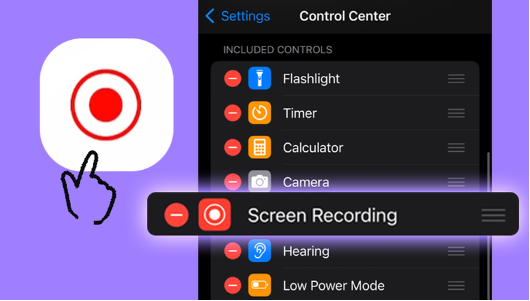
Sometimes, you might encounter videos where the download option is disabled, and third-party tools don’t seem to work. In such cases, screen recording can be a viable option. Both iOS and Android devices come with built-in screen recording features:
- iOS: Swipe down from the top-right corner (on iPhone X and later) or up from the bottom edge (on older models) to access the Control Center. Tap the screen recording icon to start recording.
- Android: Swipe down from the top of the screen to access Quick Settings and look for the screen recording option.
While screen recording is straightforward, remember that it might capture additional elements like notifications, so it’s best to enable Do Not Disturb mode before you start.
4. Using TikTok for Desktop
If you’re someone who enjoys browsing TikTok on your computer, there are options to download videos directly from the desktop version. Similar to mobile apps, third-party websites like SSSTik work seamlessly on desktops, allowing you to download videos in just a few clicks.
- Desktop Download Steps:
- Open TikTok on your desktop and navigate to the video you want to download.
- Copy the video link from the browser’s address bar.
- Visit SSSTik and paste the link, just as you would on your mobile device.
- Download the video in your preferred format and quality.
This method is particularly useful if you’re curating a collection of TikTok clips on your computer.
5. Consideration for Creators
Before you download and share TikTok videos, it’s important to consider the creators’ rights. While TikTok encourages the sharing of content, always give credit to the original creators when posting their videos elsewhere. If possible, reach out for permission, especially if you plan to use the content commercially or for promotional purposes.
6. Organizing Your Saved TikToks
Once you’ve downloaded your favorite TikTok clips, keeping them organized can save you time in the future. Here are a few tips:
- Create Folders: On your device, create folders to categorize the videos, such as “Funny,” “Inspirational,” or “Dance.”
- Use Cloud Storage: To avoid cluttering your phone’s storage, consider uploading the videos to cloud services like Google Drive or Dropbox.
- Backup Regularly: To ensure you don’t lose your collection, make regular backups of your saved videos.
Conclusion
Saving your favorite TikTok videos is easier than ever, thanks to the variety of tools and methods available. Whether you use TikTok’s built-in features, third-party services like SSSTik, or screen recording, you’ll never have to worry about losing that hilarious or heartwarming clip again. Just remember to respect creators’ rights and keep your saved videos organized, so you can enjoy them anytime, anywhere.
By following these tips and tricks, you can curate a personal collection of TikTok videos that brings joy, inspiration, and a little bit of fun to your day.
