

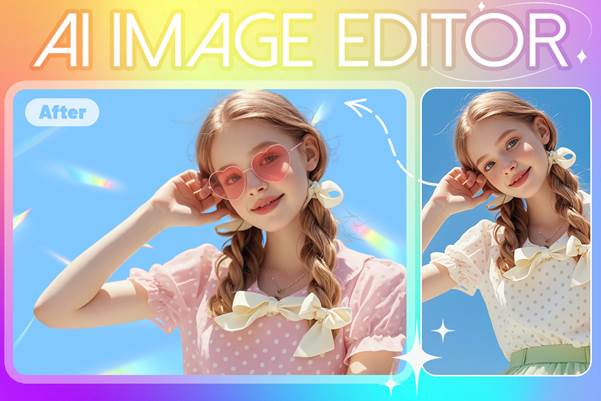
Live3D Image Editing And Design Tools
An AI Image Editor integrates artificial intelligence with advanced image manipulation tools to automate complex editing tasks. Instead of spending hours performing repetitive adjustments, designers can rely on intelligent algorithms to remove backgrounds, enhance images, generate visual variations, and refine details instantly. These capabilities dramatically accelerate workflows while allowing artists to focus more on creativity and storytelling.
Built for tabletop RPG character creation, SVGMaker’s AI Fantasy Character Generator turns text or reference images into editable D&D-style character turnaround sheets in 12 fantasy art styles.
Today, tools such as AI Image Editor are pushing this transformation even further by combining automation, smart image generation, and intuitive editing features into a unified platform. As a result, designers—from beginners to professionals—are discovering new ways to improve productivity, experiment with ideas, and deliver visually compelling work faster than ever before.
The Advantages of AI Image Editors in Modern Design Workflows
The rapid adoption of AI-powered design tools is not just a trend—it reflects a real need for efficiency, scalability, and creative flexibility in modern visual production. AI-driven image editing offers several advantages that directly address the challenges faced by designers today.
Faster Editing Through Intelligent Automation
Traditional image editing often involves repetitive manual steps such as masking, object removal, color correction, and layer adjustments. An AI-powered image editor automates these tasks using machine learning algorithms trained on massive image datasets.
For example, AI can instantly detect objects, separate subjects from backgrounds, or intelligently adjust lighting conditions. What once required complex Photoshop techniques can now be completed in seconds. This drastically reduces production time while maintaining professional quality.
For designers working with large volumes of visual assets—such as social media teams or e-commerce managers—this automation significantly improves productivity.
Enhanced Creative Experimentation
Another major advantage of AI editing tools is their ability to support rapid creative exploration. Designers can generate multiple variations of an image, test different styles, or modify compositions without starting from scratch.
AI-powered features such as style transfer, automatic color grading, and AI-generated enhancements allow creators to experiment more freely. Instead of being limited by time-consuming technical adjustments, designers can focus on refining their artistic vision.
This flexibility encourages innovation and allows creative teams to produce more diverse visual content.
Accessibility for Non-Professional Designers
Not every project has access to a dedicated design team. Many marketers, content creators, and small business owners need to produce professional visuals without advanced editing skills.
AI image editing tools simplify complex workflows through intuitive interfaces and automated features. Users can perform sophisticated edits with minimal technical knowledge. Tasks like removing image backgrounds, enhancing portraits, or adjusting lighting become accessible with just a few clicks.
As a result, AI editing technology democratizes design, allowing more people to create high-quality visuals.
Key Use Cases for AI Image Editing in Modern Content Creation
AI-powered image editing tools are being used across many industries and creative fields. From marketing teams to independent artists, the ability to quickly refine and transform images has become essential.
Below are several common scenarios where AI editing technology—and specifically Live3D AI Image Editor—can significantly improve workflow efficiency.

Multiple Advanced AI Image Editing Models
Social Media Content Creation
Social media platforms require a constant stream of engaging visual content. Creators must produce eye-catching images optimized for various formats and audiences.
Using Live3D AI Image Editor, designers can quickly enhance photos, remove distractions, adjust color tones, and prepare polished visuals for Instagram, TikTok, and other platforms. AI-powered tools help streamline repetitive editing tasks, allowing creators to focus on storytelling and branding.
E-Commerce Product Image Optimization
High-quality product images are essential for online stores. However, preparing product photos often involves background removal, color adjustments, and consistency improvements across large image libraries.
AI image editing tools can automatically isolate products, clean up backgrounds, and enhance lighting. Live3D AI Image Editor enables e-commerce teams to process product photos efficiently while maintaining a consistent visual style.
This automation helps businesses launch product catalogs faster and improve visual presentation across marketplaces.
Marketing Campaign Visual Production
Marketing campaigns often require multiple visual variations for ads, banners, landing pages, and promotional materials. Creating these assets manually can be time-consuming.
With AI-powered editing features, designers can quickly generate alternative versions of an image, experiment with different visual effects, and adapt designs for different marketing channels. Live3D AI Image Editor simplifies these processes through intelligent editing tools and streamlined workflows.
Content Creation for Streamers and Digital Creators
Digital creators—including streamers, YouTubers, and virtual content creators—frequently need custom thumbnails, profile images, and promotional graphics.
AI editing tools allow creators to enhance their visuals quickly, generate unique artistic styles, and prepare high-impact graphics for their channels. Live3D AI Image Editor supports this creative process by providing intuitive editing tools that simplify image refinement and styling.
Game and Character Art Development
Game developers and character artists often experiment with visual concepts before finalizing designs. AI-assisted editing tools allow creators to iterate quickly by modifying textures, lighting, and character elements.
Live3D AI Image Editor helps artists refine character visuals, test stylistic adjustments, and generate variations during early concept development. This speeds up the design process while preserving creative flexibility.
Rapid Prototyping for Creative Teams
Design teams frequently need to present visual concepts to stakeholders during brainstorming sessions or early project stages. Rapid prototyping allows teams to visualize ideas quickly.
AI editing tools make it easier to produce rough concepts, adjust imagery in real time, and present visual options during collaborative discussions. Live3D AI Image Editor enables teams to experiment with design ideas without investing excessive time in manual editing.
Key Features of Live3D AI Image Editor
While many AI design tools are emerging in the market, Live3D AI Image Editor stands out by combining powerful AI technology with a user-friendly editing experience. Its features are designed to support both efficiency and creative flexibility.
Intelligent Image Enhancement
Live3D AI Image Editor uses advanced algorithms to automatically enhance images by improving color balance, lighting, and sharpness. These adjustments help images appear more vibrant and professional without requiring manual editing expertise.
This feature is particularly useful when working with raw images that require quick visual refinement.
AI-Powered Object and Background Editing
One of the most time-consuming aspects of traditional design workflows is precise object selection and background removal. Live3D AI Image Editor simplifies this process with AI-driven detection and masking tools.
Users can remove or replace backgrounds, isolate subjects, and adjust compositions quickly. The AI system identifies image elements automatically, significantly reducing manual work.
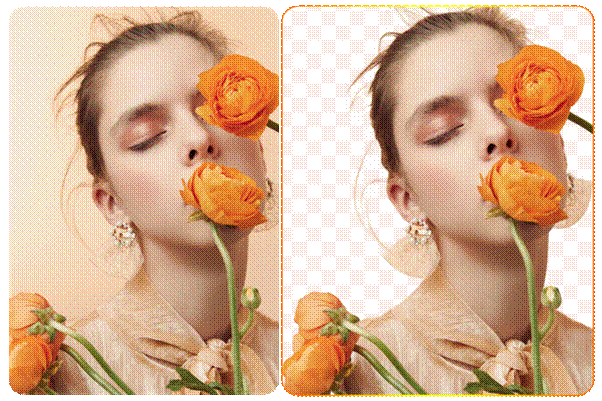
Live3D Image Editing Change Background
Smart Style Transformation
Creative professionals often need to adapt images to match different visual styles or branding guidelines. Live3D AI Image Editor includes style transformation features that allow users to modify artistic styles with minimal effort.
Whether experimenting with color schemes or exploring new visual aesthetics, designers can generate alternative versions of an image quickly.
Intuitive Workflow Integration
Beyond its individual editing tools, Live3D AI Image Editor is designed to fit naturally into modern digital design workflows. Its streamlined interface and automation features allow users to move seamlessly from image import to final export.
This integration reduces friction during the editing process and helps creative teams maintain a faster production cycle.
Conclusion: AI Image Editing Is Reshaping Creative Workflows
Artificial intelligence is fundamentally transforming how visual content is created and refined. By automating repetitive editing tasks, enabling faster experimentation, and making professional design tools more accessible, AI-powered image editing solutions are redefining modern creative workflows.
Tools like AI Image Editor demonstrate how artificial intelligence can support both efficiency and creativity. Designers can complete complex edits faster while still maintaining full artistic control over their projects. At the same time, marketers, creators, and businesses can produce professional-quality visuals without requiring extensive technical expertise.
As demand for digital content continues to grow, AI-assisted design tools will likely become an essential part of every creative workflow. Those who embrace these technologies today will be better positioned to innovate, experiment, and deliver compelling visual experiences in the future.
Blog URL Slug:
live3d-ai-image-editor-transforming-graphic-design-workflows
SEO Description:
Discover how Live3D AI Image Editor streamlines modern graphic design workflows with automation, smart editing, and faster creative production.
