

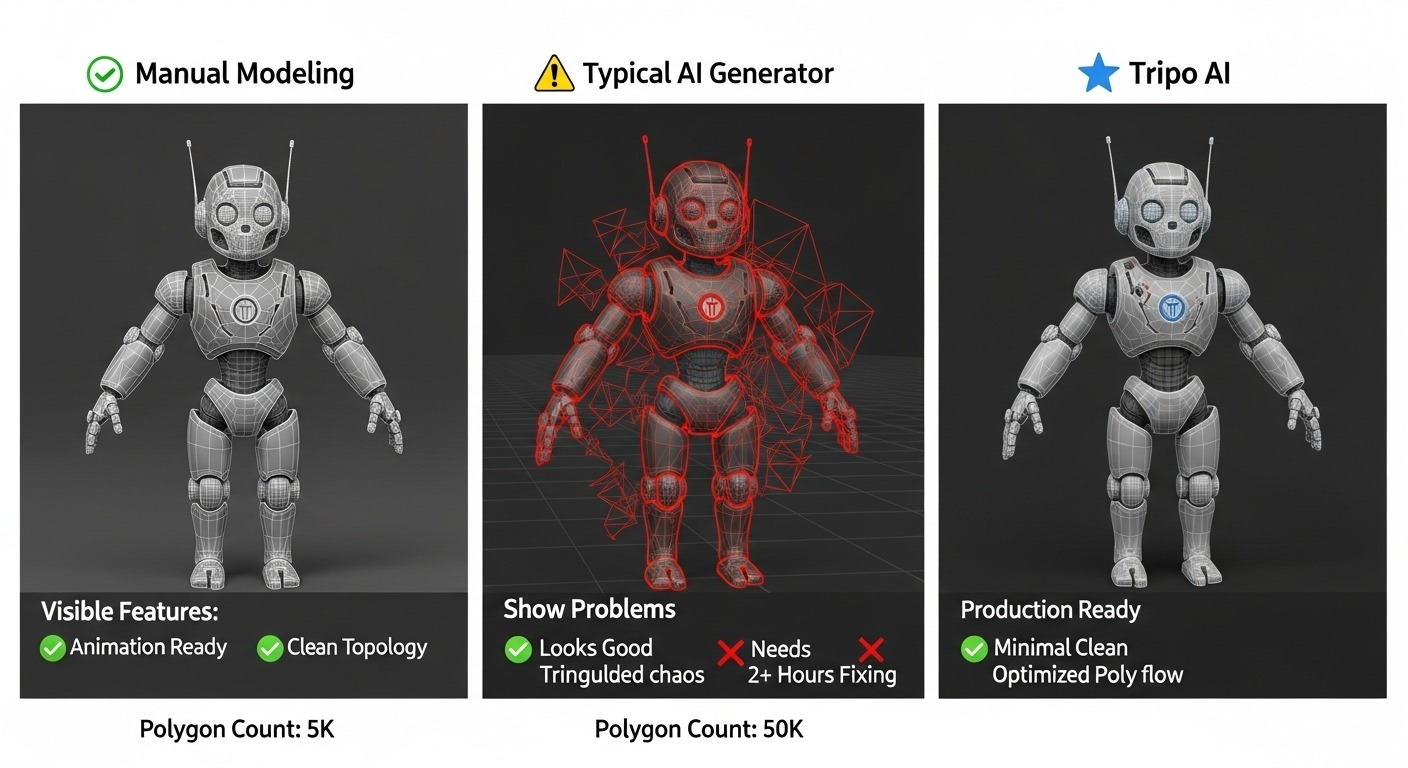
The phrase “production-ready” appears in nearly every product page in the generative 3D category. For a studio integrating these tools into an actual pipeline, the term is close to meaningless on its own. Production-ready for a hobbyist printing a figurine, production-ready for a Roblox creator, and production-ready for a AAA environment artist are three entirely different bars. The interesting technical conversation is what those bars actually require, and which AI 3D platforms cross which bars in a given week.
The marketing word that means everything and nothing
Strip the marketing layer and “production-ready” reduces to a small set of verifiable characteristics. The mesh has to be watertight. The polygon count has to land in a usable range for the target engine. The topology has to be either clean enough to use directly or clean enough to retopologize without rebuilding from scratch. The UVs have to be coherent. The materials have to either be PBR-correct or replaceable without a fight. And the export has to come out of the tool in a format the receiving software actually accepts.
That’s the floor. Almost no AI 3D output, two years ago, met all of those conditions consistently. A larger share does today, but the variance between platforms remains significant enough that technical artists evaluating tools should test each criterion separately rather than trust a generic claim.
Topology is where the claim lives or dies
Topology — the arrangement of polygons across a mesh’s surface — is the single most diagnostic indicator of whether AI 3D output will actually ship. A model can look correct in a screenshot and still have geometry so chaotic that retopologizing it manually takes longer than rebuilding from scratch. The signs to look for are pole density, triangle distribution across curved surfaces, and whether edge loops align with deformation zones for animated assets.
Better platforms now offer smart retopology as part of their generation pipeline, producing meshes with quad-dominant topology and reasonable polygon distribution. That output won’t always survive a senior character artist’s review on a hero asset, but for set dressing, props, and secondary models it frequently does. Tools like 3D AI Studio, which offer dedicated retopology along with mesh repair and PBR texturing in a single pass, are part of why the technical conversation has shifted in the last year. The output is genuinely usable for a meaningful slice of pipeline needs without manual rework.
UVs, materials, and the export chain
Topology is necessary but not sufficient. A clean mesh with broken UVs is unusable. A clean mesh with PBR materials baked into the wrong channels is unusable. The technical artists evaluating these tools tend to focus first on whether UVs are unwrapped without overlapping islands, whether texel density is reasonably uniform, and whether the resulting material set imports correctly into the target renderer.
Material output has converged toward standard PBR — base color, metallic, roughness, normal, ambient occlusion — which makes integration into Unity, Unreal, Blender’s Cycles or Eevee, and most third-party renderers tractable. The remaining surprise points are usually packing conventions (which channel holds which map) and whether normal maps are stored in DirectX or OpenGL convention. Those are easy to correct in a converter, but they need to be checked.
The export chain matters as much as the generation. FBX is standard for Unity and most engines; GLB for web and Three.js; OBJ for Blender import; STL and 3MF for printing; USDZ for Apple’s AR pipeline; DAE for legacy workflows. A tool that doesn’t export to the format your engine expects is not part of your pipeline regardless of how good the mesh is.
Where the human pass still belongs
Even with the floor met, the human pass hasn’t disappeared from production pipelines. It has narrowed and shifted. Hero assets — characters, story-critical props, signature weapons — are still hand-modeled or hand-finished after AI generation. Animation rigs still require skilled riggers. Specific stylistic targets — a particular studio’s recognizable visual language — typically can’t be reached purely by prompt.
What has changed is the share of assets where the human pass is purely additive rather than corrective. Two years ago, a technical artist receiving an AI-generated model spent more time fixing it than improving it. The current state, for the better tools, is that the model arrives in a state where the artist’s time can be spent on the next 5 percent of polish rather than the first 50 percent of repair.
A useful checklist for technical artists
For a studio evaluating AI 3D platforms in 2026, the practical checklist looks something like this:
- Generate ten varied prompts and visually inspect topology before reading any marketing copy
- Inspect UVs in a standard tool, not a marketing render
- Verify PBR channel packing matches your renderer
- Test the export round-trip into your target engine, not just into Blender
- Time the full asset-to-engine pipeline, including any retopology pass
- Run a hero-asset and a prop-tier asset through the same tool and compare which one is shippable
The platforms worth keeping in a pipeline are the ones that pass that checklist for the asset categories you actually need to produce. Production-ready, in technical terms, is a result you measure — not a label you accept.
