

Most brands start using AI product photography the same way: someone generates a handful of images for one product, likes the results, and moves on. That works fine as a first experiment. It falls apart the moment a business tries to scale it, because generating images one at a time, with no consistent process behind it, produces exactly the kind of inconsistent, disconnected catalog that undermines the whole point of using AI in the first place.
The businesses that actually get long-term value out of AI product photography treat it as a repeatable workflow, not a one-off task. That distinction, workflow versus experiment, is what separates a brand that occasionally generates a nice image from one that reliably produces consistent, on-brand visuals across an entire catalog, month after month.
What a Real Workflow Actually Looks Like
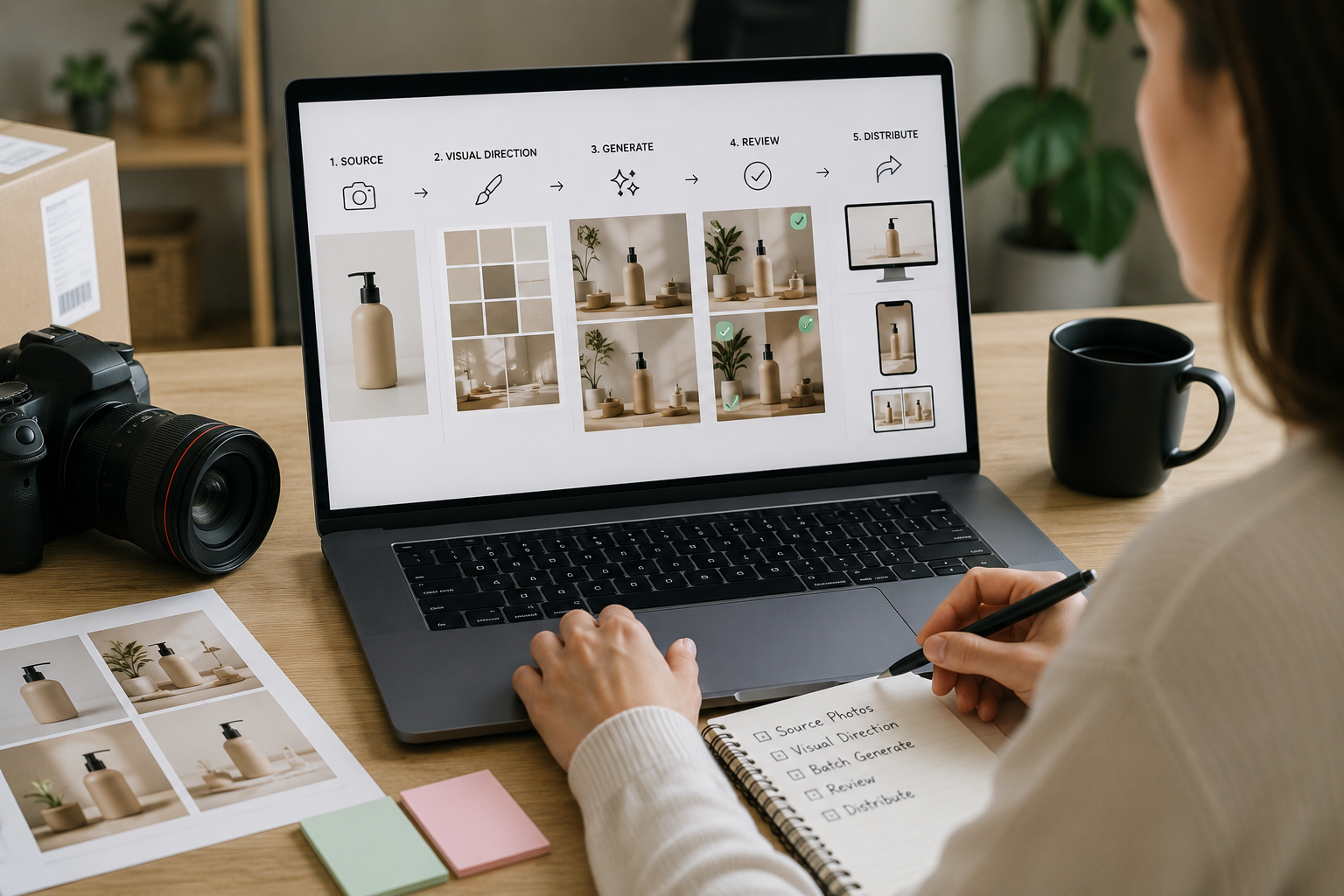
A genuine AI product photography workflow has a handful of consistent stages, regardless of which platform runs it.
A real source photo comes first. Every workflow starts with an accurate, well-lit photo of the actual product, AI expands on that image, it doesn’t invent a product from nothing.
A defined visual direction gets applied consistently. Rather than deciding scene-by-scene, a workflow establishes a repeatable style, studio, lifestyle, seasonal, so an entire catalog feels like one cohesive set rather than a pile of disconnected experiments.
Generation happens in batches, not one image at a time. This is where a real workflow starts to save meaningful time, producing variations across many products in a single pass rather than repeating the same manual steps for every SKU.
Every result gets reviewed before publishing. Product accuracy, color, logo placement, and proportions all need a human check, a workflow builds this in as a standard step, not an afterthought someone remembers only when something goes wrong.
The output gets reused across channels. A studio shot, a lifestyle variant, and a social-ready crop all come from the same underlying source and workflow, rather than being separately produced for each destination.
This is precisely the kind of structure platforms are increasingly being built around. Limli’s own workflows are designed around this exact idea, taking a product from a single source image through generation, review, and multi-channel output as one connected process, rather than a series of disconnected manual steps.
Why Workflow Matters More Than Any Single Generation
A single impressive AI-generated image doesn’t actually solve the problem most e-commerce brands have. The real challenge is producing dozens or hundreds of consistent, usable images, month after month, as new products launch and campaigns change. That’s a systems problem, not a one-time creative task, and it’s why the businesses getting the most value out of AI photography are the ones who built a repeatable process early rather than treating every new product as its own improvised project.
This is also where a lot of the value most conversations about AI photography miss actually shows up. It’s not really about how impressive one generated image looks. It’s about whether your team can reliably produce a full, consistent set of visuals for every new product without reinventing the process each time.
Choosing the Right Foundation for Your Workflow
Not every platform is actually built to support a workflow the way a business needs it to. Some tools are genuinely good at producing a single impressive image but offer very little structure for managing a growing catalog, maintaining consistency across hundreds of products, or integrating with the platforms a store already runs on.
Before committing to a tool, it’s worth understanding what actually separates a usable platform from an impressive demo, covered in detail in our guide to the best AI tools for product photography in 2026. The short version: look past the sample images and evaluate how well a platform actually supports batch generation, consistency across a full set, and integration with your existing catalog, not just how good its best individual output looks in isolation.
Budgeting for a Workflow, Not Just a Generation
A workflow also changes how you should think about cost. Evaluating a single image’s price tells you very little about what a full, ongoing production process will actually cost your business. Our breakdown of what actually determines AI product photography cost covers this in depth, but the short version is that the real number worth tracking is your effective cost per usable image across your entire workflow, not the advertised price per generation. A workflow that produces a high rate of usable output at a slightly higher subscription cost often beats a cheaper tool that requires far more regeneration and manual correction to get the same result.
Where Traditional Photography Still Fits Into the Workflow

A mature AI workflow doesn’t necessarily exclude a camera entirely. Most brands still rely on a traditional photograph as the accurate source image a workflow builds from, and some categories, fine jewelry, luxury materials, premium brand campaigns, still benefit from a professional shoot for their most important hero images specifically. Our full comparison of AI versus traditional product photography goes into where each approach genuinely earns its place, but the workflow-level takeaway is simple: a well-designed process doesn’t force an all-or-nothing choice, it defines clearly which images come from a camera and which get generated and expanded from there.
Turning This Into an Actual System
Building a real workflow, rather than repeating ad-hoc generations, usually comes down to a few decisions made once and then followed consistently: which source photos qualify as workflow-ready, what visual direction applies across the catalog, how batches get reviewed before publishing, and how output gets distributed across product pages, social, and ad channels without a separate manual step for each one.
This is the gap a dedicated platform is meant to close. Rather than treating every new product as its own improvised project, Limli is built around exactly this kind of end-to-end workflow, from a single source photo to a full, consistent library of visuals ready across every channel a brand actually uses.
Frequently Asked Questions
What’s the difference between using an AI tool and having an AI product photography workflow?
A tool produces individual images. A workflow is the repeatable process around it, source photos, visual direction, batch generation, review, and distribution, that makes producing consistent images at scale actually manageable.
Do I need a different workflow for every product category?
Not necessarily a different workflow, but complex or highly detailed products may need extra review steps or, in some cases, a traditional source photo taken with more care than a standard product shot.
How do I know if my current process counts as a real workflow?
If producing images for a new product still requires figuring out the process from scratch each time, it’s still ad-hoc. A real workflow means the steps are already defined before the next product even launches.
Is it worth building a workflow for a small catalog?
Often yes, even a small catalog benefits from consistency, and a defined process now makes scaling up considerably easier later than retrofitting one after the catalog has already grown.
The Bottom Line
The businesses getting real, lasting value from AI product photography aren’t the ones chasing the single best-looking generated image. They’re the ones who built a repeatable process around sourcing, generating, reviewing, and distributing visuals consistently, then let that process scale with their catalog instead of starting from scratch with every new product.
