

Internet television has moved far beyond simply replacing a traditional cable box.
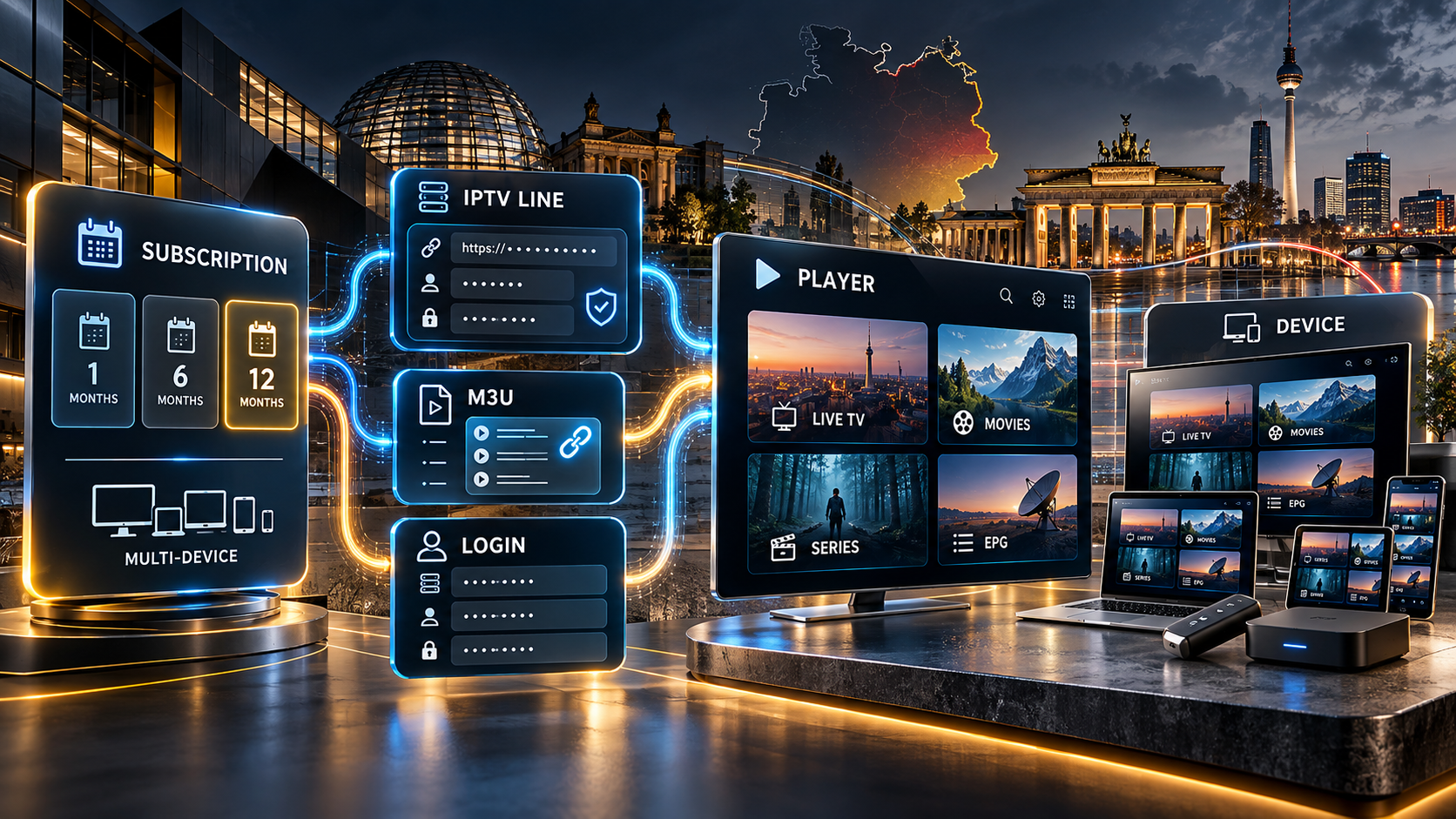
In 2026, people researching IPTV in Germany encounter an entire vocabulary of subscriptions, apps, IPTV Lines, M3U URLs, login credentials, Smart TV players and multi-device packages.
The difficult part is often not understanding IPTV itself. It is understanding what exactly is being purchased.
Is the buyer paying for a television service, an application, a playlist, access credentials or simply a media player?
Those things are related, but they are not interchangeable.
Understanding the difference before purchasing can prevent compatibility problems, unnecessary app purchases and situations where a subscription works on one device but not in the way the user expected.
This guide explains the most important things German consumers should understand before choosing an IPTV setup.
What Does IPTV Actually Mean?
IPTV stands for Internet Protocol Television.
Instead of receiving television primarily through terrestrial broadcasting, satellite or conventional cable infrastructure, television data is delivered through an internet connection.
Deutsche Telekom describes IPTV in essentially the same way: television is transmitted through an internet connection rather than a satellite, antenna or cable connection.
That technical definition sounds simple, but a modern IPTV setup can contain several separate components:
- the television service;
- the subscription;
- the login credentials;
- the IPTV application;
- the viewing device;
- the internet connection;
- and sometimes an electronic programme guide or playlist.
A consumer researching where to IPTV kaufen in Deutschland should therefore begin by deciding how and where the service will actually be used.
That is often more important than simply comparing headline channel counts.
IPTV Subscription and IPTV Player Are Not the Same Thing
One of the biggest sources of confusion comes from phrases such as “Smart IPTV.”
Someone may search for:
- Smart IPTV kaufen;
- Smart IPTV App;
- IPTV Abo;
- Smart IPTV Anbieter;
- IPTV Playlist;
- or IPTV Zugang.
These searches do not necessarily describe the same product.
An IPTV player is software.
The subscription or access credentials are what the user loads into that software.
A useful comparison is a web browser.
Installing a browser gives you an interface for opening websites, but the browser itself does not provide the websites.
In the same way, many IPTV players provide an interface for loading compatible account information but do not automatically provide a television subscription.
This distinction matters because somebody who purchases or activates an application may still need separate television access.
Conversely, somebody who already has subscription credentials needs to make sure the chosen application supports the supplied login method.
What Is an IPTV Line?
The term IPTV Line appears frequently when people research internet television subscriptions.
In practical terms, an IPTV Line usually refers to the access configuration associated with a subscription.
Rather than thinking of the Line as another application, it is more useful to think of it as the connection between the subscription and a compatible player.
Depending on the service and application, access information may be supplied through:
- an M3U URL;
- a server address;
- username and password;
- portal credentials;
- or another compatible authentication format.
The important point is that the Line and the player perform different jobs.
The player displays and organizes the available information.
The Line supplies the credentials that allow the player to connect to the subscription.
Anyone planning to IPTV Line kaufen should therefore check the supported login format before choosing a subscription.
A technically good subscription is not particularly useful if the customer’s preferred application cannot accept the credentials supplied with it.
What Is an M3U Playlist?
M3U is one of the most recognizable playlist formats associated with IPTV.
From a user’s perspective, an M3U configuration is usually straightforward.
The user receives a URL and enters it into a compatible player.
The software reads the information contained or referenced by that playlist and organizes the available entries inside the interface.
A typical setup may look like this:
- Receive the M3U URL.
- Open a compatible IPTV player.
- Select the playlist or M3U option.
- Enter the supplied URL.
- Allow the application to load the information.
This explains why searches such as IPTV M3U kaufen, M3U Liste, IPTV Playlist kaufen and IPTV Line kaufen often overlap.
Technically, however, an M3U URL is the playlist mechanism.
It is not the television player itself.
That distinction is important because two subscriptions can use different authentication methods while ultimately giving the viewer a very similar interface.
M3U vs. Xtream-Style Login Credentials
Another common configuration uses separate login credentials instead of one long playlist address.
This is often described as an Xtream-style login.
A configuration usually includes three main pieces of information.
Server Address
This tells the application where the service is located.
Username
This identifies the user account.
Password
This authenticates the account.
A compatible application then uses those details to retrieve the information connected to the subscription.
From a consumer’s perspective, neither M3U nor an account-style login is automatically superior.
The more useful question is:
Which method does my preferred player support?
M3U can be convenient for players designed around playlists.
A username-and-password interface may be easier for applications with a dedicated account login screen.
The login format itself also does not determine streaming quality.
Network conditions, source quality, device performance, Wi-Fi stability and infrastructure can all influence playback.
Buying IPTV for One Year: Is a Longer Subscription Better?
Subscription duration is another major consideration.
Consumers frequently encounter packages covering:
- one month;
- three months;
- six months;
- twelve months;
- and sometimes longer periods.
Longer subscriptions often reduce the effective monthly cost.
However, price should not be the only factor considered.
Before purchasing a 12-month IPTV subscription, check:
- whether the service supports the intended device;
- how many simultaneous connections are included;
- which login format is provided;
- whether setup support is available;
- whether additional devices require another connection;
- and when the subscription period begins.
The last point can be particularly important.
If an additional device or account is created later, it may have its own activation and expiration period rather than sharing the original subscription dates.
For households using several screens, connection limits may ultimately matter more than whether the package lasts six months or twelve.
One Device Is Not Necessarily the Same as One Connection
Another common misunderstanding concerns devices and simultaneous connections.
A service may technically work on several device types while the subscription itself permits only one active connection.
Consider a household with:
- a Smart TV in the living room;
- another television in a bedroom;
- a smartphone;
- and a tablet.
The same type of application may be available on several of those devices.
That does not automatically mean all of them can stream simultaneously.
If only one active connection is included, attempting to watch on two devices at the same time may create problems.
Households with several viewers should therefore ask:
How many devices need to stream at the same time?
That question is more useful than simply asking whether IPTV “works on multiple devices.”
Which Devices Can IPTV Work On?
Internet television is no longer limited to a dedicated receiver.
Depending on the service and player, common platforms include:
- Smart TVs;
- Android TV;
- Google TV;
- Amazon Fire TV devices;
- Android boxes;
- smartphones;
- tablets;
- Windows computers;
- macOS computers;
- and dedicated streaming receivers.
Mainstream German internet-TV platforms demonstrate the same multi-device trend.
Telekom, for example, supports internet television across Smart TVs, streaming sticks, smartphones, tablets, laptops and computers. Telekom
The key point is that compatibility should still be checked at the application level.
A television being connected to the internet does not automatically mean every IPTV application is available on its operating system.
Samsung, LG, Android TV, Google TV, Fire TV and Apple-based systems all have different software ecosystems.
Choose the Player Before the Subscription
Many buyers do this in the opposite order.
They purchase access first and only afterwards start searching for an application.
A more reliable process is:
Step 1: Identify the Device
For example:
- Samsung Smart TV;
- LG Smart TV;
- Android TV;
- Fire TV Stick;
- smartphone;
- or computer.
Step 2: Choose a Compatible Player
Confirm that the application is actually available for that platform.
Step 3: Check Which Login Methods It Supports
Does the application accept:
- M3U URLs?
- server, username and password?
- portal credentials?
- another method?
Step 4: Choose Compatible IPTV Access
The subscription should supply information in a format accepted by the chosen player.
Following this order can eliminate many avoidable installation problems.
Smart IPTV App vs. IPTV Subscription
The phrase Smart IPTV kaufen deserves particular attention because it can describe two different intentions.
One user may be looking for the Smart IPTV application itself.
Another may simply mean:
I have a Smart TV and want an IPTV subscription that works on it.
Those are different purchases.
The application is the player.
The subscription supplies the access.
A useful checklist is therefore:
Do I already have an IPTV player?
If yes, find out which credential formats it accepts.
Do I already have IPTV access?
If yes, find a player compatible with those credentials.
Do I have neither?
Choose the player and access method together rather than independently.
Understanding this distinction is particularly useful for people moving from traditional cable or satellite television to internet-based viewing.
Internet Speed Matters, but Stability Matters Too
People often ask for one specific minimum internet speed for IPTV.
In practice, there is no single figure that describes every resolution, codec, bitrate and streaming service.
A high-bitrate UHD stream naturally requires more bandwidth than a standard-definition stream.
But raw connection speed is only part of the equation.
Streaming performance can also be influenced by:
- Wi-Fi interference;
- distance from the router;
- other people using the connection;
- background downloads;
- device performance;
- network congestion;
- and unstable wireless connections.
Where practical, Ethernet can remove one of those variables.
For wireless setups, good signal strength can be just as important as the maximum speed advertised by the internet provider.
Before assuming the subscription is responsible for buffering, it can therefore be useful to test the same device using another network connection.
What Should Buyers Compare Before Choosing a Service?
A useful IPTV comparison should go beyond the number of channels displayed on a sales page.
Consider at least the following factors.
1. Device Compatibility
Can the service be used with the television, streaming stick or player you already own?
2. Authentication Method
Will you receive:
- an M3U URL;
- username and password;
- a server address;
- portal credentials;
- or another configuration?
3. Number of Connections
How many streams can operate simultaneously?
4. Subscription Duration
Is the package monthly, six months, twelve months or longer?
5. Renewal Process
Does renewal extend the existing account, or will new credentials be created?
6. Setup Support
Is help available if the user cannot configure the application?
7. Player Costs
Some IPTV applications are free.
Others may have a separate activation or premium fee.
That charge should not be confused with the price of the television subscription.
8. Installation Requirements
Check whether additional hardware, application activation or another setup step is required.
These practical factors usually tell a consumer more than one large marketing number.
Why IPTV Line, M3U and Subscription Searches Overlap
Search terminology can make the IPTV market appear more complicated than it really is.
A person searching for:
IPTV M3U kaufen
may simply want an IPTV subscription supplied through an M3U-compatible configuration.
Someone searching for:
IPTV Line kaufen
may have essentially the same goal but describe the product according to the access credentials.
Someone searching for:
Smart IPTV kaufen
may simply want television access compatible with a Smart TV player.
The underlying need can therefore be very similar despite the different search phrases.
It helps to separate the process into layers:
Subscription → credentials → player → device → internet connection
Once those layers are understood, most IPTV terminology becomes considerably easier to follow.
A Practical Buying Checklist
Before purchasing IPTV access, answer these questions:
- Which device will I use?
- Which player will I use?
- Does the player support M3U or account credentials?
- How many people will watch simultaneously?
- Do I need one connection or several?
- Do I want a short subscription or a one-year package?
- Does the player have a separate activation fee?
- Does the subscription support my intended device?
- Are setup instructions available?
- How does renewal work?
- Can another connection be added later?
If those questions have clear answers, the chance of buying an incompatible configuration becomes much lower.
A practical example of how subscription durations, devices, M3U/Xtream-style access and different package options can be organized can be seen on IPTVKaufen24.
That is also why looking beyond price alone can be useful when comparing IPTV services.
What About Smart TVs Without the Right App?
Owning a Smart TV does not guarantee that the preferred IPTV application will be available directly from the television’s app store.
This is especially relevant with older televisions.
If a preferred player cannot be installed directly, users may consider a separate streaming device such as:
- an Android TV box;
- Google TV device;
- Fire TV device;
- or another compatible media streamer.
This can extend the useful life of an older television because the external device handles the applications while the TV functions primarily as the display.
It also gives users more flexibility if they later change applications.
Should M3U Credentials Be Shared Between Devices?
Credentials should generally be treated as private account information.
An M3U link may contain information associated with the account directly inside the URL.
Likewise, username and password combinations should not be posted publicly.
Avoid publishing credentials in:
- screenshots;
- online forums;
- social media posts;
- public comments;
- or videos showing the complete login screen.
If technical assistance is needed, sensitive parts of the credentials should be hidden before screenshots are shared.
Final Thoughts
Buying IPTV becomes considerably easier once the terminology is separated into its individual components.
The subscription determines the service and access period.
The IPTV Line represents the information used to connect.
M3U and account-style credentials are different methods of supplying that information.
The IPTV player provides the viewing interface.
And the Smart TV, streaming stick, smartphone, tablet or computer is simply the device running that interface.
The biggest mistake is treating all of those components as though they were the same product.
Instead of starting with only:
“Which IPTV should I buy?”
it is more useful to ask:
Which device will I use?
Which player works on that device?
Which login method does the player support?
How many simultaneous connections do I need?
Which subscription duration fits how I plan to use it?
Answer those questions first, and comparing IPTV options becomes much simpler.
