

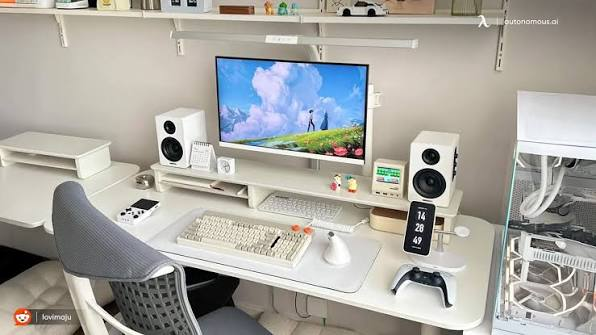
As of early 2026, flexible working arrangements remain a permanent feature of the Australian job market. With 36 percent of employed Australians continuing to utilise remote or hybrid models, professionals are investing heavily in their home and travel workstations. Interestingly, the average Australian remote worker saves around two hours a week and over $900 AUD annually on commuting costs alone. This provides professionals with the perfect opportunity to reinvest those savings into high-quality, reliable equipment. Building an optimal on-the-go workstation is no longer just about convenience. It is about maximising efficiency, securing your private data, and protecting your physical well-being.
The Foundation of Your Portable Setup
Choosing the right primary computer is the most critical decision for any digital nomad or hybrid worker. You need a device that is light enough to carry effortlessly on a flight, but large enough to handle complex spreadsheets and multitasking without causing eye strain. Hardware analysts widely classify a 14 inch laptop as the absolute sweet spot for remote professionals today. It provides the ideal middle ground between generous screen real estate and lightweight portability for travel. Upgrading to a capable, modern device ensures you have the processing power to run demanding applications seamlessly while maintaining enough battery life to work comfortably from a cafe or airport lounge without constantly hunting for a power outlet. Modern iterations of these computers often include advanced cooling systems and high-resolution displays, making them versatile enough for both intensive professional tasks and evening entertainment.
Ergonomic Accessories for Prolonged Work Sessions
Occupational Safety and Health Administration guidelines emphasise that a monitor’s top edge should sit at or just below eye level. Resting a computer flat on a desk forces a downward viewing angle, which can quickly contribute to neck and shoulder pain over extended work sessions. To maintain a neutral spine while working remotely, ergonomic experts highly recommend pairing your primary computer with a few essential, budget-friendly peripherals.
Here is the fundamental gear you need to protect your posture on the road:
- Portable Stand: A lightweight, foldable aluminium stand elevates your screen to eye level. This instantly corrects the hunching posture common among remote workers.
- External Keyboard: Since your screen is elevated on a stand, a slim Bluetooth keyboard becomes necessary to keep your arms resting comfortably at a 90-degree angle.
- Ergonomic Mouse: Swapping a trackpad for a contoured wireless mouse significantly reduces wrist strain during long hours of document navigation and editing.
Prioritising Cybersecurity on the Go
Taking your office on the road introduces unique digital vulnerabilities. Distributed employees working outside of traditional corporate perimeters are estimated to be three times more likely to fall victim to phishing attacks or accidentally expose sensitive company data. With nearly 80 percent of recent remote work breaches originating from unsecured endpoints, relying on temporary public Wi-Fi networks in hotels and cafes has become a critical vulnerability.
To combat these risks, cybersecurity professionals cite Multi-Factor Authentication and encrypted connections as non-negotiable layers of protection. Whether you are catching up on emails at a local coffee shop or filing reports from an overseas hotel lobby, exploring comprehensive guides on everyday browsing protection VPNs is an essential step to secure your digital footprint. Encrypting your traffic ensures that bad actors cannot intercept your sensitive client data over shared public networks.
Setting Boundaries for Better Well-being
An efficient, portable tech setup does more than just improve your daily output. It also plays a massive role in maintaining your mental health and preventing burnout. According to recent data from Forbes Advisor, an impressive 76% of remote workers say remote work improves work-life balance when proper digital boundaries are in place. However, this balance is only achievable if you establish clear limits between your professional and personal time.
Under Australia’s updated Fair Work Act, the newly enforceable Right to Disconnect laws legally empower employees to refuse work-related communications outside of their designated hours without fear of penalty. This legislative shift highlights the growing importance of separating workspaces from living spaces. Early data shows that setting strict digital boundaries can cut unpaid remote overtime by roughly a third. Research from Safe Work Australia notes that 33 percent of employees report mental health strain due to poor work-life balance. When you have a reliable, dedicated setup, you can complete your tasks efficiently and then physically close your computer to log off definitively. By investing in the right mix of portable hardware, ergonomic accessories, and robust security software, you empower yourself to work smarter and truly disconnect when the day is done.
