

Two photos can show the exact same subject and land completely differently depending on one thing: how that subject sits in the frame. A centered, straight-on shot reads as ordinary. The same subject shifted off-center, framed through a doorway, or shot from an unexpected angle suddenly reads as intentional. That shift from ordinary to intentional is composition, and it’s one of the areas where an AI image generator can genuinely think alongside a creator rather than just following orders. Dreamina, running on its newest model Seedream 5.0 Pro, handles compositional choices with more nuance than most tools manage.
Why composition changes everything about a photo
The subject rarely changes between a forgettable photo and a striking one. What changes is placement, framing, and the relationship between the subject and everything around it. A flower shot dead center against a plain wall says almost nothing. That same flower photographed low against the sky, with negative space pulling the eye upward, suddenly carries mood and intention. Composition is the part of a photo that a viewer feels before they can explain why.
Core techniques worth building into a prompt
A handful of composition principles show up again and again in photos that hold attention. Worth naming directly when writing a prompt:
- Rule of thirds, placing the subject off-center rather than dead middle
- Leading lines, using a path, railing, or shadow to guide the eye toward the subject
- Framing within a frame, like a doorway, window, or archway surrounding the main subject
Naming these outright in a prompt tends to produce a far more deliberate result than describing a subject alone.
Meet Dreamina’s Seedream 5.0 Pro
Seedream 5.0 Pro works well for composition-focused prompts because it reasons through spatial relationships before generating, rather than defaulting to a flat, centered arrangement. Point selection, lasso tools, and sketch guidance let you adjust framing or subject placement after the first pass, while layer separation makes it possible to shift background elements independently from the main subject. With 2K output holding detail even in shots with deep negative space, and built-in research keeping compositional choices grounded in real photographic technique rather than a generic default, it’s a model built to handle deliberate framing rather than just accurate subject rendering.
Building a deliberately composed shot from a prompt
This is where a bit of technical thinking pays off fast. Here’s how it plays out inside Dreamina.
Step 1: Write a text prompt and/or add reference image
Head to Dreamina and describe both the subject and the specific composition technique you want, off-center placement, a leading line, a natural frame within the shot. Upload a reference image if you have one that captures a similar framing idea.
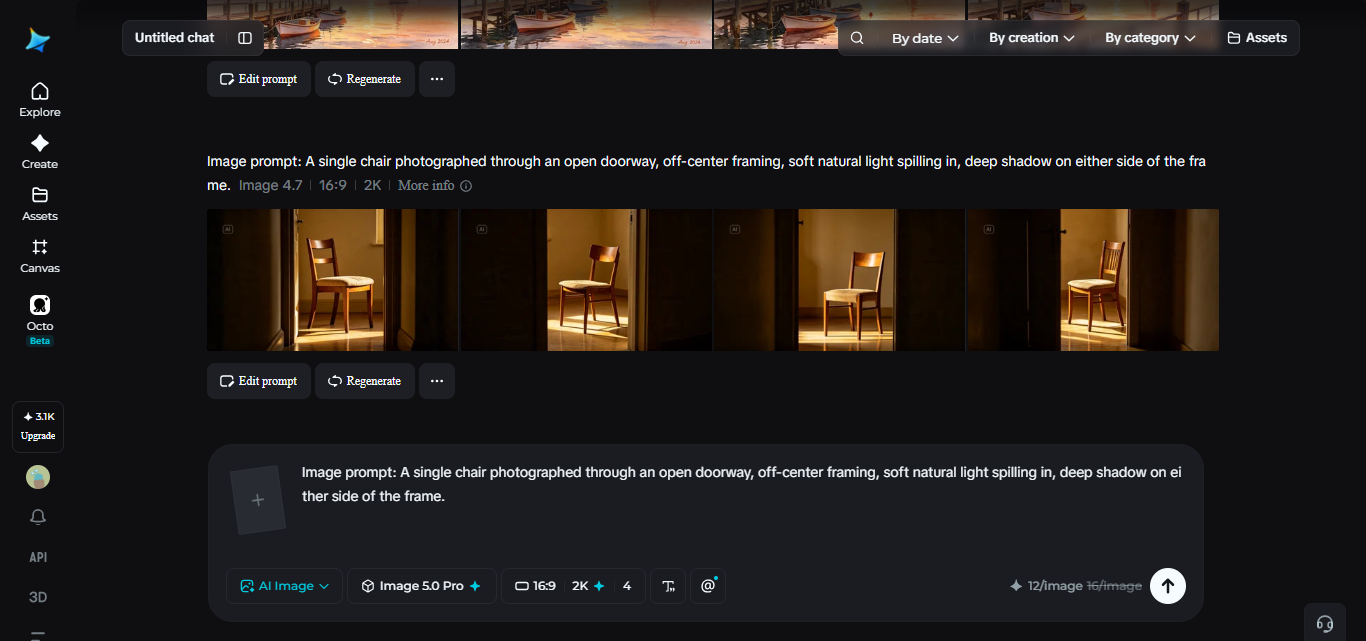
A sample prompt might read: “A wooden chair photographed through an open doorway, positioned in the left third of the frame, soft morning light spilling across the floor, deep shadow framing either side.”
Step 2: Adjust parameters and generate
Select Image 5.0 Pro by Seedream 5.0 Pro as your model. Set your aspect ratio and size to suit the composition, wider formats often support leading lines better than square crops. Choose resolution, 1K to check whether the framing reads correctly, 2K once the composition is locked in. Click Dreamina’s icon once it’s set, and let it generate.
Step 3: Customize and download
A composition rarely lands exactly right on the first attempt, since small shifts in placement can change how the whole frame feels. Use inpaint, expand, remove, and retouch to nudge a subject closer to where the eye should land, or adjust shadow and light to strengthen the framing. Once it feels balanced, hit “Download.”
Training your eye to spot strong composition before generating
A prompt reads more convincingly once the person writing it can actually recognize good composition on sight. A few habits build that instinct:
- Study photos you find striking and name the specific technique holding them together
- Practice describing negative space directly, not just the subject filling the frame
- Notice when a centered subject feels flat compared to one placed off to a side
This kind of visual literacy makes prompts sharper without needing any technical photography background.
Mistakes that flatten an otherwise strong composition
A handful of habits tend to undercut compositional work specifically. Centering every subject by default produces a series of technically fine but visually flat images. Ignoring negative space and filling every inch of the frame with detail leaves nothing for the eye to rest on. Describing only the subject, without ever mentioning framing or placement, leaves composition entirely up to chance rather than intention.
Where deliberate composition is worth the extra thought
This kind of compositional care tends to matter most in a specific set of situations. Editorial and portrait photography benefit heavily, since framing often carries as much emotional weight as the subject itself. Product photography follows a similar pattern, using composition to suggest premium quality rather than just documenting an item. Fine art and gallery-bound imagery gets real value here too, where a deliberate frame is often the whole point of the piece.
Wrapping up
A photo was never really about what’s in front of the lens alone, it’s about where that subject sits within the frame around it. With Dreamina and Seedream 5.0 Pro, that kind of deliberate framing becomes part of the prompt itself, giving even a simple subject the same intentional weight a trained photographer would bring to the shot.
