

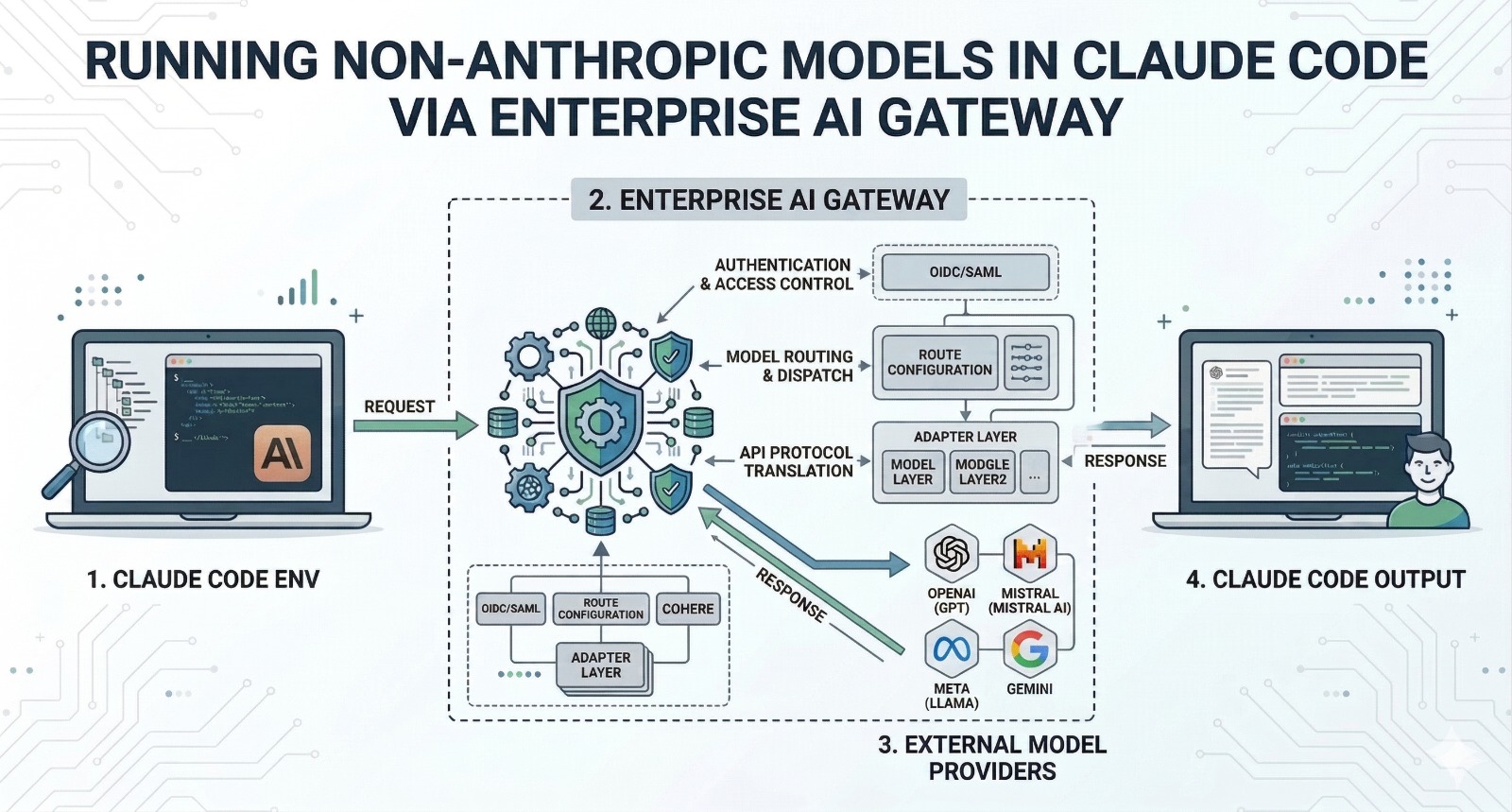
TL;DR: Claude Code is a highly capable agentic coding tool, but it is limited to Anthropic’s models by default. Bifrost, an open-source AI gateway built by Maxim AI, allows you to route Claude Code requests to any LLM provider including OpenAI, Google Gemini, Mistral, and others with just an environment variable change. No client-side changes. No custom proxy setup. You get production-ready multi-model access in under a minute.
The Claude Code Lock-In Problem
Claude Code has rapidly emerged as one of the most advanced agentic coding tools available. It brings Claude’s reasoning capabilities directly into the terminal, enabling developers to offload complex coding tasks, debug efficiently, and design systems straight from the command line.
The limitation is that Claude Code only supports Anthropic’s models by default.
For production engineering teams, this restriction introduces significant challenges. Different tasks often benefit from different models. You may want to route certain workflows through GPT-4o for its strengths, rely on Gemini for cost-efficient large-scale operations, or switch providers when Anthropic’s API encounters rate limits. Some teams must comply with infrastructure requirements that mandate platforms such as AWS Bedrock or Google Vertex AI. Others want the flexibility to evaluate multiple models without changing their tooling.
The core issue lies in protocol differences. Anthropic’s API format is not aligned with the OpenAI-compatible standard adopted by most providers.
How Bifrost Solves This
Bifrost is an open-source, high-performance AI gateway written in Go by Maxim AI. It acts as an intermediary between your application and various LLM providers, handling protocol translation seamlessly.
The integration operates at the transport layer. Claude Code sends requests formatted for Anthropic’s API, assuming it is communicating directly with Anthropic. Bifrost intercepts these requests, converts them into the target provider’s format, forwards them, and then translates the responses back into Anthropic’s structure before returning them. From the client’s perspective, nothing changes.
This approach allows Claude Code to work with GPT-4o, Gemini, Mistral, or any of the 1000+ models Bifrost supports without modifying the Claude Code binary or building custom proxy layers.
Setup in Under a Minute
You only need to configure two environment variables:
export ANTHROPIC_BASE_URL=”<http://localhost:8080/anthropic>”
export ANTHROPIC_API_KEY=”dummy-key”
ANTHROPIC_BASE_URL redirects API calls from Claude Code to Bifrost’s local endpoint. The /anthropic route ensures requests are handled using Bifrost’s Anthropic-compatible interface.
ANTHROPIC_API_KEY can be set to a placeholder since Bifrost manages authentication with upstream providers. If you are using an Anthropic MAX account, Bifrost supports session-based authentication, so this variable may not be required.
To start Bifrost:
npx -y @maximhq/bifrost
Once running, Bifrost provides a web UI at localhost:8080 where you can configure providers, add API credentials, and define routing rules. No YAML configuration or container setup is required for basic usage.
What You Unlock Beyond Model Switching
Using Bifrost with Claude Code enables more than just access to multiple models. It introduces several capabilities that are essential in production environments.
Automatic Failover. If a primary provider fails or returns errors, Bifrost can automatically reroute traffic to a fallback provider. This ensures continuity without manual intervention.
Observability. Every request is logged with token usage, latency, and success or failure status giving full visibility into both the request and response. The built-in observability dashboard provides real-time insight into how Claude Code consumes resources, helping teams manage costs effectively.
MCP Tool Injection. Model Context Protocol tools configured within Bifrost are automatically injected into requests. This allows Claude Code to use tools such as file systems, web search, databases, or custom MCP servers without requiring client-side setup.
Governance and Cost Control. Bifrost includes virtual keys with independent budgets, rate limiting, and access controls. These features help teams enforce usage policies and prevent unexpected cost overruns.
Semantic Caching. Frequently repeated or similar queries are served from Bifrost’s semantic cache, reducing both latency and cost without altering developer workflows.
Why an AI Gateway Matters for Coding Agents
As AI-powered coding tools become central to development workflows, the infrastructure layer supporting them becomes increasingly important. Running Claude Code directly against a single provider may work for individual experimentation, but it does not scale well for organizations that require reliability, cost tracking, and flexibility in model selection.
An AI gateway such as Bifrost separates the coding interface from the underlying provider. Developers can continue using Claude Code without disruption, while infrastructure teams gain centralized control over model usage, cost management, and failure handling.
Bifrost introduces only 11 microseconds of overhead at 5,000 requests per second, ensuring that performance remains strong even under heavy workloads.
Getting Started
- Install Bifrost: npx -y @maximhq/bifrost
- Configure providers through the web UI
- Set the required environment variables
- Run claude as usual
For teams already using Claude Code, Bifrost provides a straightforward way to enable multi-model flexibility. For those evaluating coding tools, it removes the constraint of relying on a single provider.
To learn more, explore the Bifrost documentation, visit the GitHub repository, or book a demo.
