

Buy a copy of Windows from three different places, and you might end up with three different products even though the software itself is identical. One license dies with your motherboard. Another follows you from PC to PC for years. The third technically belongs to a company you’ve never heard of.
The difference comes down to software license types, and most people only learn about them the hard way: after an activation error.
The three licenses you’ll actually run into
Software publishers sell the same product under several licensing models, each with its own rules. For everyday users and small businesses, three matter.
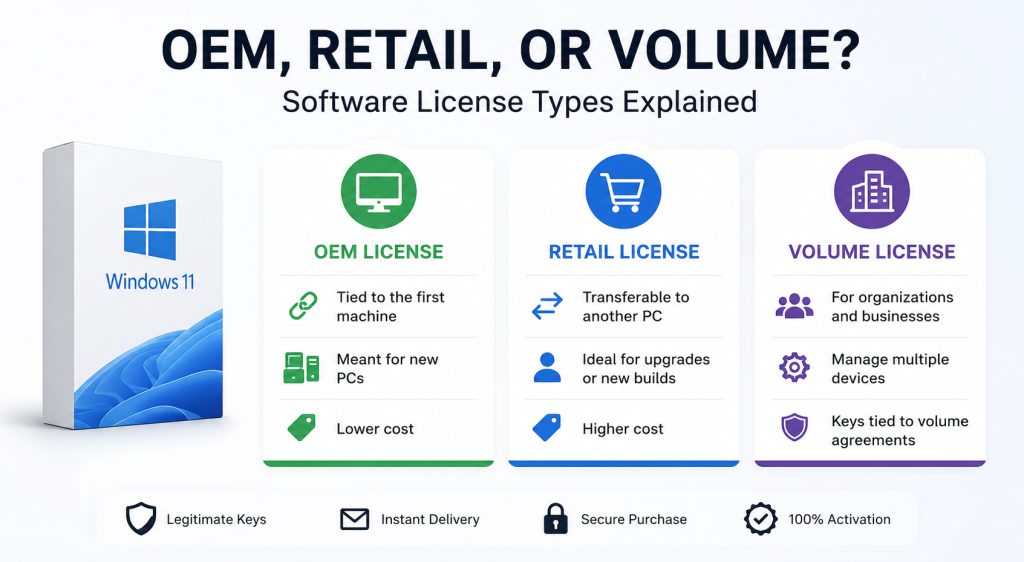
Retail licenses are the “full price” option you’d get buying a boxed copy or ordering directly from the publisher. They’re transferable deactivate the software on your old machine, activate it on the new one, done. That flexibility is what you’re paying for.
OEM licenses (Original Equipment Manufacturer) are meant to ship pre-installed on new computers. They cost noticeably less, but they’re tied to the first machine they’re activated on. Swap the motherboard and, in most cases, the license is gone. For a desktop you plan to keep for five years, that trade-off is often worth it. For a machine you upgrade constantly, it isn’t.
Volume licenses exist for organizations activating software on dozens or hundreds of machines through a single agreement. A volume key floating around on a marketplace for €5 is a red flag those keys are meant for the company that signed the agreement, and publishers can revoke them in bulk. If a price looks impossible, this is usually why.
The OEM vs retail license question, in practice
This is where most buyers hesitate, so here’s the honest version.
If you’re activating on one machine and don’t plan to move the license a family desktop, an office workstation, a home server OEM is the rational choice. Same software, same updates, same activation servers. You’re simply giving up transferability you probably wouldn’t have used.
If you rebuild your PC every couple of years or you’re the kind of person who upgrades hardware for fun, pay for retail. The math works out the second time you migrate.
One nuance people miss: “OEM” doesn’t mean “grey market.” It’s a legitimate license class defined by the publisher. What matters is that the seller is transparent about which type you’re getting. A product page that just says “Windows 11 Pro key” without specifying the license type is telling you something mainly that the seller hopes you won’t ask.
How to buy keys without getting burned
The digital license market has excellent independent sellers and terrible ones, and they can look similar at first glance. A few checks separate them:
The seller states the license type clearly on the product page. They explain how delivery works reputable shops send the key and activation instructions by email within minutes, since there’s nothing to ship. They have a real company name and address in the footer, not just a contact form. And their reviews mention successful activations, not just fast delivery.
Independent resellers like Instant Key are a good reference point for what transparency should look like in this space: license type, delivery method, and activation instructions spelled out before you pay, with a one-time purchase rather than a subscription you’ll forget to cancel. That’s the baseline any seller should meet.
Price is a signal too, just not the one people think. A key at 60% of the publisher’s price is normal resellers source licenses through legitimate channels at lower cost. A key at 5% of the publisher’s price is a volume key, a region-locked key sold outside its region, or worse.
The activation test
Whatever you buy, activate it immediately. Not next week, the day it arrives. A legitimate key activates against the publisher’s own servers without any third-party tool. If a seller sends you an “activator” program alongside the key, or asks you to disable your antivirus during installation, stop. Real licenses never require that.
And keep the confirmation email. If a key ever gets flagged months later (rare, but it happens with grey-market stock), your proof of purchase is what gets it resolved.
The short version
Match the license type to how you actually use your machines: OEM for hardware that stays put, retail for hardware that changes, and leave volume licensing to the organizations it was designed for. Then buy from a seller who tells you exactly what you’re getting before you pay. The software is the same everywhere the license terms and the seller’s honesty are what you’re really shopping for.
