

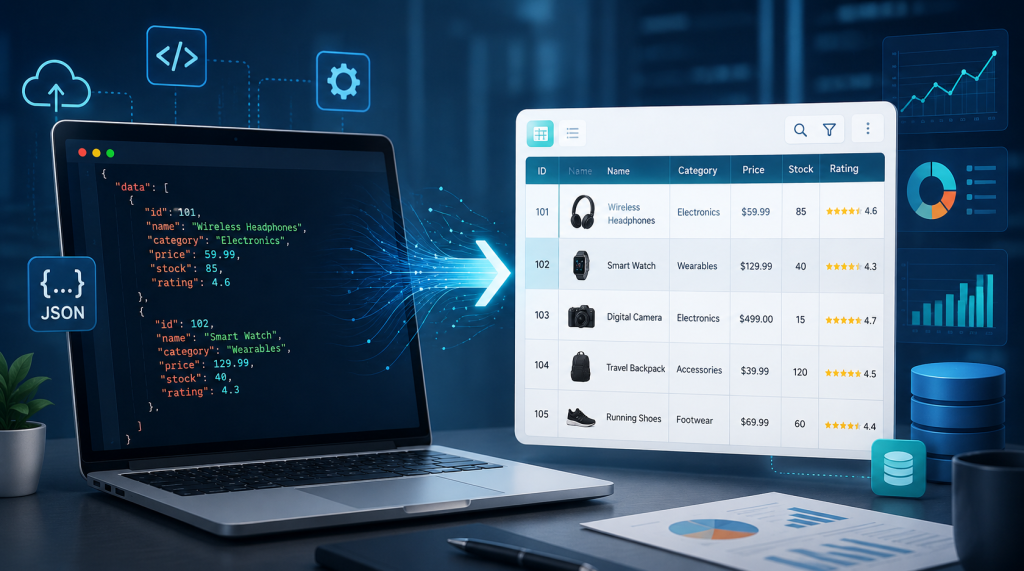
Data is the backbone of modern digital work. Websites, apps, software platforms, automation tools, and APIs all depend on structured data to function smoothly. Among the most widely used data formats today, JSON has become one of the most common because it is lightweight, flexible, and easy for machines to process. However, when people need to read, review, or explain JSON data, the raw format can quickly become difficult to understand.
This is why JSON to table tools have become so useful. They help convert complex JSON data into a simple table format, making it easier for users to view information in rows and columns. Instead of reading long lines of code, users can organize the data visually and understand it more quickly.
Understanding the Problem with Raw JSON
JSON is highly efficient for developers and systems, but it is not always friendly for general users. It includes brackets, commas, quotation marks, arrays, objects, and nested fields. When the data is short, it may be easy to understand. But when the JSON file contains hundreds of records or multiple levels of information, it can become confusing.
For example, a user may receive JSON data from an API that includes customer names, order details, dates, payment statuses, and product information. Reading this in raw format can take time. If the same data is converted into a table, it becomes much easier to scan, compare, and verify.
Tables are easier for most people because they present information clearly. Each record can appear in a row, while each field can appear in a column. This simple structure helps users understand data without needing to study the technical formatting behind it.
How JSON to Table Conversion Saves Time
One of the biggest advantages of using a JSON to table converter is speed. Manually organizing JSON data can take a long time, especially if the file has many entries. Users may need to copy values, create columns, fix formatting, and check for missing information. This manual process can also lead to errors.
A tool like Json to Table makes the process much easier by allowing users to convert JSON data into a readable table format online. This helps developers, analysts, students, and business users save time when handling structured information.
Instead of spending several minutes or even hours cleaning data manually, users can paste their JSON and quickly view the result in table form. This makes the workflow faster and more practical, especially when dealing with repeated tasks.
Helpful for API Testing and Development
Developers often use JSON while building and testing web applications. APIs usually return data in JSON format, and developers need to review that data carefully to make sure everything is working correctly.
During API testing, a JSON to table converter can make the response easier to inspect. Developers can quickly check whether required fields are present, whether values are correct, and whether the data structure matches expectations. This can be especially helpful when working with large API responses.
For example, if an API returns a list of users, products, transactions, or messages, viewing the response as a table makes it much easier to identify problems. Developers can detect missing fields, incorrect values, duplicated records, or formatting issues faster than they could by reading raw JSON.
Useful for Data Analysts and Business Teams
JSON is not limited to programming. Many business tools, analytics platforms, ecommerce systems, and automation services also export data in JSON format. This means non-technical users may also need to work with JSON from time to time.
For data analysts, converting JSON into a table can make analysis easier. Tables allow them to review records, compare values, and prepare data for reports. Business teams can also use table views to understand customer information, product data, campaign results, or system exports.
A table format is also easier to share with colleagues. Not everyone in a team understands JSON syntax, but almost everyone can understand rows and columns. This makes converted data more useful for meetings, reports, and decision-making.
Improving Accuracy in Data Review
Accuracy is important when working with structured data. A small mistake in data interpretation can cause confusion, wrong reporting, or technical problems. Raw JSON can sometimes hide errors because the format is not visually simple.
When JSON is converted into a table, users can review data more carefully. They can quickly notice empty fields, repeated values, inconsistent entries, or unusual patterns. This helps improve the quality of data review.
For users who want another similar option, jsontotable.io can also be mentioned as an alternative tool for converting JSON data into a more readable structure. Using similar tools can be useful when users want to compare outputs or work with different conversion needs.
Why Online Conversion Tools Are Popular
Online tools are popular because they are simple and accessible. Users do not need to install software or write scripts. They can open the tool in a browser, paste the JSON data, and convert it quickly.
This is especially helpful for people who only need occasional conversions. A developer may need to check an API response quickly. A student may need to understand JSON for an assignment. A business owner may need to review exported data from an online platform. In each case, an online converter provides a fast and simple solution.
Another benefit is convenience. Since online tools work directly in the browser, users can access them from different devices. This makes them practical for remote teams, freelancers, and professionals who need quick access to data formatting tools.
Making Technical Data More User-Friendly
The main purpose of a JSON to table tool is to make technical data easier to understand. It bridges the gap between machine-friendly formatting and human-friendly presentation. JSON works well for systems, while tables work well for people.
This is important because modern teams often include both technical and non-technical members. Developers may generate or receive JSON data, but managers, marketers, analysts, and clients may need to understand the same information. Converting JSON into a table helps everyone work with the data more comfortably.
When information is easier to understand, communication also improves. Teams can discuss data more clearly, identify issues faster, and make decisions with more confidence.
What Makes a Good JSON to Table Tool
A reliable JSON to table tool should be simple, fast, and accurate. It should handle different JSON structures and display them in a clean format. The interface should be easy to use, even for people who are not highly technical.
Speed is also important. Users often use these tools for quick tasks, so the conversion process should not be complicated. The tool should allow users to paste data and view the output without unnecessary steps.
A good tool should also keep the data readable. If the JSON contains multiple records, the table should organize them clearly. If the data has nested fields, the result should still be easy to follow.
A Practical Tool for Modern Data Work
As digital systems continue to grow, JSON will remain an important data format. It is used in APIs, web development, databases, automation, and many online platforms. But while JSON is useful for systems, it is not always easy for people to read.
JSON to table conversion tools solve this problem by turning structured code into a clean visual format. They help users save time, reduce errors, and understand data more clearly. Whether someone is a developer, analyst, student, or business user, these tools can make everyday data tasks much easier.
For anyone who regularly works with structured information, using a JSON to table converter is a smart way to improve workflow and make data more practical for real-world use.
