

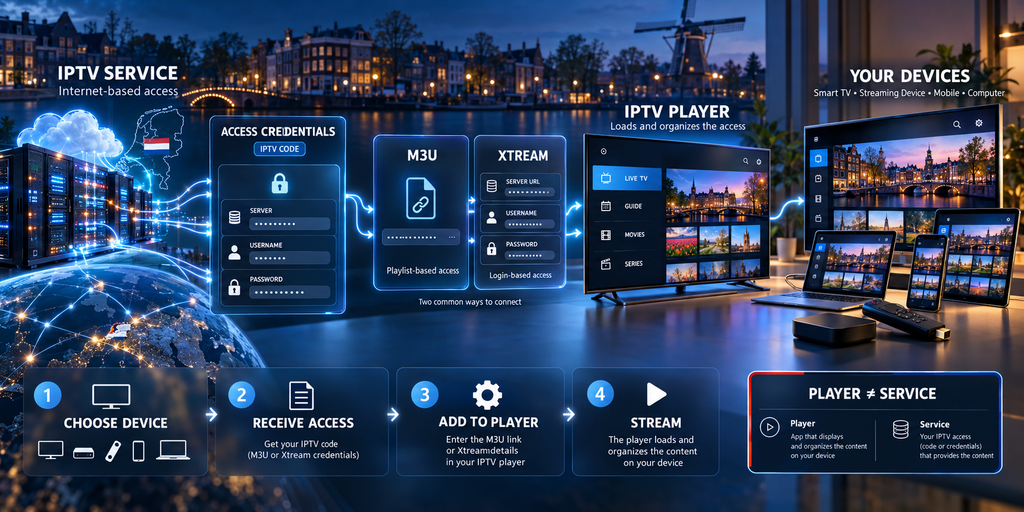
Television is increasingly becoming another connected service inside the modern home. Smart TVs, Android TV devices, streaming sticks, smartphones and computers can all receive video through internet-based platforms, giving viewers considerably more flexibility than the traditional television box connected to a single screen.
That flexibility has also introduced a new vocabulary.
Dutch consumers researching internet television regularly encounter terms such as IPTV code, M3U, Xtream Codes, playlist URL, EPG, portal and IPTV player. They are sometimes presented as if they mean the same thing, but they describe different parts of the setup.
Understanding those differences before choosing a service can make installation significantly easier and can prevent one of the most common mistakes: buying access first and only afterwards discovering that the selected app, device or number of connections does not match the intended setup.
This guide explains how IPTV access typically works, what an “IPTV code” actually means, how M3U and Xtream-style credentials differ, and what users in the Netherlands should check before configuring a television or streaming device.
What Does IPTV Actually Mean?
IPTV stands for Internet Protocol Television.
At a technical level, television and other multimedia information are delivered using IP-based networking rather than a conventional terrestrial, satellite or cable broadcasting path.
In everyday consumer language, however, the term IPTV is often used more broadly for television services that can be accessed through an internet-connected application or media player.
This distinction matters because several separate components are involved:
- the television or media content;
- the service that provides access;
- the credentials used to authenticate that access;
- the IPTV player or application;
- the device running the player;
- and the internet connection transporting the stream.
A problem with any one of those components can affect the viewing experience even when the others are working correctly.
What Is an “IPTV Code”?
“IPTV code” is a useful consumer term, but it does not always mean a single numerical code.
In practice, someone talking about an IPTV code is usually referring to the personal access information required to connect a compatible player to a television service.
Depending on the service and application, that information might be supplied as:
- an M3U or playlist URL;
- a server address;
- a username;
- a password;
- portal information;
- or another supported authentication method.
Dutch consumers therefore often search for IPTV code kopen when what they actually want is a subscription or access configuration that can be entered into a compatible IPTV application.
That distinction is useful.
You are normally not buying a mysterious standalone “code.” You are obtaining access credentials associated with a particular service, subscription period and configuration.
M3U: The Playlist Approach
M3U is one of the most recognizable terms in IPTV setup.
From the user’s perspective, an M3U configuration is usually straightforward: the provider supplies a URL, and that URL is entered into a compatible media player.
The player reads the information available through the playlist and organizes the available streams for the user.
A typical workflow looks like this:
- Receive an M3U URL.
- Open a compatible player.
- Select the option to add a playlist or M3U URL.
- Paste the URL.
- Allow the application to load the available information.
The exact menus differ between applications, but the principle is similar.
M3U can be particularly useful when a player explicitly provides an option such as Add Playlist, Playlist URL or M3U URL.
One important point is that the M3U URL itself should be treated as private account information. Sharing the full URL publicly can expose credentials embedded in the address.
How Xtream-Style Credentials Work
Another common configuration method uses what users frequently call Xtream Codes or an Xtream Codes API login.
Instead of entering one long playlist URL, the user generally receives three separate pieces of information:
Server or portal URL
This tells the application where the service is located.
Username
This identifies the account.
Password
This authenticates the account.
A compatible IPTV player then uses those details to retrieve the information associated with the subscription.
For many users, this can make setup feel cleaner than manually working with a long M3U address. Applications that support this login method may also organize categories and electronic programme information more conveniently, depending on the service and player.
A detailed practical guide to IPTV access and installation in the Netherlands explains the M3U and Xtream-style methods separately and shows why the correct method depends primarily on what the chosen player supports.
Is M3U Better Than Xtream Codes?
Not necessarily.
The important question is not which method is universally better, but which method works best with your device and application.
M3U may be preferable when:
- the player specifically asks for a playlist URL;
- the user wants a simple URL-based configuration;
- or the same playlist needs to be used in software designed around M3U files.
Xtream-style credentials may be preferable when:
- the application provides a dedicated login screen;
- entering a server, username and password is easier than working with a long URL;
- or the player can organize available categories and programme information automatically.
In some cases, both access methods lead to the same underlying subscription.
The difference is primarily how the player receives and processes the account information.
The IPTV Service and the IPTV App Are Not the Same Thing
This is one of the most important concepts for beginners.
An IPTV application is generally a player.
Installing a player does not necessarily provide a television subscription or media library.
Think of it like installing a web browser. The browser gives you a way to access websites, but installing the browser itself does not create the websites.
Similarly, an IPTV player provides the interface used to load and display compatible streams. The actual access credentials normally come from the television service separately.
This is why someone can install an IPTV application on a Smart TV and still see an empty interface.
The next step is usually to add the subscription information using whichever method the application supports.
Which Devices Can Be Used?
One reason internet-based television has become attractive is that the player can often be installed across multiple types of connected devices.
Depending on application availability and the service configuration, common options include:
Smart TVs
Modern Samsung, LG, Android TV and Google TV televisions can run compatible media applications directly on the television.
This can be convenient because no separate box is required.
Android TV and Google TV Devices
Android-based streaming boxes and televisions provide access to a wide range of player applications and generally make entering login credentials relatively straightforward.
Amazon Fire TV Devices
Streaming sticks are commonly used when the television’s own operating system lacks a preferred application or when users want a separate streaming environment.
Smartphones and Tablets
Android and iOS devices can provide convenient secondary screens.
They can also be useful for confirming that account credentials work before troubleshooting a television installation.
Windows and Mac Computers
Desktop players can load compatible playlists and streams, making a computer another possible viewing and troubleshooting device.
The important rule is simple: choose the device first, then check which player and login method it supports.
Doing this in the opposite order can create unnecessary installation problems.
One Device Is Not the Same as Multiple Connections
Another point that frequently causes confusion is the difference between device compatibility and simultaneous connections.
A service might technically work on many different types of hardware while the subscription itself permits only one active connection.
For example, a user may be able to install a compatible application on:
- a television;
- a smartphone;
- and an Android TV box.
That does not automatically mean all three can stream simultaneously.
Households that expect different people to watch on multiple screens should therefore check the connection policy before choosing a subscription.
The useful questions are:
How many devices will actually be used?
How many need to stream at the same time?
Does each device require a separate configuration?
Can an additional connection be added later?
These details are more important than simply seeing “works on all devices” in a product description.
Why IPTV Streams Sometimes Buffer
When playback freezes, the internet connection is often blamed immediately.
But streaming quality depends on several parts of the delivery chain.
Potential causes include:
Local Wi-Fi
A fast broadband connection can still perform poorly when a television is far from the router or the wireless network is congested.
Testing the same stream through Ethernet is one of the easiest ways to determine whether Wi-Fi is contributing to the problem.
Available Internet Bandwidth
Other downloads, cloud backups, video calls, gaming sessions and streams inside the same household can reduce the bandwidth available to the television.
Source Quality
A high-resolution source generally requires more data than a lower-resolution version.
Device Performance
Older Smart TVs and inexpensive streaming hardware may struggle with particular codecs or high-resolution streams even when the internet connection itself is adequate.
Application Configuration
A poorly configured player, outdated app or problematic cache can sometimes affect playback.
Provider-Side Capacity
If problems mainly appear during heavily watched live events or peak evening periods, infrastructure outside the home may also contribute.
For that reason, troubleshooting should be systematic rather than immediately assuming either the home connection or the service is responsible.
A Simple Troubleshooting Order
When a stream is unstable, start with the easiest variables to eliminate.
First, test another channel or stream.
If everything is affected, test the internet connection.
Next, restart the player and device.
Then test the same credentials on another compatible device if possible.
If the problem occurs only over Wi-Fi, try Ethernet or move closer to the router.
If several devices show the same problem while the general internet connection remains stable, the cause is more likely to be outside the individual television or app.
This method is more useful than repeatedly reinstalling the application without identifying which part of the chain is failing.
What Should You Check Before Choosing IPTV Access?
Consumers often compare subscriptions only by the number of channels or the advertised price.
Those numbers reveal very little about whether the service will fit the actual household.
A more useful evaluation starts with practical questions.
1. Which Access Method Is Provided?
Check whether you receive M3U, Xtream-style credentials, a portal configuration or another method.
Then confirm that your preferred player supports it.
2. How Many Connections Are Included?
Someone watching only on one television has different requirements from a household with several screens.
3. Which Devices Are Supported?
Do not assume that compatibility with one Smart TV platform automatically means compatibility with every platform.
4. Is Installation Help Available?
Setup instructions can be particularly valuable for people configuring IPTV for the first time.
A broader overview of IPTV in the Netherlands highlights device compatibility, installation guidance, connection limits and the difference between a player and the television service as important points to check before choosing an option.
5. Is Programme Information Available?
An electronic programme guide, commonly abbreviated to EPG, can make live television significantly easier to navigate.
6. How Is Support Provided?
Installation questions often arise only after the credentials have been received.
Knowing how and when technical support is available can therefore matter as much as the initial purchase process.
Keep Your IPTV Credentials Private
M3U links, usernames, passwords and portal information should be handled like other account credentials.
Avoid publishing them in:
- screenshots;
- public forums;
- social media posts;
- YouTube comments;
- or support messages visible to other users.
If you need help with configuration, hide sensitive information before sharing a screenshot.
This is particularly important with M3U addresses because authentication details can sometimes be contained directly inside the URL.
IPTV Technology and Content Rights Are Separate Questions
The underlying IPTV technology is not inherently unlawful.
Internet Protocol is simply a method of delivering information over networks, and IPTV technology is also used by legitimate telecommunications and media services.
The important legal question is whether the service has authorization to distribute the television channels, films, sporting events or other copyrighted material it provides.
Consumers should therefore distinguish between the technology used to deliver a stream and the rights to distribute the content inside that stream.
A professional-looking application or technically functional playlist does not by itself prove that the underlying content is licensed.
When rights and legality matter, consumers should verify the provider and the origin of the content rather than relying only on price, channel count or marketing claims.
The Best Setup Starts Before Installation
Most IPTV configuration problems can be reduced by making a few decisions before purchasing access.
Start by identifying the primary viewing device.
Then choose a compatible player.
Check whether that player prefers M3U, Xtream-style credentials or another authentication method.
Determine how many simultaneous connections the household actually needs.
Finally, evaluate the service itself: support, setup instructions, connection policy, stream quality, programme information and account terms.
Once those pieces fit together, the actual installation is usually the easiest part of the process.
Frequently Asked Questions
What does “IPTV code” mean?
It is commonly used as a general term for the personal information required to access an IPTV subscription. Depending on the service, that may be an M3U URL, server address, username and password, portal credentials or another supported method.
Is an M3U link the same as Xtream Codes?
No.
An M3U configuration usually uses a playlist URL. An Xtream-style configuration normally asks separately for a server address, username and password.
Both methods can sometimes provide access to the same subscription, but the login process is different.
Do I still need an IPTV player after receiving the credentials?
Usually, yes.
The credentials provide access, while the player provides the interface that loads and displays the available streams.
Can one IPTV account work on several televisions?
Technically compatible devices and permitted simultaneous connections are two different things.
A subscription might be installable on several device types while allowing only one active stream. Always check the connection policy.
Why does IPTV work on my phone but not on my television?
If the same credentials work on another device, the problem may be related to the television app, device compatibility, local network connection or the way the credentials were entered.
Testing on multiple devices can help isolate the cause.
Is IPTV legal in the Netherlands?
IPTV is a technology and can be used for legitimate services. Legal issues arise when copyrighted television, films, sports or other material are distributed or accessed without the necessary authorization. Consumers should verify that a service has the appropriate rights for the content it provides.
Final Thoughts
Terms such as IPTV code, M3U and Xtream Codes can make internet television appear more complicated than it really is.
At their core, they describe different ways of connecting a compatible player to an account.
M3U generally uses a playlist URL.
Xtream-style access generally separates the server address, username and password.
The IPTV application acts as the player, while the service provides the account and available content.
And the device, local network, subscription connection limits and provider infrastructure all influence the final viewing experience.
For Dutch consumers, understanding those elements before purchasing anything is more valuable than choosing purely on the basis of price or advertised channel numbers.
Choose the device first, confirm the supported login method, determine how many connections you need, protect your credentials and verify the service behind the streams.
That produces a far more reliable setup than treating an “IPTV code” as a product that exists independently of the player, device and subscription behind it.
