

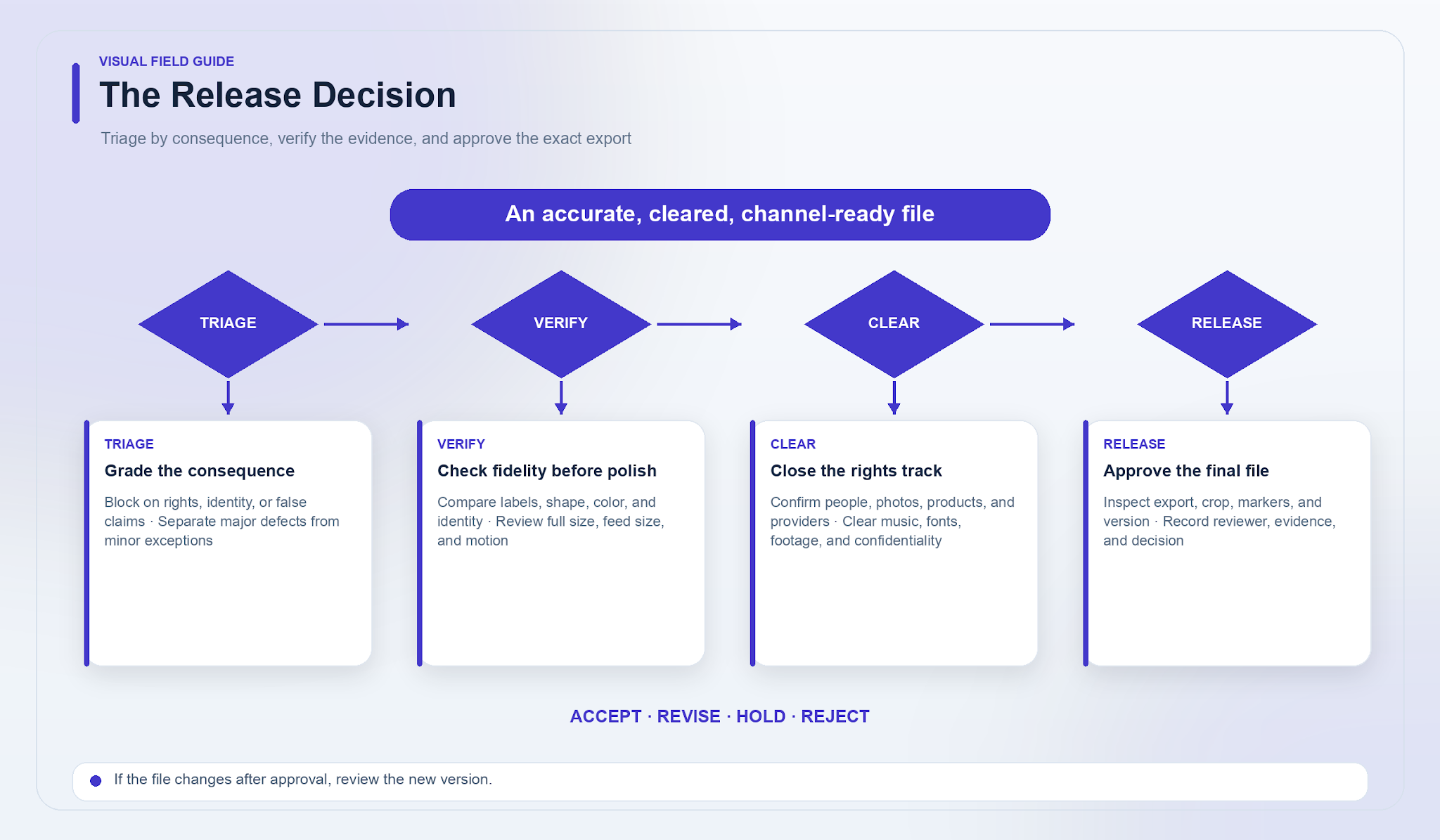
A glossy product image can still be a defective product image. If the cap has changed shape, the label promises something the approved copy does not, or the person in the source photograph has not consented, attractive lighting is irrelevant. The release question is not “Does this look good?” It is “Is this exact file accurate, cleared, and fit for its intended use?”
A workable review separates those questions. Triage problems by consequence, compare fidelity with approved evidence, review rights on their own track, and inspect the export that will actually be published. The process below is operational guidance, not legal advice; uncertain rights or claims belong with the appropriate qualified reviewer.
Give the reviewer a release question, not just a file
The same image can be acceptable as an early mood concept and unusable as a product-page hero. Before review, identify the channel, audience, purpose, approved references, required copy, and release owner. Include any known usage permissions and the provider or model involved.
Then state what must remain true. For a skincare jar, that might mean the exact pack shape, label text, color variant, and number of items shown. For a conceptual editorial illustration, the scene may be imaginary while the headline, logos, and source permissions still need scrutiny.
This context prevents two common review failures: rejecting an intentional creative choice as a factual error, and waving through a factual error because the overall style feels right. Where possible, let someone other than the prompt writer perform the final review. Familiarity makes it easy to see what was intended rather than what is actually there.
Triage by consequence, not by ease of repair
A tiny misspelling in a logo is more serious than a large but irrelevant smudge in an imaginary sky. Severity should reflect what publication would mean, not how long a fix might take.
- Blocker: an unresolved permission, wrong product or variant, misleading demonstration, unsupported claim, unusable logo, or identity problem. Hold or reject the asset; do not release it with a note to fix later.
- Major: a visible distortion, broken crop, unreadable required text, inconsistent brand element, or technical defect that must be corrected before approval. Revise and review the resulting version.
- Minor: a limited issue that does not alter facts, rights, required brand elements, or channel usability. Repair it, or record a named reviewer’s reason for accepting the exception.
Context can move an issue between levels. A slight hue shift in a fictional backdrop may be minor. The same shift in a garment offered in a specific color can be a blocker. A watermark may be irrelevant during internal exploration but unacceptable under the destination or provider requirements for release.
When categories overlap, use the higher severity until the responsible reviewer resolves the question. “Blocked pending clarification” is a useful status, not a prediction of reputational disaster. It simply keeps uncertainty out of the publishing queue.
Fidelity and polish need different evidence
Fidelity asks whether the asset preserves what it represents. Polish asks whether the execution meets the creative standard. A jar with perfectly soft shadows but an altered ingredient list fails fidelity. An accurate jar with a distracting background may need polish while remaining factually sound.
Check fidelity against the approved reference, side by side. Compare proportions, closures, labels, quantities, colors, accessories, and physical interactions. For people, check identity across versions and frames against the approved depiction and consent. Read every visible character rather than assuming plausible lettering is correct. Confirm that the scene does not imply a feature, ingredient, certification, or result absent from the approved evidence.
Check polish at two viewing sizes. At full size, inspect hairlines, fingers, shadows, reflections, repeated patterns, transparent areas, and object boundaries. At normal feed size, ask whether the subject separates from the background and whether necessary copy survives the smaller view. For video, watch the whole clip, then examine important transitions; a hand or product edge can change briefly even when the opening frame looks clean.
Brand consistency sits across both checks. Exact requirements might include packaging, trademark use, and approved claims. Flexible choices might include a decorative background or crop within defined safe areas. Write down which is which so “not my taste” does not become a hidden rejection rule—and personal preference does not excuse an actual inconsistency.
Run rights review as a separate track
Rights are not the final dusting of approval after visual review. Check them alongside production. Confirm permissions for submitted photographs, people, products, logos, and other material, then review the selected provider and model terms for the intended use. Keep a dated reference to what was checked.
Paying for generation does not by itself settle those questions. Do not assume exclusivity, copyright eligibility, or exact fidelity. If a project requires exclusivity or a particular form of legal protection, escalate that requirement instead of treating a downloaded file as proof of clearance.
Confidentiality deserves the same specificity. New Uyo creations are private by default, but provider direct URLs may be accessible to anyone who holds them. Use suitable access controls for unreleased material rather than equating a default setting with a complete confidentiality review.
For a video edit, clear added music, stock footage, fonts, photographs, and voice material separately. An image-to-video result is a short clip, not a finished advertisement with captions, licensed music, and a call to action. This is routine production hygiene, not a reason to panic; unresolved items simply remain open until the appropriate reviewer closes them.
Repair the image without losing the review trail
When a usable image needs a local change, Uyo provides an AI Image Editor for PNG, JPG, and WebP files up to 2 MB. Specify both the requested change and what must be preserved, then iterate on a new version rather than overwriting the candidate already reviewed.
For example: “Change the backdrop to a plain warm gray. Preserve the jar’s silhouette, cap, label layout, text, and color.” That instruction is more useful to the reviewer as well as the editor because it identifies the intended repair and the fidelity points that must survive it.
After editing, compare the new version with both the previous candidate and the approved reference. Recheck the repaired area, the preserved elements, and the full release gates. A local correction can coincide with a new alteration elsewhere, so the old approval should not automatically carry forward.
Inspect the export, not only the preview
Open the exact file destined for the channel. Confirm its format, dimensions, file size, aspect ratio, crop, safe areas, thumbnail, and duration where relevant. Check captions for wording and timing, and watch with sound off and on when audio exists. A preview can conceal an export crop, compression problem, or version mix-up.
Inspect provider watermarks or other visible markers in the actual output; provider watermarks may remain. Check the destination’s requirements and applicable provider terms instead of treating an unobtrusive mark as permission to ignore it.
Finally, match the export to the reviewed asset ID and version. If the file changed after approval, the approval belongs to the earlier file. This simple rule prevents a last-minute replacement from bypassing every earlier check.
Make the release log useful under pressure
A good log answers a later question without requiring someone to reconstruct the review from chat messages. Record the asset ID, final filename, version, channel, purpose, reviewer, review date, approved references, provider and model, issues found, severity, decisions, and relevant permission or terms checks. Add the name of the person authorized to release it.
Use a clear outcome: accept, revise, hold, or reject. Acceptance means no blocker or major issue remains open, minor exceptions are documented, and the exact export has passed inspection. Revision creates a new version; a hold identifies the unanswered question and its owner; rejection preserves the reason so the team does not repeat an unworkable route.
Attach the log to the final asset in the normal publishing workflow. The release package should leave no ambiguity about which file was approved, what evidence was used, and which exceptions a named reviewer accepted.
