

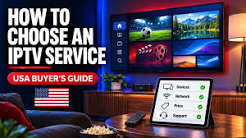
Streaming television has changed how people watch live channels, sports, news, movies, and entertainment. Instead of relying only on a traditional cable package, viewers can use internet-based services to access programming on a range of connected devices. The flexibility is attractive, but the growing number of options can make it difficult to understand what IPTV is, what equipment is needed, and how to compare services responsibly.
This guide explains the basics of IPTV, the factors that affect streaming quality, how to evaluate channel offerings and prices, and the questions worth asking before subscribing. Whether you are exploring internet television for the first time or comparing alternatives to a conventional TV package, a little research can help you choose a service that fits your viewing habits and budget.
What Is IPTV?
IPTV stands for Internet Protocol Television. In simple terms, television programming is delivered through internet networks rather than exclusively through cable, satellite, or over-the-air broadcast systems. Depending on the provider and product, IPTV may include live television channels, on-demand programs, catch-up features, and other viewing options.
The term is often used broadly in everyday conversation. Some legitimate television companies use internet delivery as part of their subscription products, while other services may offer streams without having the rights to distribute the content. The technology itself is not inherently unlawful; the important distinction is whether the provider is authorized to make the programming available in the viewer’s region.
How Internet Television Works
When a viewer selects a channel or video, the service sends media data over an internet connection to a compatible app, device, or browser. The player buffers a small amount of data and then displays the stream. Many services use adaptive bitrate streaming, which can adjust video quality according to available bandwidth and network conditions.
A stable connection matters as much as raw speed. Wi-Fi interference, congestion, an overloaded router, distant servers, or limitations on the streaming device can all contribute to buffering, picture degradation, or playback interruptions. For that reason, troubleshooting should consider the whole home network rather than simply testing the internet speed once.
Why Viewers Consider IPTV
Flexible viewing options
Internet television can make it easier to watch on televisions, phones, tablets, computers, and streaming boxes. A household may appreciate being able to continue a program on another screen, depending on the service’s supported devices and account rules. Always check how many simultaneous streams are permitted before assuming multiple family members can watch at once.
A wider range of programming
Some internet TV packages focus on local and national channels, while others emphasize international programming, entertainment, documentaries, or sports. The most useful package is not necessarily the one with the longest channel list. A smaller selection of channels that you actually watch may be better value than an enormous catalogue filled with unfamiliar stations.
Potentially simpler package choices
Traditional television bundles may include channels, equipment fees, and add-ons that customers rarely use. Internet-based options can sometimes offer different package structures, although pricing and features vary. Compare the complete cost, including taxes, device purchases, premium add-ons, and any required internet plan.
How to Compare IPTV Providers
1. Confirm the service is authorized
Before paying, look for clear information about the company, its terms of service, supported regions, and the content it is licensed to distribute. Be cautious if a provider makes sweeping promises about every premium channel, every major event, or an unusually large library at a price that seems implausible. A legitimate provider should be able to explain its offering and provide accessible policies.
2. Review channel availability
Channel lineups can differ by location and may change over time. Check whether the channels you care about are included, whether local stations are available in your area, and whether language or regional options meet your needs. If you mainly watch a few networks, write those down and verify each one rather than relying on a headline channel count.
3. Examine video quality and reliability
Look for clear descriptions of supported resolutions, playback features, and any quality limitations. HD or 4K labels are useful only when the content is actually offered in that resolution and your device and connection can support it. Independent reviews may provide helpful context, but recent feedback is more useful than old comments because streaming infrastructure can change.
4. Understand the pricing
Compare package structure and costs through IPTV pricing plansIPTV pricing plans
5. Check device compatibility
Make sure the service works with the television or device you already own. Common streaming platforms include smart TVs, Android TV devices, Apple TV, streaming sticks, computers, and mobile devices, but support is not universal. Confirm the exact model and operating-system version, and check whether the service requires a separate app or player.
6. Read the account and privacy policies
A subscription may require an email address, payment details, and basic account information. Review how personal data is collected, stored, and used. Use a unique password, avoid sharing account credentials publicly, and be wary of sellers who request unnecessary personal information or ask you to install unknown files.
Watching Sports Through Internet TV
Sports viewers often need to consider more than a channel list. A match may be available through a broadcaster, a league’s official streaming product, a regional sports network, or a subscription bundle. Rights can vary by competition, country, and season, and some events may be subject to local blackout rules.
A sports-focused guide can help identify a provider’s stated offerings; review sports programming information and verify important events against the official rights holder.
For live events, consistency is especially important. A stream that works well for on-demand shows may still experience delays or interruptions during a popular game, when network traffic is high. If possible, test a service during the time you normally watch sports and on the device you plan to use.
What Internet Speed Do You Need?
The bandwidth required depends on video resolution, the number of active streams, and the behavior of the apps in your household. As a general planning guideline, a single HD stream usually needs several megabits per second of sustained bandwidth, while 4K video typically needs substantially more. Multiple simultaneous streams, video calls, downloads, and gaming can increase household demand.
A speed test measures performance at one moment, but it does not always reveal stability. If your connection is inconsistent, try connecting the streaming device to the router with Ethernet. If wired networking is not practical, use a strong Wi-Fi signal, consider a modern router, and avoid placing the router behind furniture or near sources of interference.
Tips for a Better Streaming Experience
Use a reliable network connection
Whenever possible, use Ethernet for devices that remain near the router. For Wi-Fi, connect to an appropriate band and position the router in a central, open location. Restarting networking equipment can sometimes resolve temporary problems, but persistent issues may require checking router settings or contacting your internet provider.
Keep apps and devices updated
Updates can fix bugs, improve compatibility, and address security issues. Install updates from the device’s official app store or manufacturer, and avoid downloading modified apps from unfamiliar websites. If playback problems begin after an update, consult the service’s support information before changing multiple settings at once.
Reduce unnecessary network congestion
Large downloads, cloud backups, and other video streams can compete for bandwidth. If buffering happens at busy times, pause background transfers or test the stream when fewer devices are active. Quality-of-service features on some routers may help prioritize video traffic, but their configuration depends on the specific equipment.
Choose a device with enough performance
Older streaming devices may struggle with newer apps, high-resolution video, or limited storage. If the interface is slow or playback repeatedly crashes, check the device’s specifications and available updates. Sometimes a device upgrade—not a change in subscription—is the practical solution.
Common IPTV Problems and Basic Troubleshooting
Buffering or frequent pauses
First, test the connection on the same device and location where you stream. Restart the app, check whether other devices are using substantial bandwidth, and try Ethernet or a stronger Wi-Fi signal. If the problem affects only one service, its support team may be able to identify an outage or server issue.
A channel will not load
Confirm that the channel is included in your subscription and available in your region. Check for service announcements, restart the app, and make sure your device’s date and time settings are correct. Avoid repeatedly entering account details into unofficial apps or websites.
Poor picture quality
The player may be adapting to a weak connection. Check your network stability, close other bandwidth-heavy activities, and review the app’s video-quality settings if they are available. If the source itself is low resolution, a faster internet connection may not improve the picture.
The app crashes or will not open
Install official updates, restart the device, and check available storage. If necessary, clear the app cache using the device’s standard settings or reinstall the official application. Make sure you have access to your account information before reinstalling.
IPTV, Cable, Satellite, and Free Streaming: How They Differ
Cable television generally uses a provider’s cable network, while satellite TV receives programming through a dish. Over-the-air television uses an antenna to receive local broadcast signals. Internet TV relies on broadband connectivity and compatible software or hardware. Each approach has trade-offs: availability, installation requirements, channel selection, portability, reliability, and overall cost.
Free streaming services may offer ad-supported channels or on-demand content, while paid services may provide additional programming or features. It is sensible to compare the options based on your viewing habits, budget, and location rather than assuming one technology is always superior. Many households use a combination of antenna television and streaming subscriptions.
Questions to Ask Before Subscribing
Use the following checklist when comparing providers:
· Are the channels and programs offered legally in my country or region?
· Is the package clear about included channels, add-ons, and limitations?
· What is the total price after introductory offers, fees, and renewal?
· Can I cancel easily, and what are the refund or trial terms?
· Which devices and operating-system versions are supported?
· How many simultaneous streams are allowed?
· Is customer support available, and are contact details clearly provided?
· Does the service explain its privacy and security practices?
· Can I test the experience before committing to a long subscription?
Making a Sensible Choice
The best internet television option is the one that reliably delivers the content you want, works with your equipment, and fits your budget. Start with a short list of must-have channels or programs. Compare the real monthly cost, verify device compatibility, and read the terms rather than focusing only on promotional claims.
You can use a provider’s main website as one source of information. Visit IPTV USA to review its stated features and packages. Independently confirm licensing, availability, payment terms, and customer support before deciding.
Conclusion
IPTV gives viewers another way to access television over an internet connection, offering flexibility across compatible devices and a range of programming choices. However, quality depends on the provider, network, device, and content rights—not simply on the number of channels advertised.
Take time to compare services, test your connection, understand the subscription terms, and confirm that the programming is authorized where you live. A careful decision can help you avoid unnecessary costs and make streaming more dependable for everyday entertainment and live viewing.
Backlink placement (editorial note)
This draft contains exactly three contextual backlinks embedded as clickable anchor text:
· IPTV pricing plans — https://www.iptvusaone.com/pricing
· sports programming information — https://www.iptvusaone.com/sports
· IPTV USA — https://www.iptvusaone.com/
