

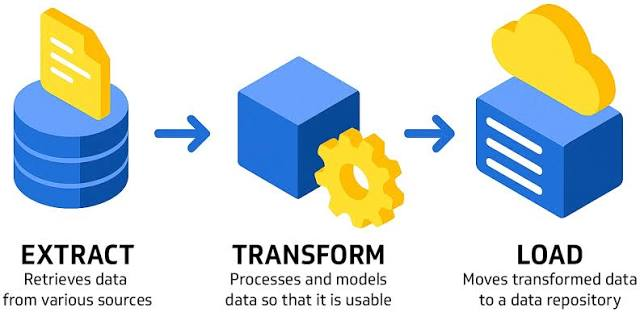
Extract Transform Load (ETL) is the general procedure of copying data from one or more sources into a destination system that represents the data differently. In everyday business terms, ETL is how raw, scattered data becomes structured, consistent, and ready for reporting, forecasting, and decision-making. Whether you are learning fundamentals through a data analysis course in Pune or building career-ready skills via a data analytics course, understanding ETL helps you judge data quality, interpret metrics correctly, and communicate effectively with engineering teams.
Why ETL Matters for Reliable Reporting
Most organisations store data across multiple tools: a CRM for leads, an accounting system for invoices, a support desk for tickets, and product logs for user behaviour. Each system records information in its own way. Dates may use different time zones, customer names may not match exactly, and IDs may be missing or duplicated. ETL exists to bring order to this complexity.
When ETL is done well, it delivers three outcomes that matter to business users:
- Consistency: A single definition of key metrics like revenue, active users, or churn.
- Accuracy: Fewer duplicates, fewer missing values, and clearer handling of edge cases.
- Speed: Automated refreshes replace manual exports and repeated spreadsheet merges.
Without a dependable ETL process, dashboards can show conflicting numbers, and teams waste time reconciling results instead of acting on insights.
Step 1: Extract — Pulling Data from Source Systems
Extraction is the process of collecting data from its original systems. Sources can include databases, cloud applications, flat files (CSV/Excel), APIs, and event logs. The goal is to capture data in a way that is complete, secure, and traceable.
Key decisions in extraction include:
- Batch vs near real-time: Batch loads run on a schedule (hourly, daily). Near real-time loads support faster monitoring and operational reporting.
- Full vs incremental loads: Full loads copy everything each run. Incremental loads capture only new or changed records, which is more efficient but requires careful logic for updates and deletions.
- Access and privacy: Extraction must respect permissions. Sensitive fields may need masking, encryption, or restricted access even before transformation.
For analysts, a useful mindset is to treat extracted data as “raw material.” It often contains duplicates, gaps, and inconsistent formats, and those issues must be addressed before analysis.
Step 2: Transform — Converting Raw Data into Business-Ready Data
Transformation is where the destination system begins to “represent the data differently.” This step cleans, standardises, and enriches information so it can be used reliably for analytics.
Typical transformations include:
Cleaning and validation
- Removing duplicate rows
- Handling missing values with clear rules
- Standardising formats (dates, currency, numeric fields)
- Applying basic quality checks (for example, quantities should not be negative)
Standardisation and alignment
- Converting timestamps into a standard time zone
- Renaming fields into consistent naming conventions
- Mapping categories (regions, product lines, campaign names) to controlled lists
Joining and enrichment
- Linking customers across systems using IDs or matching logic
- Adding reference data such as exchange rates or product master tables
- Creating derived metrics like margin, retention flags, or cohort labels
Transformation is also where mistakes can silently distort results. Incorrect joins can multiply rows and inflate totals. Incorrect filters can hide valid records. Good transformations are transparent, documented, and testable.
Step 3: Load — Placing Data into a Destination for Analytics
Loading writes the transformed data into the destination platform, commonly a data warehouse, data mart, or analytics database. The destination is organised for querying and reporting, not for day-to-day transactions.
Important loading considerations include:
- Data modelling: Many teams load data into structures that support reporting speed and clarity, such as fact tables (events/transactions) and dimension tables (customer, product, time).
- Historical tracking: Some values change over time (pricing tiers, customer segments). Pipelines may store snapshots or maintain controlled history so reports remain explainable.
- Performance and reliability: Loads should be monitored, logged, and alert on failures. Teams also plan for retries and safe recovery when a job breaks mid-run.
From an analytics perspective, the loaded layer is often the “trusted” data that feeds dashboards and BI tools.
Common ETL Challenges and Practical Controls
Even mature pipelines face recurring challenges:
- Schema changes: Source tools add or rename fields, which can break transformations.
- Late-arriving data: Transactions sometimes appear after the reporting window, requiring backfills.
- Scaling issues: As volume grows, jobs slow down without incremental processing and optimisation.
- Definition drift: Business rules change, and old logic can produce misleading trends.
Teams manage these risks with controls such as automated tests, reconciliation checks, job-level monitoring, and clear documentation of metric definitions. These habits are worth learning early because they reduce confusion when numbers do not match expectations.
Conclusion
ETL processes power trustworthy analytics by extracting data from multiple sources, transforming it into consistent structures, and loading it into systems designed for reporting and analysis. When ETL is built with validation, documentation, and monitoring, it improves both accuracy and confidence in business decisions. If you are strengthening your foundation through a data analysis course in Pune or preparing for real-world reporting work in a data analyst course, ETL knowledge is a practical advantage because it helps you spot data issues early and explain results with clarity.
Business Name: ExcelR – Data Science, Data Analyst Course Training
Address: 1st Floor, East Court Phoenix Market City, F-02, Clover Park, Viman Nagar, Pune, Maharashtra 411014
Phone Number: 9699753213
