

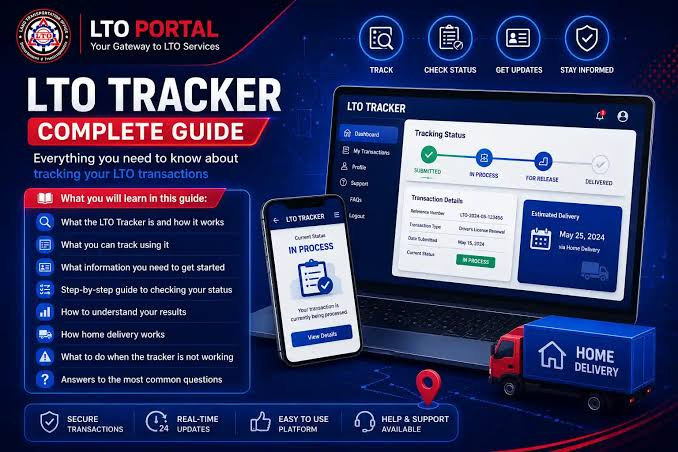
Anyone who has waited in line at a Land Transportation Office branch knows the feeling. You take a number, sit for hours, and finally reach the counter only to hear, “Not yet, please come back next week.” For millions of Filipino drivers, this cycle of wasted trips is frustrating and expensive.
The good news is that you can often avoid it. With an online guide and status checker such as LTO Tracker, you can find out where your plate number, driver’s license, or registration stands before you leave the house. This article explains how online tracking works, what you need, and how to avoid common mistakes.
Why Waiting in Line Is Still a Problem
Vehicle ownership in the Philippines keeps growing, and so does the workload of every LTO office. New plates, license cards, renewals, and ownership transfers all go through the same system. Delays are common, especially when plates are produced in batches and shipped to branches.
The real problem is not the wait itself but the lack of information. Without knowing whether your document has arrived, you risk several wasted trips. Each one costs fare, fuel, parking, and often a day off work. An online status check replaces that guesswork with a clear answer.
What Can You Check Online?
A status tracking guide typically covers several common needs:
- Plate number release: After buying a new vehicle, you usually get a temporary plate first. You can check whether your permanent plate has been produced and sent to your branch.
- Driver’s license progress: See whether your card is still processing, printed, or ready for pickup.
- Registration validity: Confirm whether your registration is active before a long trip or an emission test.
- OR/CR availability: Your Official Receipt and Certificate of Registration are essential documents, so it helps to know when they are ready.
- Transfer of ownership: If you bought or sold a used vehicle, you can confirm that the change has been recorded.
- Violations and fines: Before renewing a registration or buying a second-hand vehicle, checking for pending violations can save you from surprises.
What You Need Before You Start
Most online checks need only a few details. Keep these ready:
- Your plate number (for example, ABC 1234)
- Your 15-digit MV file number, found on your Certificate of Registration
- Your driver’s license number
- Your OR/CR details
- A stable internet connection
An LTMS account is generally not required for a basic status lookup, although you will need one for many official transactions. If a search returns nothing, try the MV file number instead of the plate number. It is longer and more specific, which often gives more accurate results for recently registered vehicles.
Step-by-Step: How to Check Your Status
The process takes less than a minute:
- Open the tracker page on your phone or computer.
- Choose your search type, either plate number or driver’s license.
- Enter your details carefully. One wrong digit is the most common reason for a failed search.
- Submit the search and wait a few seconds.
- Read your result. You will usually see a status such as in process, dispatched, available for pickup, or ready for delivery.
If your result says the item is available for pickup, bring a valid ID and your registration papers to your assigned branch. Knowing this in advance means you walk in with confidence instead of hope.
Understanding “Not Found” Results
Seeing “Not Found” can be alarming, but it rarely means something is seriously wrong. The usual causes are simple:
- A typo: Re-check every character against your documents.
- A recent application: New records can take a few business days to appear, so check again after two or three days.
- Data timing: Different tools update at different intervals. A result that looks outdated in the morning may be corrected by the afternoon.
If the problem continues after a week, contact the LTO directly through its hotline or visit your branch with your documents.
Home Delivery: Skip the Trip Entirely
Many drivers now prefer to have plates or license cards delivered. The process is usually straightforward:
- Upload a clear photo of a valid ID and your OR/CR.
- Provide a complete address, including house number, street, barangay, city, and a nearby landmark.
- Pay the delivery fee through an e-wallet such as GCash or through QRPh.
- Wait for an SMS with your courier tracking number.
Delivery fees commonly fall between ₱150 and ₱600, depending on your location, and most deliveries arrive within 3 to 10 business days. Metro Manila is typically faster, while island provinces and remote areas can take longer. Keep your payment receipt and tracking number until the item arrives, since they make it much easier to resolve any problem.
Protect Yourself From Scams
Popularity attracts imitators. As online tracking has grown, so have fake pages and social media accounts that try to collect personal data. A few simple rules will keep you safe:
- Only enter what is truly needed, such as a plate number, license number, ID photo, or basic contact details.
- Never share online banking passwords, ATM PINs, or one-time passwords. A legitimate status check or delivery payment will never ask for them.
- Be cautious with any page that pressures you to pay quickly or promises faster release for a special fee.
- Confirm sensitive transactions through the official LTMS portal or your local LTO office.
It is also important to remember that independent guides and trackers are not the government. LTO Tracker is an information resource and is not affiliated with the Land Transportation Office, so use it to understand the process and prepare, and rely on official channels for final confirmation.
Practical Tips for Smoother Tracking
- Double-check your numbers before every search.
- Use the exact format shown on your documents.
- Give new applications time. Checking too early only shows incomplete information.
- Check each vehicle separately if you own more than one, since results are tied to the specific number you enter.
- Screenshot your result. It helps if you later need to follow up with LTO staff.
When to Contact the LTO Directly
Online tools are helpful, but they cannot solve everything. If your record is missing after several days, if your details do not match, or if you suspect an error in your registration, go to the source. The LTO Central Office is located on East Avenue in Quezon City, and you can also use its official hotline. Always verify the current contact numbers on the official LTO website before calling, since details can change.
Final Thoughts
Managing vehicle paperwork does not have to eat up your whole day. With a few details on hand and a reliable guide, you can check your plate status, follow a delivery, and confirm your registration from anywhere. The key is to enter accurate information, be patient with processing times, and stay alert to scams.
Whether you are a first-time car owner, a motorcycle rider waiting for a plate, or a driver renewing a license, taking five minutes to check your status first can save you an entire day in line. Bookmark a trusted resource like LTO Tracker, keep your documents organized, and make your next LTO transaction faster and far less stressful.
