

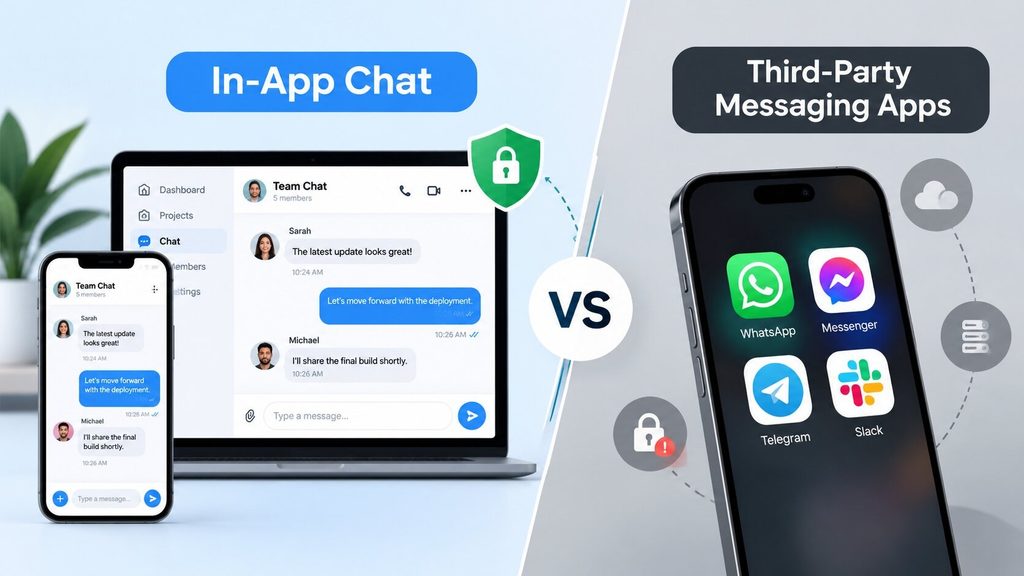
There are several ways for business teams to communicate among themselves as well as with their customers. While having these options does carry their own benefits, it also makes it difficult to pick the right one.
There are businesses that use third-party messaging apps such as WhatsApp or Messenger to communicate with customers because of the familiar infrastructure. Some businesses choose to add in-app chat to their website or mobile app for complete control over their data and customization flexibility.
So, how to choose the right approach?
This blog breaks down the difference between in-app chat vs. third-party messaging and provides a detailed comparison of which suits your enterprise workflow better.
What Is In-App Chat?
In-app chat is a built-in communication feature that is integrated into the software products of your enterprise ecosystem using a chat API or chat SDK. Unlike third-party messaging apps, you can send real-time messages without ever leaving your application environment.
Enterprises that deploy an in-app chat API have their user data stay within native databases. This means all user interactions are centralized, which in turn improves productivity since there is no switching back and forth between external windows to communicate and send files.
Also, enterprises have total ownership over communication, which is important for maintaining strict compliance standards.
What Are Third-Party Messaging Apps?
Third-party messaging apps are external platforms like WhatsApp, Telegram, or Slack. They operate outside of your internal tech stack. Their interface may look familiar, like private messaging apps, but they store user data on external servers.
But that creates a data silo and restricts control over workflows. Unlike in-app chat solutions, enterprises cannot set custom security policies and have to rely on compliance terms. This creates vulnerabilities and data leaks.
In-App Chat vs Third-Party Messaging: Key Differences
| Factor | In-App Chat | Third-Party Messaging Apps |
| Data Ownership | Stored on-premises, so it is completely owned by the enterprise | Stored on vendor-controlled servers |
| Customization | UI elements and workflows can be customized to maintain brand identity | Rigid layouts. Customization is typically very limited |
| Security & Compliance | Strict compliance standards adherence. Allows custom security workflows | Depends on vendor compliance terms. Limited security control |
| White-labelling Capability | Strips away any third-party logos and lets you showcase your own brand identity | Shows external vendor’s logo and other UI elements |
| Hosting Options | Flexible deployment options: both on-premises or cloud | Only hosted on the vendor’s cloud infrastructure |
| Source Code Access | Full source code access is offered | Restricted by vendor |
| Total Cost of Ownership | One-time perpetual licensing cost | Comparatively lower initial cost but accumulates over time based on per-user fees |
| AI Chatbot Support | Can be integrated with custom LLMs | Restricted to the vendor’s native bot integrations |
| Third-Party Tool Integration | Connects with your existing tool stack and any third-party tools of your choice | Restricted to vendor’s marketplace |
When Should You Choose In-App Chat?
There are 4 categories of operational priorities based on which you can decide whether or not you need a private messaging app. Here is a closer look at what they’d mean in your enterprise setup:
- Strict Regulatory Compliance: Highly regulated industries like healthcare, fintech, SaaS enterprises, and educational institutions have to adhere to strict data privacy standards (such as HIPAA, GDPR, or SOC 2). In-app chat API deployments keep your chat logs on your own server rather than external vendor servers, which may be prone to data breaches.
- Smooth Workflow: If you are an enterprise with users juggling between windows to resolve a support ticket or to complete a workflow, then you need an in-app chat SDK to keep users inside your application. This reduces friction and a disjointed experience, which improves productivity.
- Unified Brand Identity: To build a brand identity and trust among stakeholders and clients, your in-app messaging interface must be cohesive across screens without any external brand logo or other UI elements.
- Data Ownership and Analytics: You need behavioral insights to understand users and improve product growth. In-app messaging solutions allow you to analyze chat interactions and user activity metrics without hitting third-party API limits.
When Are Third-Party Messaging Apps Better?
While in-app chat has its advantages, there are business scenarios where third-party communication tools have practical value. Here are some primary scenarios:
- Rapid Prototyping and MVPs: If you are to launch a minimum viable product to test the market, then you are probably on a tight launch deadline. In such cases, startups can integrate third-party messaging apps to validate core features rather than spending hours on a custom in-app chat SDK.
- For External Vendor Collaborations: If your team needs to often communicate with external freelancers or consultants who do not have credentials to your core software. In that scenario, directing them to a third-party messaging tool quickens onboarding.
- Zero-Maintenance Overhead: For small teams with limited development resources, server maintenance and real-time scaling can get complicated. Opting for an external communication platform seems practical since the infrastructure management is done by the vendor.
- Customer Support on Public Channels: Reaching customers on a platform that is familiar to them for pre-sales inquiries can help you convert leads without asking them to log into your in app chat.
With all that said, it is worth noting that third-party messaging apps lead to fragmented chat histories and security risks. If you are aiming for long-term enterprise growth, secure chat apps are the way to build a secure infrastructure.
Can Businesses Use Both?
Yes, businesses can use an in app chat and a third party messaging app. In fact, many organizations deploy a hybrid messaging model by using an in-app chat API for core software workflows and third-party apps for customer touchpoints.
Let’s take a SaaS healthcare platform. The organization can use an in-app chat SDK inside their patient-doctor messaging portal. This maintains HIPAA compliance and data ownership. But the support team needs a public messaging app to answer general booking inquiries before directing them to the in app dashboard.
Take an on-demand logistics application, for example. Consider the delivery person and the dispatcher. They communicate through an in app chat integrated into the routing software. But customers receive their updates via an external SMS without needing to download the app.
It is standard practice to use both to balance external reach while also maintaining strict data control.
How Can Businesses Add In-App Chat?
There are two primary deployment paths, and it is dependent on your available internal resources, timeline, and requirements. Here are the two approaches that you can take:
Option 1: Build from scratch
Building an in-app chat feature from scratch demands a significant amount of development effort, time, and upfront expenses. Rather than depending on a pre-built in-app chat SDK that enables quick deployment, you build the entire communication infrastructure with your internal resources. Here’s how:
- You set up persistent WebSocket connections for real-time messaging.
- Build a database that stores chat logs and user data securely.
- Develop custom encryption protocols for data privacy compliance.
- Create UI elements to reflect brand identity.
The advantage:
Absolute ownership. You own the code, so you can customize any workflow or UI element without any vendor’s limitations.
The Disadvantage:
It takes a significant amount of time to develop and manage ongoing server maintenance, regular security patches, software updates, and scaling efforts.
Option 2: Use a Chat API or SDK
If you want a middle ground without spending much time on development, then a pre-built chat API or SDK is the most efficient option. Enterprise solutions like MirrorFly offer chat APIs and SDKs to embed a production-ready messaging app into existing software.
The entire process is in the following 5 steps:
Step 1: Obtain API Credentials
Sign up for an account on the provider console, go through the verification process, and copy your unique SDK license key from the application info section.
Step 2: Configure Dependencies
Include repository URLs and SDK dependencies in your project’s build files (e.g., Gradle configurations for Android or dependency managers for cross-platform/web environments).
Step 3: Initialize the SDK
At your application’s entry point, pass your unique license key to the initialization method to connect with the messaging servers.
Step 4: Register and Connect Users
Register unique user identifiers via the core module, and make server connections with connection listeners for monitoring users’ status changes.
Step 5: Handle Messaging
Create user JIDs with built-in utilities, call text-send methods, and set up message listeners to receive incoming replies in real time.
The Advantage:
Offers quick deployment and launch within 48 hours while also offering complete data ownership with self-hosting capabilities and white-label customization flexibility.
The Disadvantage:
Using a Chat API or SDK provider takes more than 48 hours to integrate advanced AI features.
Wrapping Up
While both in-app chat and third-party messaging have their own advantages, relying completely on external apps creates data silos and compliance issues. But once you choose to go with a private messaging app, there arises this dilemma between building from scratch and using prebuilt API and SDKs.
Analyze everything from compliance requirements to budget constraints and then decide. One question remains the same with both approaches: can I own a customizable chat app and have complete data ownership? So evaluate based on that, and you’ll have the best in-app chat software for your team.
