

A portrait, a camera clip and a music track can all be useful inputs for Seedance 2.0. Put them into one request without explaining their jobs, however, and the model has to guess what to borrow from each file. That is how a motion reference quietly changes the location, or a style image lends its clothes to the main character.
The problem is not a lack of material. It is unclear authority. Every reference needs a role, and the prompt needs to say where that role ends.
Four inputs, four different jobs
Before writing the scene, make a plain inventory. It might say that Image A owns the character’s face and grey coat, Image B owns the location and evening colour, Video A owns the camera path, and Audio A supplies dialogue timing. If two files both claim the coat and show different versions, the conflict is visible before a credit is spent.
Now the prompt can refer to the files as instructions rather than inspiration:
Use Image A for the woman’s face and clothing. Use Video A only for the slow semicircular camera move; do not copy its people or room. Keep the cafe and evening light from Image B. The spoken line follows Audio A.
“Only” and “do not copy” are doing real work. A reference contains far more information than the feature you want. Naming that feature prevents incidental details from becoming creative direction.
If a file has no distinct job, leave it out of the first test. A large allowance for reference material is a ceiling, not a target.
Seedance 2.0 still needs a scene you can see
References do not replace blocking. “A tense conversation in a cinematic cafe” gives the model atmosphere but little action. A visible sequence is easier to generate and easier to judge: the woman places a key on the table; the man looks down at it; the camera moves slowly towards his face.
A short prompt needs a subject, a starting position, one main action, a camera decision and a sound decision. That is enough structure for a first pass. Timing, effects and secondary gestures can follow once the basic shot works.
For teams sending repeatable requests, a documented Seedance 2.0 API provides another advantage: the exact media inputs can remain attached to the task. “We used the same references” is surprisingly hard to prove when files have been renamed, replaced or reordered between attempts.
The actor and the camera are not the same movement
Prompts often collapse every kind of movement into one sentence. In the finished clip, that can make the character, background and lens appear to rush in different directions.
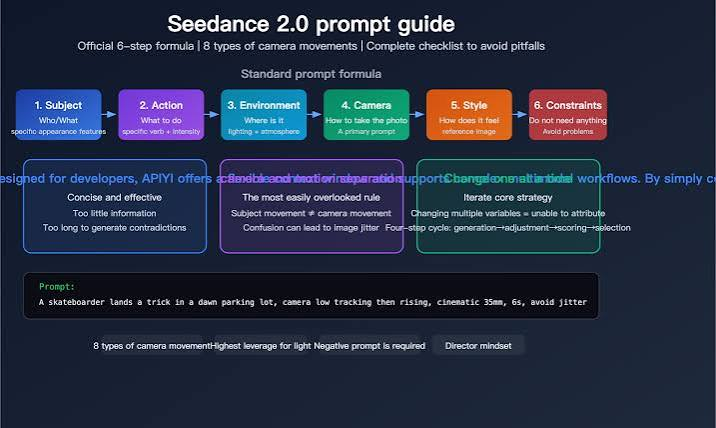
Write the performance first. “The cyclist turns her head towards the crowd” describes subject movement. Then write the view: “The camera tracks beside her at shoulder height.” If a video reference contains both, specify which one matters.
This distinction is especially helpful when borrowing choreography. You may want the body movement from a source clip while keeping a locked camera, or the camera route while replacing the original performance. Without that instruction, the model has no reason to separate them.
One camera idea is usually enough for a short shot. A push-in, orbit and overhead reveal may each be attractive, but fitting all three into a few seconds makes the scene harder to read. More camera language can produce less direction.
Sound should change the picture
Audio is not simply a finishing layer in an audio-video model. A spoken line determines how long a face needs to remain visible. A beat can determine the moment of a cut or gesture. Ambient sound can make a quiet frame feel crowded, distant or unsafe.
Give the audio one main function. If dialogue matters, include the exact line and keep the physical action modest enough to fit around it. If music controls the pace, name the event that should meet the important beat. If an audio file is only a mood reference, say so rather than letting it dictate the edit.
Crowding a short clip with dialogue, music, effects and a detailed camera routine leaves no clear priority. The result may contain each element while giving none of them enough space.
A failed first test can be useful
The first generation does not need to be beautiful. It needs to answer a question. Does the identity reference hold through a head turn? Does the camera path remain legible? Can the line of dialogue fit before the reveal?
Start with the minimum set of files that can answer that question. Add the motion clip after the character works. Add audio after the visual blocking works, unless speech timing is the test itself. When a result fails, revise the clause connected to the failure and leave the rest alone.
A visual interface such as ClipDance can be useful while arranging references and trying a shot. Keep the inventory outside the interface anyway. The moment an output is close, those notes become the difference between a deliberate revision and another roll of the dice.
Seedance 2.0 is multimodal, but the craft remains recognisable: decide who is in charge of identity, movement, place and sound. Once every source has a job, fewer files often produce a more controlled scene.
