

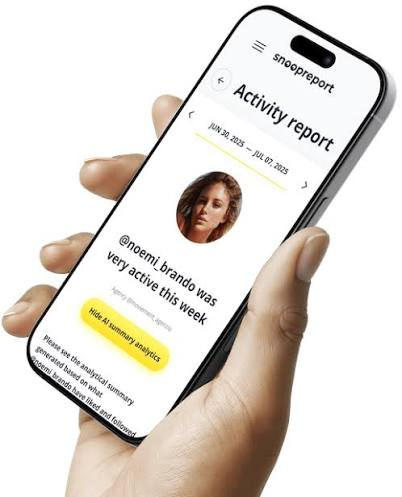
Snoopreport is a long-running tool for tracking public Instagram activity. It launched in 2017, has been used by more than 500,000 people and has kept working through several rounds of Instagram changes, including the removal of the Following tab. In this review we look at it from a technical angle: what data it works with, how reports are structured, what the AI Summary actually does and where its limits are.
If your main goal is to see what someone likes on Instagram, this review should tell you whether Snoopreport is the right fit.
Data Model: What Snoopreport Works With
Snoopreport builds reports from public Instagram activity. That design choice drives everything else:
- Public profiles only. If an account is private, its activity isn’t visible to the public and isn’t available to Snoopreport.
- No account connection. The service doesn’t log in as you and doesn’t need access to your Instagram account at all.
- Time-series by design. Activity is collected into reports over time, so history is a core feature rather than an add-on.
Because your account isn’t involved, nothing about your tracking is visible to the tracked profile, and there’s no risk of Instagram flagging your account for automated behavior.
Report Structure
Each report is organized into sections, delivered weekly or monthly depending on your plan:
Likes
Posts and reels the profile liked during the period, with the accounts that published them. This is the section people come for when they want to see what someone likes on Instagram.
Follows and unfollows
Accounts added to and removed from the following list, with dates. Combined with likes, this shows whether a new follow turned into active engagement.
Activity times
When the profile tends to be most active on Instagram, useful for spotting routines and for timing outreach.
AI Summary
A natural-language synthesis of the profile’s interests, habits and notable patterns, generated from the likes and follows in the report.
The AI Summary, in Detail
The AI Summary is Snoopreport’s main differentiator. Raw likes data is noisy: a profile might like a hundred posts a week across memes, friends’ photos, brand ads and niche hobbies. The summary groups that activity into themes, highlights what’s consistent and what’s new, and describes it in plain language.
In practice, it produces outputs like a profile’s main interest areas, recurring creators and brands, signs of new hobbies and practical suggestions such as gift ideas or conversation starters. It turns a dataset into something you can act on in a couple of minutes.
Why are likes such a good input? Instagram itself treats them as a strong signal. In an explainer on how ranking works, Instagram’s head Adam Mosseri listed a person’s activity, including the posts they’ve liked, among the signals that shape what they see in Feed and Explore. Snoopreport applies a similar idea in reverse: if likes predict what someone wants to see, they also describe what someone is into.
How the Reports Evolve Over Time
The first report on a new profile is a snapshot: recent likes, current follows and an initial summary. Value compounds from there. By the fourth weekly report, the AI Summary can distinguish stable interests from new ones, and the follows section shows a clear timeline of additions and removals. After a few months, you can compare seasons, for example how a profile’s attention shifted from travel content in summer to home and cooking content in winter.
This is also why Snoopreport favors weekly and monthly reports over a constant stream of notifications. Patterns need time to form, and a report format makes them far easier to see than a feed of individual events.
How It Compares to Alternatives
Manual checking can confirm whether someone liked a specific post, but it can’t reveal likes on posts you didn’t think to check. Mobile apps focused on alerts are convenient for quick pings but usually stop at raw lists. Login-based viewers may show more about your own account, at the cost of handing over your credentials. Snoopreport’s combination of public-only data, history and AI analysis puts it in a different category: less about instant alerts, more about understanding.
Platforms and Access
- Web dashboard: works in any modern browser with no installation.
- iOS app: for reading reports on the go.
- Sample report: available on the website to preview the format.
- Research access: Snoopreport offers free datasets to data science students and researchers on request.
Pricing
Plans start at $0.99 a week. For a tool that combines likes, follows, unfollows, history and AI analysis, that’s an accessible price, and it removes most of the risk of trying it.
There’s no free trial needed to judge the format: the public sample report shows a complete report layout, including the likes section and the AI Summary, so you know exactly what you’re buying before you add a profile.
Strengths and Limitations
Strengths:
- Likes, follows and unfollows in one consistent report
- History built in from day one
- AI Summary that turns noisy activity into clear themes
- No login and no connection to your account
- Long track record and low starting price
Limitations:
- Public profiles only, as with every legitimate tool
- Weekly or monthly reports rather than real-time streams
- Likes are signals, not certainties; interpretation still needs common sense
Security Considerations
From a security standpoint, the no-login architecture is the most important feature. Many Instagram viewers authenticate as the user, which gives them full account access and creates a single point of failure. Snoopreport’s approach removes that entire class of risk: there are no credentials to steal, no tokens to leak and no automated actions performed through your profile.
Use Cases
- Personal: understanding a friend’s interests for gifts or conversation.
- Fandom: following what favorite creators and public figures engage with.
- Marketing: influencer vetting, competitor research and audience analysis.
- Research: studying public engagement patterns over time.
- Parenting: insight into a teen’s public account activity as a starting point for conversation.
FAQ
How accurate is the likes data?
- Reports are built from public activity collected over time. As with any tracker, the value lies in consistent patterns across weeks rather than in any single data point.
Can the tracked person see that I’m using Snoopreport?
- No. Your account isn’t connected, and Snoopreport doesn’t interact with the tracked profile.
Does Snoopreport work for business accounts?
- Yes. Any public profile can be tracked, including brands and creators, which makes it useful for competitor and influencer research.
Is there an API or data export?
- Snoopreport focuses on reports in its web dashboard and iOS app. For academic work, it offers free datasets to data science students and researchers on request.
How long does the first report take?
- Reports are delivered on a weekly or monthly schedule, and history builds from the day you add a profile. The sample report shows the format in the meantime.
Verdict
Technically, Snoopreport gets the fundamentals right: public data only, no account connection, history by design and an AI layer that makes likes data readable. If you want to see what someone likes on Instagram and understand what it means, it’s a strong and affordable option, from $0.99 a week. Try the sample report and add a profile at snoopreport.com.
2.
kongotech.org
Instagram Following Tracker Tools Compared: Snoopreport vs DolphinRadar vs the Native List
The following list is Instagram’s most underused data source. It shows who an account pays attention to, and how that changes over time says even more. Yet the native list on a profile is about the least convenient way to read it: no dates, no history and an order that doesn’t reflect when accounts were added.
So which Instagram following tracker should you use? In this comparison we weigh the native list against two dedicated tools, DolphinRadar and Snoopreport, on the criteria that matter for anyone tracking follows regularly: change detection, history, extra signals, safety and price.
The Contenders
The native following list
Every public profile shows its following list in the Instagram app. You can scroll it and search it for specific accounts. It costs nothing and requires no extra tools.
DolphinRadar
DolphinRadar is a web tool that analyzes public Instagram data. It shows recent follows and unfollows, liked photos, top interactions and trending content tags, and doesn’t require connecting your own account. It also bundles utilities such as a story viewer, a downloader and a hashtag generator, plus a database of influencers. Reports are ready after a detection period.
Snoopreport
Snoopreport has tracked public Instagram activity since 2017 and has more than 500,000 users. It delivers weekly or monthly reports with new follows and unfollows, liked posts and reels, active hours and an AI Summary of interests. It never connects to your Instagram account and starts at $0.99 a week.
Criterion 1: Detecting Changes
Native list: you see the current state only. Spotting new follows means remembering or recording the previous state, and unfollows are invisible.
DolphinRadar: shows recent follows and unfollows once its detection period is complete.
Snoopreport: lists new follows and unfollows in every report, with dates.
Criterion 2: History
Native list: none.
DolphinRadar: tracks activity over time after you add an account.
Snoopreport: history is built into the report format. You can scroll back through weekly or monthly reports and compare periods side by side.
Criterion 3: Extra Signals
Follows alone tell half the story. Likes reveal how actively someone engages with the accounts they follow.
Native list: follows only.
DolphinRadar: adds liked photos, top interactions and content tags.
Snoopreport: adds liked posts and reels, active hours and the AI Summary, which explains what the combined activity says about a profile’s interests.
Criterion 4: Safety
Native list: completely safe; it’s Instagram itself.
DolphinRadar: works from public data without connecting your account.
Snoopreport: never asks for your login and never connects to your account.
Many other following trackers on the market do ask for your Instagram credentials. That’s worth avoiding. According to FTC data, people reported losing $2.1 billion to scams that started on social media in 2025, eight times the figure from 2020. Handing your password to an unknown app makes you an easier target.
Criterion 5: Price
Native list: free, but costly in time.
DolphinRadar: paid plans.
Snoopreport: from $0.99 a week.
Testing It Yourself
The best way to choose is a short side-by-side test. Pick three public profiles you know well, such as a brand, a creator and a friend’s public account, so you can judge whether the results make sense. Check the native list for each and note what you can and can’t tell. Then add the same profiles to a dedicated tracker and wait for the first report. Ask three questions: did it show changes I couldn’t see before, did it save me time, and did it help me understand why the list changed? That last question is usually where the difference between tools becomes obvious.
What Changes in a Following List Usually Mean
- A cluster of follows in one niche: a new interest, project or campaign.
- Follows of agencies, suppliers or retailers: a business relationship forming.
- Unfollows of a former partner or community: a relationship or interest ending.
- Follows in a new city or country: travel, relocation or market expansion.
- Steady follows of similar creators: a profile actively scouting or researching a space.
None of these is certain on its own, but together with likes they paint a reliable picture, which is exactly what Snoopreport’s AI Summary is designed to synthesize.
Scorecard
| Criterion | Native list | DolphinRadar | Snoopreport |
| Change detection | None | Follows and unfollows | Follows and unfollows with dates |
| History | None | Yes | Weekly and monthly reports |
| Extra signals | None | Likes, interactions, tags | Likes, active hours, AI Summary |
| Needs your login | No | No | No |
| Extras | None | Story viewer, downloader, influencer database | iOS app, sample report |
| Price | Free | Paid plans | From $0.99/week |
Who Benefits Most From a Following Tracker
Following trackers serve very different people. Marketers use them to see which creators and partners competitors connect with. Creators use them to spot brands that are shortlisting collaborators. Fans use them to keep up with the new accounts their favorite public figures discover. And friends use them to understand someone’s new interests before a birthday or a reunion. What all of these have in common is a question about change: what’s new, what’s gone and what it means. That’s precisely the question the native list can’t answer and a dedicated tracker can.
Which Should You Use?
- The native list if you only need to check whether someone follows a particular account.
- DolphinRadar if you want a broad toolkit with many Instagram utilities in one place.
- Snoopreport if your priority is understanding following activity: dated changes, likes, history and an AI Summary that explains it, starting at $0.99 a week.
Getting Started With Snoopreport
Setup takes only a few minutes, and nothing about it touches your Instagram account:
- Create an account on snoopreport.com with your email; there’s no Instagram sign-in.
- Add the public profiles whose following lists you want to monitor.
- Preview the sample report while your first report is prepared.
- Read the AI Summary first, then the follows and unfollows sections.
- Compare reports week over week to see patterns emerge.
Instagram Following Tracker FAQ
Can a following tracker see private accounts?
- No. A private account’s following list is visible only to approved followers. Every legitimate tracker, including both tools here, works with public profiles only.
Does the tracked account get notified?
- No. Viewing a public following list doesn’t notify anyone, and login-free trackers don’t use your account.
Why is the native list in a strange order?
- Instagram doesn’t present other people’s following lists strictly by date, which is exactly why a tracker that records changes over time is needed.
How many profiles can I track?
- Start with the few that matter most to you. Smaller watchlists make weekly reports quicker to read, and you can always add more later.
Does Snoopreport also track likes?
- Yes. Every report includes liked posts and reels alongside follows and unfollows, which is what makes the AI Summary possible.
Can I use it on my phone?
- Yes. Reports are available in the web dashboard and in Snoopreport’s iOS app.
Final Verdict
The native list answers yes-or-no questions; it can’t show change. DolphinRadar adds tracking and a wide toolkit. Snoopreport is a focused Instagram following tracker for understanding what’s changing and why, combining dated follows and unfollows with likes, history and an AI Summary, without your login, from $0.99 a week. Start with one profile at snoopreport.com.
