

Events are becoming more interactive, and attendees increasingly expect to be part of the experience rather than simply watch it. A social media wall for events gives organizers a way to bring that participation into the venue by showcasing live posts, photos, videos, hashtags, and user-generated content on event screens. When attendees see their content featured in real time, it can encourage more people to post, participate, and connect with what is happening around them.
But creating an engaging event social wall takes more than simply displaying a social feed. The right social media wall tools can help you collect content from multiple platforms, encourage audience interaction, run polls and activities, manage UGC, customize displays, moderate content, and measure engagement. With so many options available, this guide explores the top social media wall tools for events and what each platform offers, so you can choose the right solution for your next conference, trade show, festival, corporate event, or brand activation.
What Is a Social Media Wall for Events?
A social media wall for events is a digital display that brings social media content and audience-generated content together in one place.
Instead of attendees viewing event-related posts individually on their phones, organizers can display selected content on large LED screens, TVs, projectors, digital signage, or other event displays.
A typical event social wall can collect:
- Social media posts
- Photos and videos
- Hashtag content
- Mentions and tagged posts
- Audience submissions
- Event updates
- Brand-related content
- User-generated content
The most advanced social wall platforms also provide tools for moderation, customization, audience interaction, content collection, and analytics.
Why Use a Social Media Wall at Events?
A social wall can turn a traditional event display into an interactive communication channel.
Increase Audience Participation
Attendees are more likely to participate when they know their content can appear on a large event screen.
Showcase User-Generated Content
Attendee photos, videos, and social posts can provide authentic content that reflects the event from the audience’s perspective.
Create Real-Time Engagement
Live updates allow attendees to see what is happening across the event as content is posted.
Increase Sponsor Visibility
Branded campaigns, sponsor hashtags, and featured content can give sponsors additional exposure during the event.
Make Event Screens More Interactive
Polls, reactions, Q&A, contests, and gamification can encourage attendees to interact rather than simply watch.
Measure Audience Activity
Analytics can help organizers understand which content and interactions generate the most engagement.
Top Social Media Wall Tools for Events
1. Social Walls by Taggbox
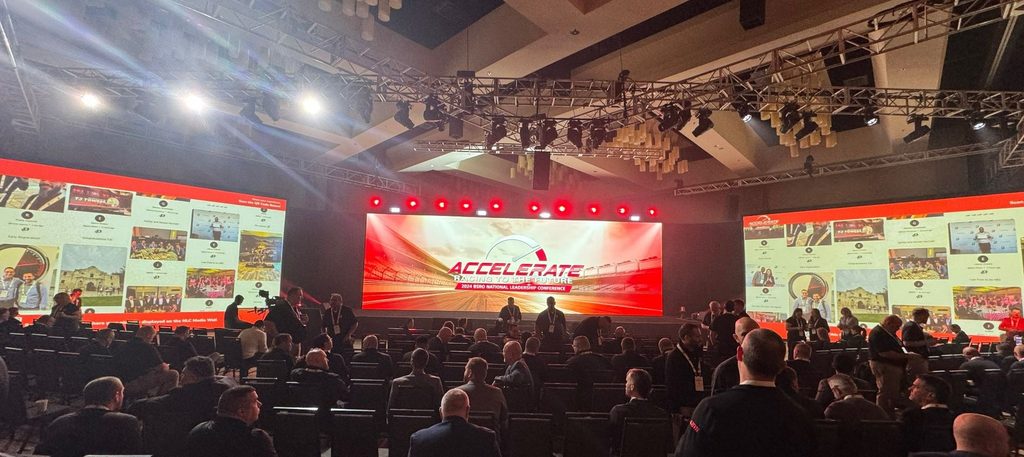
Social Walls by Taggbox is an event-focused platform designed to help organizers collect, curate, moderate, and display social content across event screens and digital signage.
The platform goes beyond basic social aggregation by combining content collection with audience engagement features. Organizers can display live social media content while also giving attendees multiple ways to participate.
Its features include social media aggregation, real-time updates, SnapUp QR-based photo and video uploads, reactions, polls, Q&A, contests, gamification, leaderboards, moderation, customization, analytics, and multi-screen publishing.
Key features:
- Collect content from multiple social platforms
- Display live social media posts at events
- Collect attendee photos and videos through SnapUp QR uploads
- Add audience reactions and interactive polls
- Run Q&A, contests, quizzes, and challenges
- Use gamification and leaderboards
- Moderate and curate user-generated content
- Customize themes, layouts, backgrounds, and branding
- Display content on TVs, LED walls, projectors, and digital signage
- Track engagement and audience activity with analytics
- Support privacy-focused content management
This makes Social Walls by Taggbox a strong option for organizers looking for an interactive social media wall for events rather than a simple social feed.
2. Walls.io
Walls.io is a popular social wall platform designed to collect and display social media content across events, websites, and digital signage.
It supports real-time social content and provides interactive capabilities such as reactions, polls, QR-based contributions, and photo-booth functionality.
Key features:
- Social media aggregation
- Real-time social walls
- Content moderation
- Customizable layouts
- Digital signage support
- Event-focused displays
Walls.io can be a good choice for event organizers who want a well-established platform for displaying social content and encouraging participation.
3. Flockler
Flockler is a social media aggregation and content-display platform that can be used for events, websites, digital signage, and other communication environments.
Its focus extends beyond event social walls, making it suitable for organizations that want to manage social content across multiple digital touchpoints.
Key features:
- Social media aggregation
- Digital signage displays
- Customizable layouts
- Content moderation
- Multi-channel content publishing
- Social feeds
- Multiple display options
Flockler is particularly useful for organizations that want to combine social content with broader digital display requirements.
4. Curator
Curator.io helps businesses collect and display content from multiple social media sources in customizable feeds.
For event organizers, it can be useful when the primary goal is to aggregate social content and display it in a centralized location.
Key features:
- Multi-platform social aggregation
- Social media feeds
- Hashtag-based content collection
- Customizable layouts
- Content moderation
- Social content displays
- Analytics
Curator.io can work well for events that primarily need a straightforward social media wall tool for collecting and displaying audience content.
5. Onstipe
Onstipe is a social media aggregation platform that offers social wall displays for websites, events, and digital screens.
Its straightforward approach can make it suitable for smaller events and organizations looking for basic social wall functionality.
Key features:
- Social media aggregation
- Hashtag feeds
- Event social walls
- Customizable designs
- Social content moderation
- Digital displays
- Multiple social sources
Onstipe can be considered when affordability and simple social media aggregation are important factors.
6. Everwall
Everwall is designed specifically around real-time social walls for events, websites, and digital displays.
It provides features intended to help event organizers moderate content and create interactive experiences for audiences.
Key features:
- Real-time social media walls
- Content moderation
- Customizable displays
- Event announcements
- Social content filtering
- Digital signage support
Everwall is worth considering for conferences, festivals, corporate events, and other large gatherings where real-time social interaction is a major part of the experience.
Social Media Wall Tools Comparison
Choosing between different social media wall tools for events becomes easier when you compare the features that matter most for your event.
| Features | Social Walls by Taggbox | Walls.io | Flockler | Curator.io | Onstipe | Everwall |
| Social Media Aggregation | 🟩✓ | 🟩✓ | 🟩✓ | 🟩✓ | 🟩✓ | 🟩✓ |
| SnapUp QR Photo & Video Uploads | 🟩✓ | 🟩✓ | 🟥X | 🟥X | 🟩✓ | 🟩✓ |
| Audience Reactions | 🟩✓ | 🟩✓ | 🟥X | 🟥X | 🟩✓ | 🟥X |
| Live Q&A | 🟩✓ | 🟩✓* | 🟥X | 🟥X | 🟥X | 🟥X |
| Interactive Polls | 🟩✓ | 🟩✓ | 🟥X | 🟥X | 🟩✓ | 🟩✓ |
| Gamification & Leaderboards | 🟩✓ | 🟩✓ | 🟥X | 🟥X | 🟥X | 🟩✓ |
| UGC Rights Management | 🟩✓ | 🟥X | 🟩✓ | 🟥X | 🟥X | 🟥X |
| Advanced Audience Engagement | 🟩✓ | 🟩✓ | 🟥X | 🟥X | 🟩✓ | 🟩✓ |
| Analytics | 🟩✓ | 🟩✓ | 🟩✓ | 🟩✓ | 🟩✓ | 🟩✓ |
| Digital Signage | 🟩✓ | 🟩✓ | 🟩✓ | 🟩✓ | 🟩✓ | 🟩✓ |
How to Choose the Right Social Media Wall Tool for Your Event
With so many social media wall tools available, the best choice depends on what you want your event audience to experience.
1. Check Social Platform Support
Make sure the platform supports the social networks your audience uses. Look for support for platforms such as Instagram, Facebook, TikTok, LinkedIn, YouTube, and X, depending on your campaign.
2. Look for Audience Engagement Features
If your goal is to create an interactive event social wall, don’t stop at content aggregation.
Look for:
- Polls
- Reactions
- Q&A
- Quizzes
- Contests
- Challenges
- Leaderboards
- Audience voting
3. Consider UGC Collection
A good event social wall should make it easy for attendees to contribute content.
QR-based uploads can be especially useful because attendees can submit photos and videos directly from their phones.
4. Evaluate Moderation
When hundreds of people contribute content, moderation becomes essential.
Check whether the platform offers:
- Content filtering
- Manual approval
- Keyword filtering
- Post management
- Duplicate content control
- User-generated content moderation
5. Check Customization Options
Your social wall should match your event branding.
Look for customizable:
- Themes
- Layouts
- Backgrounds
- Logos
- Colors
- Typography
- Display formats
6. Consider Your Display Environment
Think about where the social wall will appear.
You might use:
- LED walls
- TVs
- Projectors
- Digital signage
- Venue displays
- Exhibition screens
- Multiple displays
Make sure your chosen platform works well across your required screen formats.
7. Look at Analytics
Analytics can help you understand whether your social media wall is actually generating engagement.
Useful metrics may include:
- Impressions
- Views
- Clicks
- Reactions
- Engagement
- Popular hashtags
- Top-performing posts
- Audience activity
8. Review Pricing
Pricing can vary significantly between social wall platforms. Compare not only the starting price but also what is included in each plan.
Consider whether features such as advanced analytics, additional screens, moderation, interactive elements, and UGC collection require a higher plan.
Tips for Getting More Engagement From Your Event Social Wall
Simply placing a social media wall at your event does not guarantee participation. Give your audience a clear reason to interact with it.
Promote Your Event Hashtag
Introduce the event hashtag before the event and display it prominently at the venue.
Encourage Photo Sharing
Ask attendees to share photos and videos from the event and show selected contributions on the social wall.
Create Interactive Challenges
Use photo contests, hashtag challenges, voting, and gamification to encourage participation.
Feature Attendees
Highlight selected attendee posts and contributions. Recognition can encourage more people to participate.
Involve Sponsors
Create branded campaigns or sponsor challenges that encourage attendees to interact with sponsor-related content.
Keep the Wall Dynamic
Combine social posts with announcements, videos, event highlights, polls, and other content to keep the display interesting throughout the event.
Final Thoughts
The right social media wall tool for events can turn a traditional event screen into a live hub of audience participation. Instead of simply displaying social media posts, modern platforms can help organizers collect user-generated content, encourage interaction, highlight attendees, support sponsors, and measure engagement.
Among the available options, Social Walls by Taggbox stands out for its combination of social media aggregation, SnapUp QR uploads, audience reactions, polls, Q&A, gamification, moderation, customization, analytics, and multi-screen event displays.
However, the best social media wall for events depends on your specific requirements. Consider your audience, event type, social platforms, engagement goals, display environment, moderation needs, and budget before making a decision.
When used strategically, a social media wall can become more than a display. It can become a central part of the event experience—giving attendees a reason to participate, share, interact, and become part of the story happening around them.
