

When businesses plan a wireless network, the first instinct is often to think in terms of routers. But in commercial environments, especially where coverage, stability, and scalability matter, the conversation quickly shifts. That is where ceiling mount access points enter the picture. A ceiling mount AP is not just a different form factor. It represents a fundamentally different approach to Wi-Fi deployment, one that prioritizes structured coverage over convenience.
What Is a Ceiling Mount AP?
A ceiling mount access point is a wireless networking device designed to be installed on ceilings to provide centralized and evenly distributed Wi-Fi coverage.
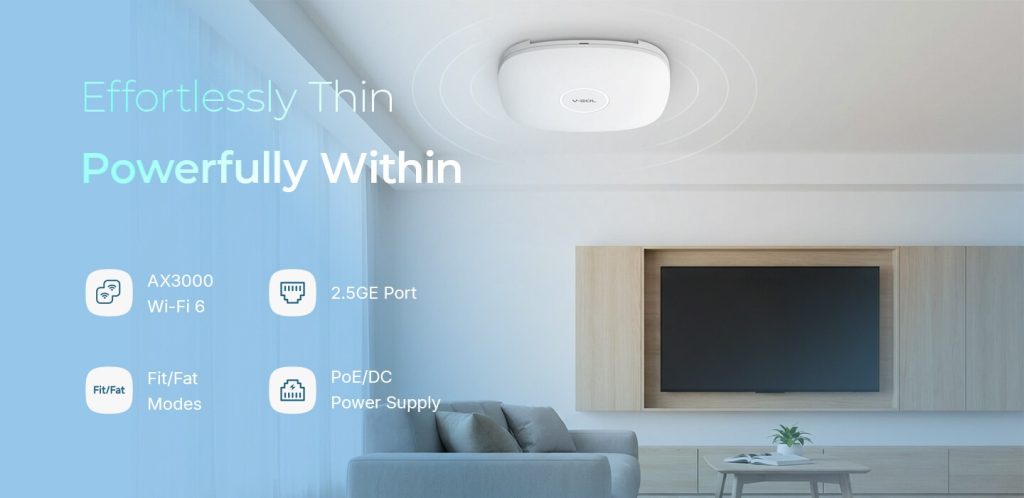
Unlike home routers that typically sit on desks or shelves, ceiling APs are:
- Installed overhead for optimal signal propagation
- Powered via Ethernet, usually using PoE
- Connected to a centralized network infrastructure
This placement is not arbitrary. Mounting an AP on the ceiling minimizes physical obstructions such as walls, furniture, and human movement, which can significantly degrade signal quality.
In practical terms, a ceiling AP acts as part of a coordinated system rather than a standalone device.
How Ceiling Mount APs Work in Business Networks
To understand their role, it helps to look at how business Wi-Fi is typically structured. Instead of relying on a single device to cover an entire area, enterprises deploy multiple APs connected to a central switch or controller. Each AP handles a specific coverage zone, and together they create a seamless wireless environment.
A typical setup includes:
- A core router or gateway
- A PoE switch supplying power and data
- Multiple ceiling-mounted APs distributed across the space
In more advanced deployments, APs are managed through a controller or cloud platform, allowing administrators to:
- Monitor performance
- Adjust channels and power levels
- Handle roaming between APs
This architecture is what enables stable connectivity even when dozens or hundreds of devices are connected simultaneously.
Why Ceiling Mount APs Are Preferred in Commercial Environments
At first glance, installing devices on ceilings may seem excessive. However, in business scenarios, the benefits quickly become apparent.
1. More Consistent Coverage
Ceiling placement allows signals to radiate outward and downward in a more uniform pattern. This reduces dead zones and avoids the uneven coverage often seen with desktop routers.
In offices or retail spaces, this translates into fewer complaints about weak signals.
2. Better Performance in High-Density Areas
When many users connect at the same time, interference and congestion become major issues. Ceiling APs are designed to handle:
- Higher AP client density
- More efficient channel allocation
- Improved load balancing across devices
This makes them particularly suitable for environments like hotels, conference rooms, and shopping centers.
3. Cleaner Installation and Scalability
Because they are mounted overhead and powered via Ethernet, ceiling APs eliminate the need for visible cables and power adapters.
More importantly, scaling the network becomes straightforward. Need more coverage? Add another AP. The system expands without disrupting the existing setup.
4. Seamless Roaming Experience
In multi-AP deployments, users can move between coverage zones without losing connection. This is essential in environments such as:
- Large offices
- Campuses
- Hospitality venues
A well-designed ceiling AP network ensures that devices switch between access points smoothly, often without the user noticing.
Ceiling Mount AP vs Traditional Router
Understanding the difference between these two helps clarify why ceiling APs dominate business deployments.
| Aspect | Ceiling Mount AP | Traditional Router |
| Deployment | Multi-device system | Single device |
| Coverage | Even, scalable | Limited, uneven |
| Installation | Ceiling, PoE | Desktop, power adapter |
| Management | Centralized or cloud-based | Local only |
| Use Case | Business environments | Home or small setups |
The key distinction is architectural. Ceiling APs are designed for distributed networks, while routers are built for isolated usage.
Typical Deployment Scenarios
Ceiling mount APs are not limited to one industry. Their versatility makes them suitable across a wide range of environments.
Office Spaces
In modern offices, employees rely on stable Wi-Fi for video conferencing, cloud applications, and collaboration tools. Ceiling APs provide:
- Consistent coverage across open-plan layouts
- Reliable connectivity for multiple devices per user
- Reduced interference compared to consumer routers
Hospitality (Hotels and Resorts)
Hotels face a unique challenge: delivering strong, consistent Wi-Fi across hundreds of rooms.
Ceiling APs, often combined with fiber-based solutions, enable:
- Room-level or corridor-based coverage
- Centralized management for IT teams
- Scalable deployment as the property expands
This is also where integrated solutions, such as those offered by VSOL, become relevant. By combining fiber access devices with ceiling mount APs, it is possible to build a streamlined FTTO architecture that reduces both complexity and cost.
Retail and Commercial Spaces
In retail environments, Wi-Fi supports not just customers but also operations, including POS systems and inventory management.
Ceiling APs help ensure:
- Stable connectivity across large open areas
- Minimal interference from shelving or fixtures
- Capacity for high foot traffic
Education and Campus Networks
Schools and universities require coverage across classrooms, libraries, and common areas.
Ceiling AP deployments allow:
- Wide-area coverage with minimal blind spots
- Support for high device density
- Centralized control for network administrators
Where VSOL Ceiling Mount APs Fit In
Within this broader landscape, VSOL’s ceiling mount AP products are positioned as cost-effective, business-oriented solutions for structured Wi-Fi deployment.
Rather than targeting premium enterprise tiers, VSOL focuses on delivering practical performance for scenarios such as:
- SMB networks
- Hospitality environments
- Regional ISP projects
Key characteristics of VSOL ceiling APs typically include:
- Support for modern Wi-Fi standards such as Wi-Fi 6/7
- PoE-powered installation for simplified deployment
- Compatibility with centralized management systems
- Integration potential with fiber access solutions like ONU and OLT devices
This integration is particularly relevant in FTTO deployments, where fiber infrastructure and wireless access need to work together seamlessly.
While VSOL may not offer the extensive ecosystem of top-tier enterprise vendors, its approach emphasizes efficiency and accessibility, which aligns well with cost-sensitive projects.
Key Factors to Consider Before Deployment
Choosing a ceiling mount AP is not just about the device itself. Network design plays a critical role.
Before deployment, consider:
Coverage Planning
- Size of the area
- Physical obstacles such as walls and partitions
- Ceiling height and layout
User Density
- Number of concurrent devices
- Type of usage (basic browsing vs high-bandwidth applications)
Network Infrastructure
- Availability of PoE switches
- Backhaul capacity
- Integration with existing systems
Scalability
- Future expansion needs
- Ease of adding new APs
A well-planned deployment often matters more than the specific brand chosen.
Final Thoughts
Ceiling mount APs are not just an upgrade from traditional routers. They represent a shift toward structured, scalable, and performance-oriented wireless networking. For businesses that rely on stable connectivity, whether in offices, hotels, or retail environments, this approach provides clear advantages in coverage, capacity, and manageability.
Brands like VSOL contribute to this space by offering accessible solutions that bridge the gap between affordability and functionality. While they may not dominate the high-end enterprise segment, they provide a viable path for organizations seeking reliable Wi-Fi without excessive complexity or cost.
Ultimately, the effectiveness of a ceiling mount AP deployment depends on how well the system is designed and implemented. The hardware is only one part of the equation, but choosing the right type of device is where that process begins.
